
Pipeline Phone: the CRM dialer that logs every call
Make and take calls inside Pipeline CRM. Every call lands on the right record with the recording and transcript attached, so there is no separate phone app and nothing to copy over.
✓ No per-user fee ✓ Recording and transcripts included ✓ Available on any plan
Trusted by over 18,000 users globally





At a Glance
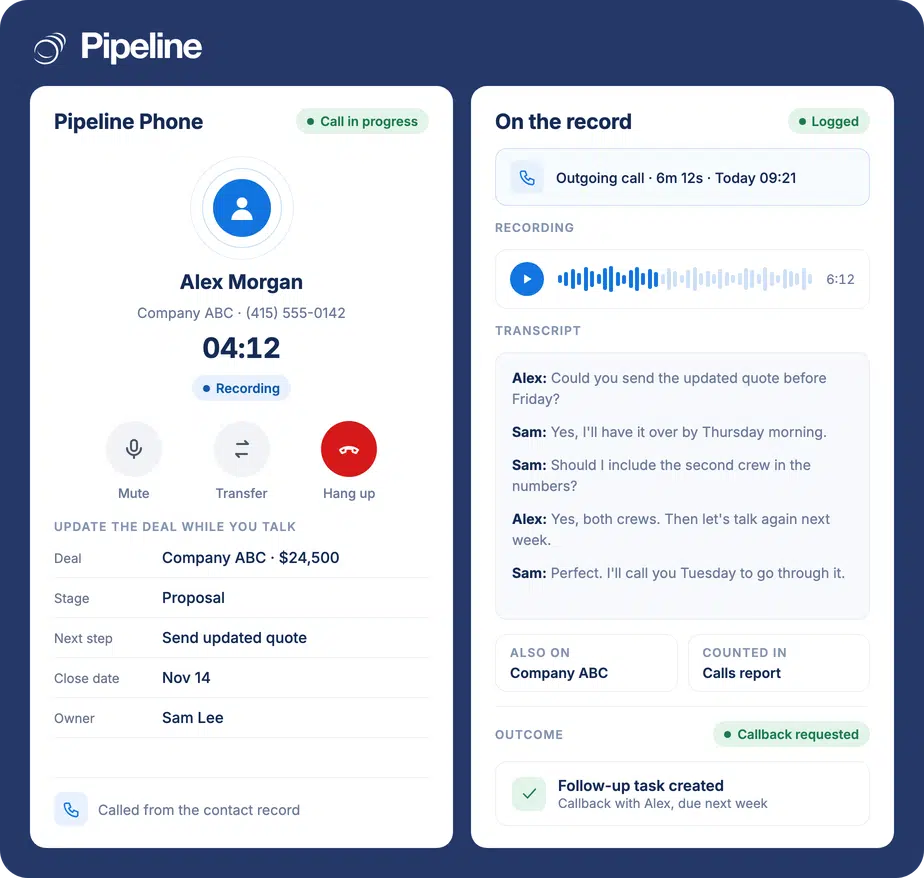
Pipeline Phone is the CRM dialer built into Pipeline CRM. Reps call from any record or the dialer that follows them around the app, take incoming calls in the browser or on their cell, and every call is logged on the contact with its recording and transcript. It is pay as you go: 2.5¢ a minute incoming, 3¢ outgoing and $2 a month per number, with no per-user fee.
Calls happen in one tool, the record lives in another
Most teams run a separate phone system next to their CRM, and the two never quite agree.
Two systems to keep in sync
Seats in the phone tool, users in the CRM, and someone keeping both lists matched by hand every time a rep joins or leaves.
Notes copied over one call at a time
Recordings and call notes get pasted into the CRM after the fact, which is slow, and the call that never gets logged is the one that mattered.
Managers can’t see the calling
When call history sits outside the CRM, nobody can line up who was called against what happened to the deal.
Set up once, then just call
An admin turns it on in Account settings, under Phone. Reps don’t install anything.
Turn it on and add credit
An admin makes a prepaid deposit, chooses an auto recharge amount and registers the business, which keeps your numbers from showing as spam.
Give reps a number
Enable each user and provision a new US number, picking an area code where one is available, or assign one from your pool.
Call from any record
Click a phone number to call in the browser, or use Connect to Mobile to ring your cell first. The call is logged on the record when it ends.
Calling without leaving the deal

Teams that sell on the phone
The more of your selling happens on calls, the more there is to gain.
Reps working the phone
One click to call from the record, notes and fields updated during the call, and no logging afterwards.
Sales managers
Call volume, talk time and outcomes in Reports, by rep or team, next to the pipeline they drive.
Admins paying for a phone tool
Numbers assigned inside the CRM, usage-based billing and no seat count to keep in step with your user list.
What Pipeline Phone includes
Everything below ships with Pipeline Phone. There are no tiers.
Click to call from any record
Call a person or company from their record, using their work number by default.
A dialer that follows you
Recent calls, a keypad and contact details in a widget you can move or collapse anywhere in the CRM.
Incoming calls in the browser
Calls ring in Pipeline CRM. Unanswered calls go to voicemail or forward to your cell.
Automatic call logging
Every call creates an activity on the contact, including missed calls and voicemails.
Recording and transcripts
Recordings are attached to the activity, and a transcript follows a few minutes after the call.
Call logs
A sortable, filterable list of every call, with playback, transcripts and CSV export.
Calls report
Call volume, talk time and outcomes by rep, team, week or month, saved like any other report.
Call outcomes
Reps mark how each call went, from Connected to Meeting Booked, and you can add your own.
Call-triggered automations
For example, a callback task for tomorrow whenever a call ends with No Answer.
Transfer to your cell or a teammate
Move a live call to your mobile and keep talking, or hand it to a colleague.
Unknown callers into contacts
Turn a number you don’t have yet into a new person or company in one step.
Pay for minutes, not seats
No per-user fee and no contract. Calls and numbers are paid from a prepaid balance that refills itself, and recording and transcripts are included.
From any country, to your Pipeline Phone number.
To US and Canadian numbers. Recording and transcript included.
Per number. A new US number, with an area code where available.
Billed per started minute. Minutes a rep spends on their cell instead of the browser add 1.5¢ a minute. Full details on the Pipeline Phone pricing page.
The call is the record
A sales call that only exists in someone’s memory, or in a separate phone app, is the part of the pipeline nobody can see. With Pipeline Phone the call, the recording and what was said all live on the deal they belong to.
Pipeline Phone questions
Can’t find what you need? Contact our team.
How much does Pipeline Phone cost?
Incoming calls are 2.5¢ a minute and outgoing calls to US and Canadian numbers are 3¢ a minute, with recording and transcripts included. Each phone number is $2 a month. Minutes a rep spends on their cell instead of the browser add 1.5¢ a minute.
There is no per-user fee. Usage is paid from a prepaid balance that refills automatically. Every detail is on the pricing page.
Do I still need a separate phone system like RingCentral or Aircall?
Not for calling from Pipeline CRM. Pipeline Phone gives your reps their own numbers and handles incoming and outgoing calls inside the CRM.
If you would rather keep the phone system you have, the integrations with RingCentral, Aircall, Dialpad and others are still available.
Are calls recorded and transcribed?
Yes. Recording and transcripts are included in the per-minute rate, and both are attached to the call on the contact’s record. Callers hear a short announcement that the call is recorded.
An admin can turn recording or transcription off for the whole account. The price stays the same.
Can my reps call from their cell phones?
Yes. Connect to Mobile rings the rep’s cell first and then connects the call, incoming calls can forward to a cell, and a live call can be moved from the browser to the cell. Those cell minutes add 1.5¢ a minute, and the call is still logged in Pipeline CRM.
There is no separate Pipeline Phone mobile app.
Can I keep my existing business number?
Moving an existing number isn’t done in the app. Contact Customer Care and we’ll check whether your number can move to Pipeline Phone.
Which countries does it cover?
Pipeline Phone provides US numbers. You can call US and Canadian numbers and receive calls from any country. Calling numbers in other countries isn’t available yet.
What doesn’t this version do?
It is calling only, so no SMS or WhatsApp. It runs in the browser, with your cell as an option, rather than in a mobile app. You handle one call at a time, transfers are cold, and there are no conference calls.
It also can’t make emergency calls, such as calls to 911, so keep another phone for those.
Which plans include Pipeline Phone?
Every Pipeline CRM plan with an active subscription. An admin sets it up in Account settings, under Phone. Accounts on a free trial can’t start Phone billing.