

CRM maps and route planning
Put your customers and prospects on a map. See who else is worth visiting while you are already in the area, build a route that is optimised for time and distance, and send it to your phone before you set off.
✓ No credit card required ✓ 14-day free trial ✓ Cancel anytime
Trusted by over 18,000 users globally





At a Glance
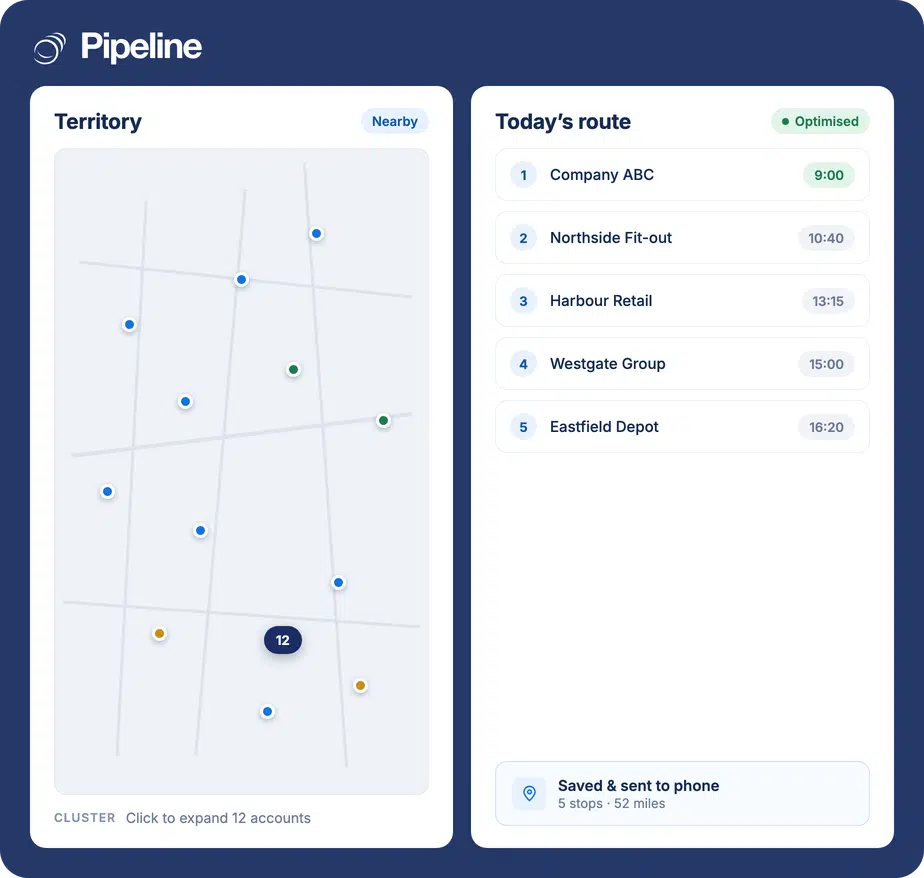
Map Views plots your Pipeline CRM contacts and companies on a map so field teams can see a territory rather than a list. Clusters expand to show hotspots, a location search reveals whether you have business in an area, and route planning orders stops for time and distance. Routes and favourite locations can be saved and sent to your phone. Every plan includes it, from 5 to 100 routes per user each month.
A list of accounts hides the geography
Field selling is a travel problem as much as a sales problem, and a CRM list view is silent about travel.
You drive past accounts without knowing
A meeting downtown ends early and the three other customers within ten minutes stay unvisited, because nothing on the screen says they are there.
Route planning happens in a separate tab
Copying five addresses into a maps app and reordering them by hand is a daily tax, and the result never gets saved anywhere useful.
Territory coverage is invisible
Without a map, two reps can work the same area while a third one goes untouched, and nobody notices until the numbers do.
From territory view to today’s route
The map is built from records you already have, so there is nothing to import or maintain separately.
See the territory
Customers and prospects appear on the map from their CRM records. Clusters mark hotspots and expand on click, so a dense city does not become an unreadable pile of pins.
Find who is nearby
Search a specific location to see whether you have business in that area – useful when a meeting ends early, or when a conference takes you to a city you do not normally cover.
Build and send the route
Order the stops automatically for time and distance, save the route and your regular locations, and send it to your phone.
Teams who sell in person
The value scales with how much of the week is spent travelling between accounts.
Field reps covering a region
When the day is four or five visits, the difference between a planned route and an improvised one is a whole extra call.
Managers dividing territory
Seeing coverage at a high level is what stops two people working the same postcode while another is ignored.
Anyone onboarding a new rep
A map of the accounts they have inherited is a faster handover than a spreadsheet of addresses.
What Map Views covers
Included on every plan; the monthly route allowance is what scales with the plan.
Customers and prospects on a map
Records plotted from the data already in your CRM.
Nearby discovery
See who else is worth a visit while you are already in the area.
Expandable clusters
Hotspots collapse into a cluster you can click to expand.
Location search
Search an area and see whether you have business there.
Route optimisation
Stops ordered automatically for time and distance.
Saved routes
Keep the routes you run regularly rather than rebuilding them.
Saved locations
Store the places every route starts or ends, like your office or the airport.
Send to phone
Push the planned route to your phone before you leave.
Territory coverage view
See coverage at a high level to manage territory and onboard new field reps.
Route allowance by plan
5 routes per user each month on Start, 15 on Develop, 45 on Grow and 100 on Enterprise.
The best next visit is usually the closest one
Field teams do not lose time on the meetings. They lose it between them – driving past accounts nobody flagged, and rebuilding tomorrow’s route in a maps app tonight. Putting the pipeline on a map turns both of those from guesswork into something the CRM already knows the answer to.
Map and route planning questions
Can’t find what you need? Contact our team.
How does a CRM map help a field sales team?
It answers a question a list cannot: who else is near where I already am. Contacts and companies from your CRM appear on a map, so when a meeting ends you can see the other accounts within reach rather than driving home past them.
The second thing it answers is coverage. Seeing a whole territory at once is how a manager spots the areas being worked twice and the ones not being worked at all.
How does route planning work?
You pick the stops and the route is ordered automatically to optimise for time and distance, rather than you sequencing addresses by hand in a separate maps app.
Routes can be saved and reused, and sent to your phone so the plan you made at your desk is the one you actually drive.
How many routes can I plan?
Route planning is on every plan, with a monthly allowance per user: 5 routes on Start, 15 on Develop, 45 on Grow and 100 on Enterprise.
For a rep planning a route most working days, Grow is the first plan where the allowance stops being the constraint. The pricing page has the full matrix.
What happens in a city where I have a lot of accounts?
Dense areas collapse into a cluster showing the number of accounts, and the cluster expands when you click it. That keeps a busy map readable instead of a solid block of overlapping pins.
Clusters also make hotspots obvious at a glance, which is useful when deciding where a visit day is worth the travel.
Can I check whether we have business in an area before travelling?
Yes. You can search a specific location and see whether there are customers or prospects there.
That is the common use when a conference or an existing commitment takes someone to a city they do not normally cover – the trip is already paid for, so the question is only who else to see while there.
Can I save the places I always start from?
Yes. Favourite locations such as your office or the airport can be saved, so they do not have to be re-entered every time you build a route.
Frequently run routes can be saved in the same way.
Does the route work on my phone?
Routes can be sent to your phone once planned, so the sequence you built is available when you are actually driving it.
For working the rest of the CRM while out, see mobile CRM.