
Sales
Automation
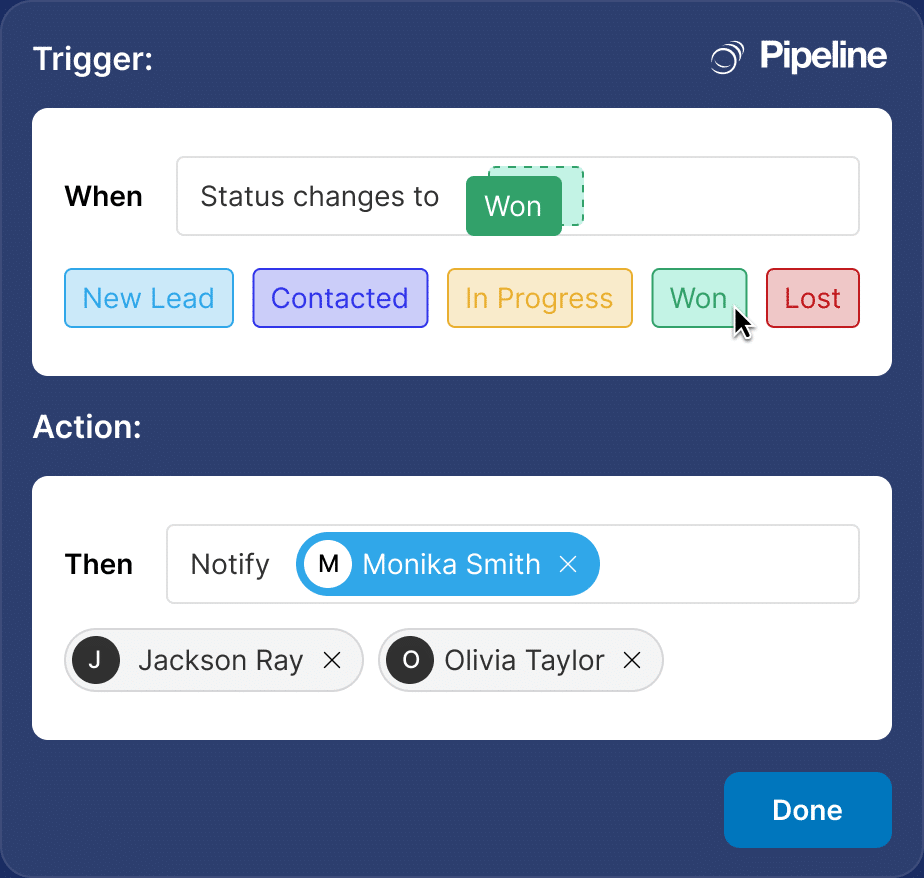
Stop doing the same tasks over and over. Pipeline CRM automates lead routing, follow-up tasks, deal updates, and internal notifications the moment a trigger fires. No code, no Zapier, no technical setup. Automations included from the Develop plan.
✓ No credit card required ✓ 14-day free trial ✓ Cancel anytime
Trusted by over 18,000 users globally





At a Glance
Pipeline CRM is a sales automation tool that offers no-code workflows triggered by data and time events, automated task creation, and email and field updates for small and mid-size sales teams, with native Gmail and Outlook integration and REST API. Pipeline CRM’s sales automation lets admins build no-code workflows that fire on data events (deal created, stage changed, field updated) or time events (days in stage, close date approaching, no activity in X days). Automations can create tasks, send emails, update fields, assign owners, apply Todo Templates, and move deals between pipelines. Automations are available on the Develop plan (10 active) and Grow plan (20 active), with 1 included on the Start plan. 14-day free trial with no credit card required.
What is sales automation?
Sales automation is a system of rules that run inside your CRM to handle repetitive work for your team. When a specific event happens (a lead is created, a deal moves to a new stage, a field is updated, or a certain amount of time passes), the system automatically performs one or more actions: creating a task, sending a notification, updating a field, or reassigning a record. Research from McKinsey shows that about 30% of sales activities can be automated with current technology, freeing reps to spend more time with real prospects.
Speed
Respond to leads in seconds, not hours. Trigger follow-up tasks and notifications the moment a form is submitted, a stage changes, or a deal stalls.
Consistency
Every rep follows the same process. Automations apply the right Todo Template, assign the right owner, and capture the right data on every record.
Scale
Handle 10x the volume without 10x the headcount. Automations run 24/7, never miss a follow-up, and keep your pipeline moving while your team focuses on selling.
Sales automation is not about replacing reps. It’s about removing the busywork that keeps them from selling. The best automations turn your CRM from a record-keeping tool into a system that actively helps your team close more deals. Pipeline CRM gives you a visual builder, prebuilt templates, and plans that include automation from day one. No technical setup, no third-party tools, no learning curve.
How does an automation run in Pipeline CRM?
Every Pipeline CRM automation follows the same five-step lifecycle. Once configured, it runs in the background with no manual intervention. Here’s what happens from trigger to audit trail.
No scripting, no webhooks, no external systems required. Everything runs inside Pipeline CRM with a visible audit trail on every record.
Why do sales teams struggle without automation?
Most sales teams know they should automate, but CRM automation feels complex or expensive. The result: reps spend hours on manual work, managers chase status updates, and deals slip through the cracks. Salesforce research shows that sales reps spend only 28% of their time actually selling. Automation is how you change that.
Follow-ups fall through the cracks
A rep promises to follow up in 3 days, forgets, and the deal goes cold. Without automated task creation, your team relies on memory and calendars, which fail at volume.
Leads aren’t routed fast enough
Inbound leads sit in a queue, get assigned hours later, and lose to a faster competitor. Manual routing is a tax on your response time.
Process drift across the team
Every rep has their own way of working. Some skip qualification steps, others forget to update deal stages, and your data becomes unreliable for forecasting.
What can you automate with Pipeline CRM?
Pipeline CRM automations are built for two audiences: sales reps who never want to miss a follow-up, and admins who need to enforce process across the team. Use the tabs below to see how automations work for each role. Watch the full product demo to see it in action.
Data events and time events start every automation
Pipeline CRM supports two kinds of triggers. Data-based triggers fire on record events: deal created, person added, company updated, activity logged. Time-based triggers fire on date logic: X days after a deal enters a stage, Y days before a close date, or on a custom date field.
- Data triggers: Deal, Person, Company, Customer, Calendar, Activity, Data Export
- Time triggers: before, after, or on any date field (close date, custom dates)
- Field-level conditions: trigger only when specific values match
- AND/OR logic: combine multiple conditions for precise targeting
Data Triggers
Time Triggers
Eight action types cover every workflow
When a trigger fires and conditions match, Pipeline CRM automations can take any combination of actions on the record. From creating follow-up tasks to moving deals between pipelines, actions run instantly and are logged to the record’s Activity Feed.
- Create tasks (assign to owner, team, or specific user)
- Create deals from new people records
- Send email notifications (to users or external addresses)
- Apply Todo Templates (full task sequences)
- Assign owners to company records
- Update custom fields with calculated or static values
- Move deals between pipelines (with or without activities)
- Update Customer Health status
Actions
Conditions (AND / OR)
Never miss a follow-up, never forget a qualified lead
For sales reps, automations are the safety net that catches the busywork. Follow-up tasks appear automatically. Proposal reminders fire on day 7. Stalled deals nudge their owner. Reps focus on the conversation, not the calendar.
- Auto-created follow-up tasks when deals move to Proposal or Negotiation
- Re-engagement nudges when a deal goes quiet for 10+ days
- Quarter-end check-in reminders on active accounts
- Instant email notifications when high-value leads arrive
When
You send a proposal to a deal in the Negotiation stage
Then (automatically)
A “Follow up on proposal” task appears on your dashboard on day 7, assigned to you, due tomorrow.
Enforce process without nagging your team
For CRM admins, RevOps, and sales managers, automations are how you scale a repeatable process. Data hygiene rules run silently in the background. High-value deals escalate automatically. Exports notify managers. Your team runs the playbook because the system runs it for them.
- High-value deal alerts (deals over $10K notify execs on creation)
- Stalled deal escalation (no activity 10+ days triggers manager task)
- Export notifications (know when reps pull data out of the CRM)
- Full audit trail on every record for compliance and coaching
When
A deal is created with amount > $10K AND source = Inbound
Then (automatically)
Notify VP of Sales + CRO by email, assign to senior rep, and log the automation run to the deal’s audit trail.
Prebuilt automation templates you can set up in minutes
You don’t need to build automations from scratch. These eight templates cover the most common sales workflows and can be configured in under five minutes inside Pipeline CRM. Each one follows the same pattern: a trigger event, optional conditions, and the action that runs.
When
A new lead is captured via webform with title containing VP, Director, or Head and company size over 50 employees
Then
Assign to Enterprise Sales Rep and apply the 2-day qualification Todo Template
Lead Routing
When
A new person is created with State equal to California or Oregon or Washington
Then
Assign to West Coast territory rep and send territory welcome email to the prospect
Lead Routing
When
A deal has been in the Proposal stage for 7 or more days
Then
Create a “Follow up on proposal sent” task for the deal owner with a 1-day due date
Follow-up
When
A deal has had no activity for 10 days and is not in Won or Lost status
Then
Create a “Nudge: deal gone quiet” task for the deal owner due today
Follow-up
When
A new person is added to the CRM (regardless of source)
Then
Apply the “New Contact Onboarding” Todo Template: welcome email, intro call, and day-7 check-in
Data Hygiene
When
A new deal is created with an amount greater than $10,000
Then
Send an email notification to the VP of Sales and CRO with deal details
Deal Management
When
A deal’s stage changes to Closed-Won
Then
Convert the associated company to Customer status and notify the CSM team
Deal Management
When
A deal’s last activity is 45+ days old, status is not Won or Lost, and source is Outbound
Then
Create a “Re-engagement outreach” task and update custom field Status Reason to Dormant
Re-engagement
How do sales teams in different industries use automations?
Automations look different by industry because the sales process looks different. Here’s how three of Pipeline CRM’s strongest verticals use automations to remove busywork and close more deals.
Construction & Contractors
- Auto-assign bid requests to the right estimator by region
- Create follow-up tasks for every site visit logged
- Notify project managers when a bid is accepted and moves to active project
Construction teams handle bids across multiple regions with different estimators, schedules, and subcontractor networks. Pipeline CRM automations route new bid requests to the estimator by region the moment they arrive. When a site visit is logged, a follow-up task appears automatically. When a bid moves to “Accepted,” the project manager gets notified so the handoff from sales to operations is instant. Learn more about our CRM built for construction sales teams.
Manufacturing & Distribution
- Auto-apply Todo Templates for quote-to-order workflows
- Escalate high-value orders (over $25K) to senior reps automatically
- Send approval tasks to sales ops when a discount field exceeds 15%
Manufacturing sales runs at high volume with strict pricing rules. Automations apply a standardized Todo Template the moment a quote is created, making sure every order follows the same steps: spec verification, credit check, production lead time, delivery schedule. When an order exceeds a value threshold or requires a discount above 15%, an approval task auto-assigns to sales operations. High-value orders skip the queue and escalate to senior reps. The same rules that govern the process run automatically instead of living in a handbook.
Professional Services
- Trigger proposal follow-up sequences 3, 7, and 14 days after send
- Auto-route inbound inquiries by practice area or service line
- Create quarter-end check-in tasks for active clients with assigned CSMs
Professional services firms depend on proposals, referrals, and long relationship cycles. Pipeline CRM automations keep the pipeline warm during long evaluations. When a proposal is sent, a sequence of follow-up tasks auto-generates at 3, 7, and 14 days. Inbound inquiries route to the right practice area partner based on service line fields. Five days before quarter-end, active clients with an assigned CSM get a check-in task so relationships stay fresh. Automations make relationship management structural instead of dependent on individual memory.
How do real customers save time with Pipeline CRM automations?
Customers across construction, manufacturing, and professional services use Pipeline CRM automations to remove busywork and standardize their sales process. Here are three examples.
Efficiency increase + 30% team growth
WLS Companies doubled sales efficiency and grew their team 30% after implementing Pipeline CRM as their process backbone for coordination and follow-up.
Read the full storyBoost in revenue partnerships
GlobalTranz’s agent recruiting team achieved a 63% boost in partnerships with revenue-generating agents using Pipeline CRM automations for pipeline tracking and follow-up.
Read the full storyEnd-user adoption rate
The Garland Company reached 90% adoption across their sales team after Pipeline CRM automations standardized their process and eliminated manual follow-up work.
Read the full storyAward-winning support
What should you look for in sales automation software?
Not every CRM handles automation the same way. Some hide it behind enterprise pricing. Others require custom scripts or third-party tools. When evaluating sales automation, focus on these six criteria.
Data and time-based triggers
Your CRM should support both event-driven (deal created, field updated) and time-driven (X days in stage, before close date) triggers. Without both, half your workflows can’t automate.
Conditional logic with AND/OR
Simple triggers aren’t enough. You need conditions that combine multiple fields (deal value greater than $10K AND source equals Inbound). Without AND/OR, you’re stuck with blunt rules.
No-code builder (not scripts)
Your sales ops team shouldn’t need to write code or hire a consultant to build basic workflows. A visual builder with dropdowns and field pickers is the bar.
Automations included, not gated
Some CRMs make you upgrade to the top tier for automations. Pipeline CRM includes automation from the Develop plan ($33/user) so you don’t pay enterprise prices for basic functionality.
Prebuilt templates to copy
You shouldn’t start from scratch. Look for a library of pre-built automation templates (lead routing, follow-up, data hygiene) you can clone and adapt in minutes.
US-based live chat support
When an automation doesn’t behave as expected, you need answers fast. Pipeline CRM offers US-based live chat with a 97.6% satisfaction rate and under-1-minute response time.
Works with your existing tools
Pipeline CRM automations work alongside the tools your team already uses. Trigger tasks from calendar events, sync email activity, connect to Zapier for broader workflows.






Frequently Asked Questions
Find the answer to your question here. If you don’t see it, please feel free to contact us.
What is sales automation in a CRM?
Sales automation in a CRM is a set of rules that run inside the system to handle repetitive tasks automatically. When a trigger event happens (a deal is created, a stage changes, a field is updated, or time passes), the CRM performs one or more actions: creating a task, sending an email notification, updating a field, or reassigning an owner. The goal is to remove manual busywork so sales reps can focus on selling.
Pipeline CRM’s automations support both data-based triggers (record events with field-level conditions) and time-based triggers (date-driven rules). Actions include creating tasks, sending emails, applying Todo Templates, updating fields, assigning owners, and moving deals between pipelines. Automations are available on the Develop plan (10 active) and Grow plan (20 active). Start a free 14-day trial to build your first automation today.
How do I set up an automation in Pipeline CRM?
You set up automations in Pipeline CRM through the admin settings panel at Settings > Other > Automations. Only users with admin permissions can create or edit automations. The visual builder walks you through three steps: choose a trigger (data event or time event), add optional conditions (field values that must match), and define one or more actions (tasks, emails, field updates, assignments).
No code or scripting is required. Most automations can be configured in under five minutes, especially if you start from one of the prebuilt automation examples. See the full Automations Overview help article for a step-by-step walkthrough.
Which Pipeline CRM plans include automations?
Automations are available on every Pipeline CRM plan, but the number of active automations varies by tier. All prices are per user per month, billed annually. The Start plan ($25) includes 1 active automation. The Develop plan ($33) includes 10. The Grow plan ($49) includes 20. Enterprise plans include 100 or more based on the contract.
This is more generous than many competitors. Pipedrive restricts automations to the Growth tier ($39). Close gates workflow automation at the Growth tier ($99). Pipeline CRM includes automation from Develop, making it accessible to small and mid-market sales teams without an enterprise budget. Compare plans for the full breakdown.
What’s the difference between automations and email drip campaigns?
Automations and email drip campaigns are two separate features in Pipeline CRM that solve different problems. Automations are rules that run on any record event or time event and can perform multiple action types (create tasks, update fields, send one-off notifications, assign owners). They are admin-configured and apply to deals, people, companies, and activities.
Email Drip Campaigns are scheduled email sequences specifically for nurturing leads or customers over time. A drip campaign might send 5 emails over 30 days to new inbound leads. You can trigger a drip campaign as part of an automation (for example, when a new lead is created with a specific source), but the campaigns themselves are managed separately. Drip Campaigns are available on the Grow plan.
Can Pipeline CRM automations route leads to the right rep automatically?
Yes. Pipeline CRM combines two features to route leads automatically: round-robin assignment on Lead Forms and conditional automations that assign owners based on field values. With round-robin, new webform submissions are distributed evenly across a set of users or a team. Automations then layer on top with smarter logic: route VP/Director titles to Enterprise reps, route California prospects to the West Coast rep, or route deals over $50K to senior sellers.
Lead Forms with round-robin are available from the Start plan (2 active forms). Automations with field-level conditions are available from Develop. Together they give you the fastest possible lead response time without any manual triage.
Is there a free trial for Pipeline CRM’s automations?
Yes. Pipeline CRM offers a 14-day free trial with full access to the automation builder and all template types. You can configure up to the plan limit of active automations during the trial (1 on Start, 10 on Develop, 20 on Grow). No credit card is required to start.
We recommend trying the Develop or Grow tier during the trial if you want to test multiple workflows. Start with one of the prebuilt templates (lead routing or stalled deal nudge) to see how the visual builder works. Sign up for your free Pipeline CRM trial or schedule a guided demo if you’d prefer a walkthrough with our team first.