
The Pipeline CRM mobile app
Everything the desk version does, on the device you actually have with you between meetings. Scan a business card into a contact, dictate a note that turns itself into text, check who is nearby, and move a deal forward before you drive off.
✓ No credit card required ✓ 14-day free trial ✓ Cancel anytime
Trusted by over 18,000 users globally





At a Glance
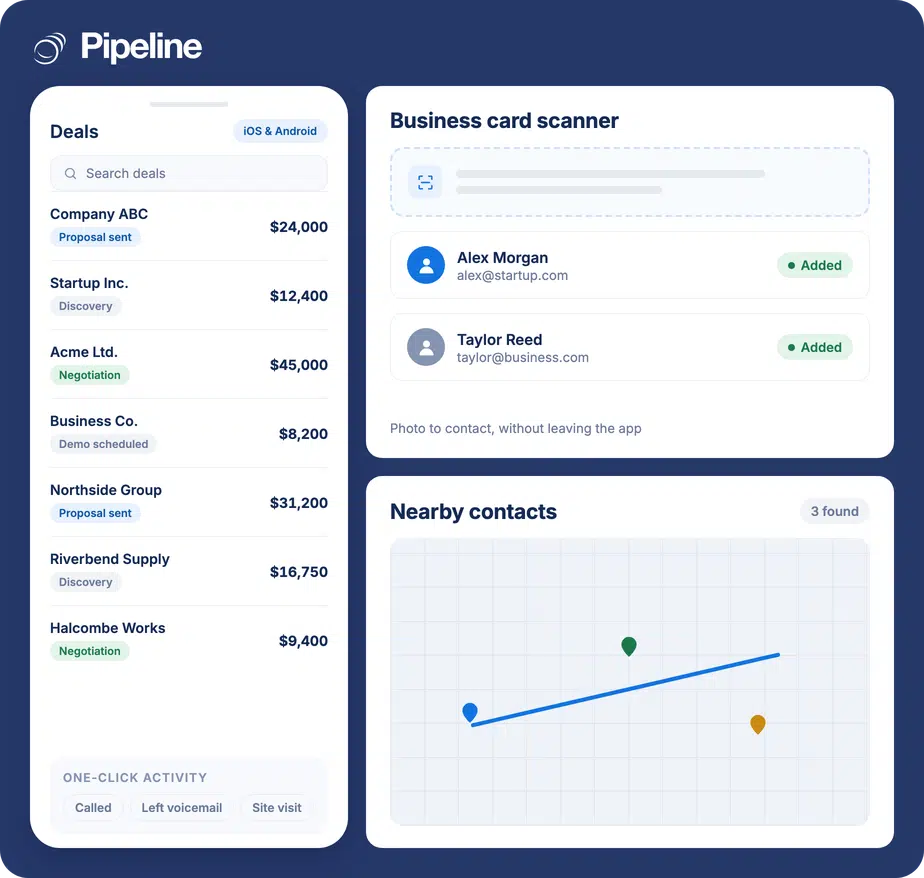
The Pipeline CRM mobile app runs your pipeline from iOS or Android. Scan a business card straight into a contact, record field notes that are converted to text, see contacts near your current location, plan a route of up to 10 stops, and get phone alerts on mentions, stage changes and won or lost deals. It is available to all users at no extra cost.
The CRM is only current if it can be updated where the work happens
Field sales generates its information in car parks and receptions, and loses most of it on the way back to a desk.
Notes get written hours later, if at all
What was agreed in a meeting is sharpest for about ten minutes. By the evening it is a summary, and by Friday it is a guess.
Business cards pile up in a pocket
A card is a contact record that has not been typed in yet, and the typing is exactly the job nobody does after a long day of visits.
Mobile apps are usually a cut-down copy
If the phone version cannot actually update a deal, reps stop opening it, and the pipeline is only as current as the last time someone sat down.
Capture it before you leave the car park
The app is built around the three things that happen between meetings: capture, context and the next stop.
Capture the contact
The business card scanner turns a card into a Pipeline CRM contact instantly, and it works on photos of cards you took previously – so the backlog in your camera roll is recoverable too.
Record the note by speaking it
Record field sales activity while it is fresh and it is converted to text, rather than typing it on a phone keyboard or promising yourself you will do it later.
Line up the next stop
See a map of contacts near where you are, and plan a route of up to 10 locations from the app.
The mobile app in a couple of minutes
A walkthrough of the app as a field rep would actually use it.
Anyone whose desk is a passenger seat
The app matters in proportion to how much selling happens away from a computer.
Field reps running visit days
Four or five calls a day generates four or five sets of notes, and all of them are better captured on the spot.
Anyone working events and trade shows
A day of conversations produces a stack of cards. Scanning them as you go is the difference between leads and a rubber band.
Distributed teams
When the team is spread out, phone alerts on mentions and stage changes are how people stay in step without a standing call.
What the mobile app covers
Available to all users on iOS and Android at no extra cost.
iOS and Android
Native apps for both, available to every user.
Business card scanner
Go from a card to a Pipeline CRM contact instantly.
Scan from your camera roll
Create contacts from business card photos you took previously.
Voice notes converted to text
Record field activity while it is fresh and have it transcribed.
One-click activities
Log frequent notes such as “made a phone call” in a single tap.
Contacts near you
See a map of a contact’s location and multiple contacts around where you are.
Route planning
Plan a route of up to 10 locations from the app, powered by Google Maps.
Phone alerts
Get notified on mentions, stage changes and recently won or lost deals.
Calendar from the app
Update, organise and view your calendar without a laptop.
Contacts and deal information
Full access to customer and deal records while you are out.
The best CRM data is the data captured on the spot
Nothing degrades faster than the detail of a conversation. A mobile app that can only show you records is a reference book; one that can capture a card, a note and a stage change in the ninety seconds after a meeting is the difference between a pipeline that reflects reality and one that reflects last Thursday.
Mobile app questions
Can’t find what you need? Contact our team.
Is the mobile app included in my plan?
Yes. The Pipeline CRM mobile app is available to all users on iOS and Android at no extra cost and with no hidden fees.
There is no mobile-only tier and no separate licence: download it, log in with your existing account and it is the same CRM.
Can I update deals and pipelines from my phone?
Yes, and this is the part that separates a usable mobile CRM from a viewer. You have full access to contacts, customer and deal information, and you can keep the pipeline current from wherever you are.
Practically, that means the stage change happens after the meeting rather than at the end of the week.
Does it do voice-to-text notes?
Yes. You can record your field sales activity while it is still fresh and it is converted to text, so notes get captured without typing on a phone.
For the notes you write over and over, one-click activities let you log something like “made a phone call” in a single tap instead.
Can I scan business cards into the CRM?
Yes. The mobile business card scanner takes you from a card to a Pipeline CRM contact instantly.
It also works retrospectively: you can create contacts from business card photos you have already taken, which is usually where a trade show’s worth of leads is sitting.
Can I see which customers are near me?
Yes. You can pull up a map of a contact’s location and view multiple contact locations around where you currently are, which is how an early finish turns into another visit.
You can also plan a route of up to 10 locations directly from the app. For territory-level planning, see map views and route planning.
What notifications does it send?
Phone alerts when someone mentions you on a lead, contact or ongoing deal, and updates on recently won or lost deals and stage changes.
That is the mechanism that keeps a distributed team aware of pipeline movement without a daily call.
Which devices does it run on?
iOS and Android. Both are supported for all users.
The app is designed around field sales tasks rather than being a shrunken copy of the desktop screen, which is why the capture features – scanning, dictation, one-click activities – are the ones given the most room.