
CRM email integration for Gmail and Outlook
Connect the inbox your team already uses. Every message to and from a synced contact lands on the right record automatically, so the deal history writes itself instead of depending on someone remembering to CC the CRM.
✓ No credit card required ✓ 14-day free trial ✓ Cancel anytime
Trusted by over 18,000 users globally





At a Glance
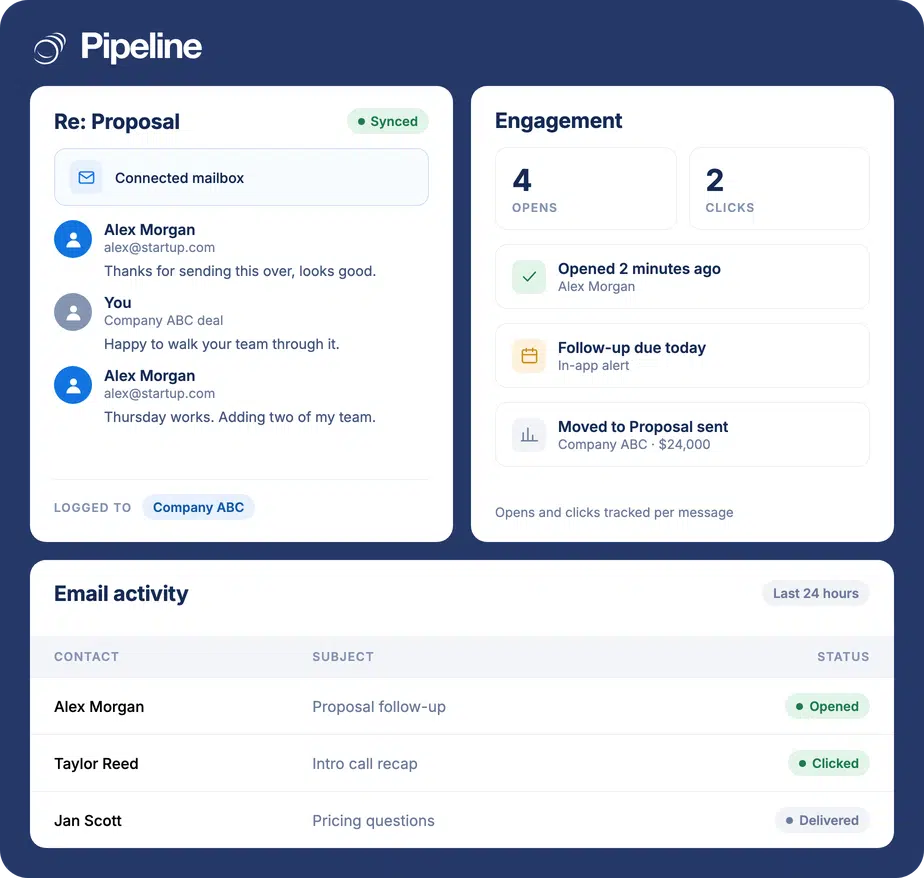
Pipeline CRM connects to Gmail and Outlook so inbound and outbound email with synced contacts is captured on the matching contact and deal automatically, with no CC or BCC step. Contacts and calendar events stay aligned in both directions in real time. Opens, clicks and downloads are tracked, and the whole thread is visible to every rep on the deal. Sync and tracking are on every plan.
A deal history is only useful if it is complete
Email is where deals are actually won, and it is the one record almost every CRM leaves half-filled. Three ways that shows up:
The CRM only knows what someone remembered to log
Manual CC and BCC habits hold for about a week. After that the record shows three of the eleven emails that actually decided the deal, and nobody can tell which eight are missing.
Whoever sent the email is the only one who saw it
When context lives in one rep’s inbox, cover during holiday, a handover, or a manager reviewing a stalled deal all start with asking that rep to forward things.
You cannot tell interest from silence
Without open and click data, a prospect reading your proposal four times looks identical to one who never opened it, so follow-up priority is guesswork.
Connect the inbox once, then stop thinking about it
Setup is a connection and a choice about scope. After that the capture is automatic for every synced contact.
Connect Gmail or Outlook
Authorise the mailbox your team already sends from. There is no separate CRM inbox to learn and no change to how anyone writes email.
Choose which contacts to sync
Pick the Outlook contact categories or contact groups that matter – existing clients, active prospects, or anyone tied to a live deal – so personal mail stays out of the CRM.
Email lands on the record by itself
Inbound and outbound messages with synced contacts appear against the matching contact and deal, visible to every rep on it, with opens and clicks tracked as they happen.
Teams where one inbox is not the whole story
Email capture pays off hardest where more than one person needs the thread, or where the cycle is long enough that memory is not a system of record.
Teams selling in pairs
A rep and an estimator, or an AE and a specialist, both need the same thread. Shared capture means neither has to forward anything.
Long, quiet sales cycles
When a deal runs months with gaps, the email trail is the only reliable record of what was promised and when it went quiet.
Anyone covering someone else’s pipeline
Holiday cover, territory changes and handovers stop being an archaeology exercise when the history is already on the deal.
What email integration covers
Where a capability depends on your plan, it says so – the plan matrix on the pricing page is the authority.
Gmail and Outlook connection
Connect the mailbox your team already uses, on any plan.
Inbound and outbound capture
Email in both directions with a synced contact is logged against the matching contact and deal.
No CC or BCC step
Capture does not depend on anyone remembering to copy the CRM.
Two-way contact sync
Contact edits made in Pipeline CRM update in Outlook in real time, and the other way around.
Calendar sync
Calendar events stay aligned alongside email and contacts.
Contact-scope control
Choose which contact categories or groups sync, so personal mail stays out of the CRM.
Open, click and download tracking
See what a prospect actually engaged with, not just what you sent.
Activity notifications
Get notified when a prospect engages, so follow-up lands while it is still relevant.
Team-visible threads
Everyone on a deal sees the same history, not just the sender.
Email tracking allowance
250 tracked emails per user on Start; unlimited on Develop, Grow and Enterprise.
Shared email templates
Reuse and share your best-performing templates across the team. Available on the Grow plan and above.
The record fills itself in
Every CRM can store an email. The difference is whether the storing depends on a person. When capture is automatic, the deal history stops being a reflection of how disciplined the team was last week and starts being something you can actually manage a pipeline from.
Email integration questions
Can’t find what you need? Contact our team.
How does a CRM sync emails into a sales pipeline without moving messages around?
Nothing moves. Your email stays in Gmail or Outlook and you keep sending from the client you already use. Pipeline CRM reads mail exchanged with the contacts you have chosen to sync and attaches a copy of the thread to the matching contact and deal.
There is no separate CRM inbox to work out of, and no folder discipline to maintain. The pipeline view gains the history; your mailbox is unchanged.
Is there a CRM that updates itself from Gmail conversations?
That is what email integration does here. Once a mailbox is connected and you have picked which contacts are in scope, inbound and outbound messages with those contacts are captured on the record automatically, along with opens, clicks and downloads.
What it does not do is infer deal stages or amounts from the text of a conversation. It records what was said and when; moving the deal is still a decision a person makes, or an automation you set up.
How does email integration work in a CRM?
Three things have to line up: authorisation, matching and scope. You authorise the CRM to access the mailbox; it matches each message to a contact record by email address, and through that contact to any deals they are on; and you decide which contacts are in scope so personal mail is never pulled in.
Once those are set, capture is passive. The common failure mode in other systems is making capture depend on a manual step, such as a BCC address, because that step stops happening within a fortnight.
Does Pipeline CRM work with both Gmail and Outlook?
Yes. Both are supported, and connecting one does not commit the rest of the team to the same client.
The provider-specific setup, including the Outlook add-on install and choosing which contact categories sync, is covered on the Outlook integration and Google Workspace integration pages.
What gets tracked when I email a prospect?
Opens, clicks and downloads are tracked automatically, and you can be notified when a prospect engages. That is the difference between knowing a proposal was sent and knowing it was opened four times and the pricing attachment was downloaded.
Tracking is available on every plan. The Start plan includes 250 tracked emails per user; Develop, Grow and Enterprise are unlimited.
Are email templates available on every plan?
No. Shared email templates are on the Grow plan and above. Email sync, capture and tracking are available on every plan, including Start.
Bulk email and drip campaigns are also Grow and above. The pricing page carries the full plan matrix.
I already use Pipedrive’s Gmail integration. What is different here?
The mechanics are similar – both connect a mailbox and log mail against records. The comparison worth making is not the email feature in isolation but what the rest of the CRM costs to run and how much configuration it needs.
We keep an honest side-by-side at Pipedrive vs Pipeline CRM, including where Pipedrive is the better choice.