

Outlook CRM integration with a two-way add-in
Install the add-in, tag the contacts you care about, and Pipeline CRM keeps them in step with your mailbox both ways. Calendar events and tasks sync too, and you can file any email onto the right deal without leaving your inbox.
✓ No credit card required ✓ 14-day free trial ✓ Cancel anytime
Trusted by over 18,000 users globally





At a Glance
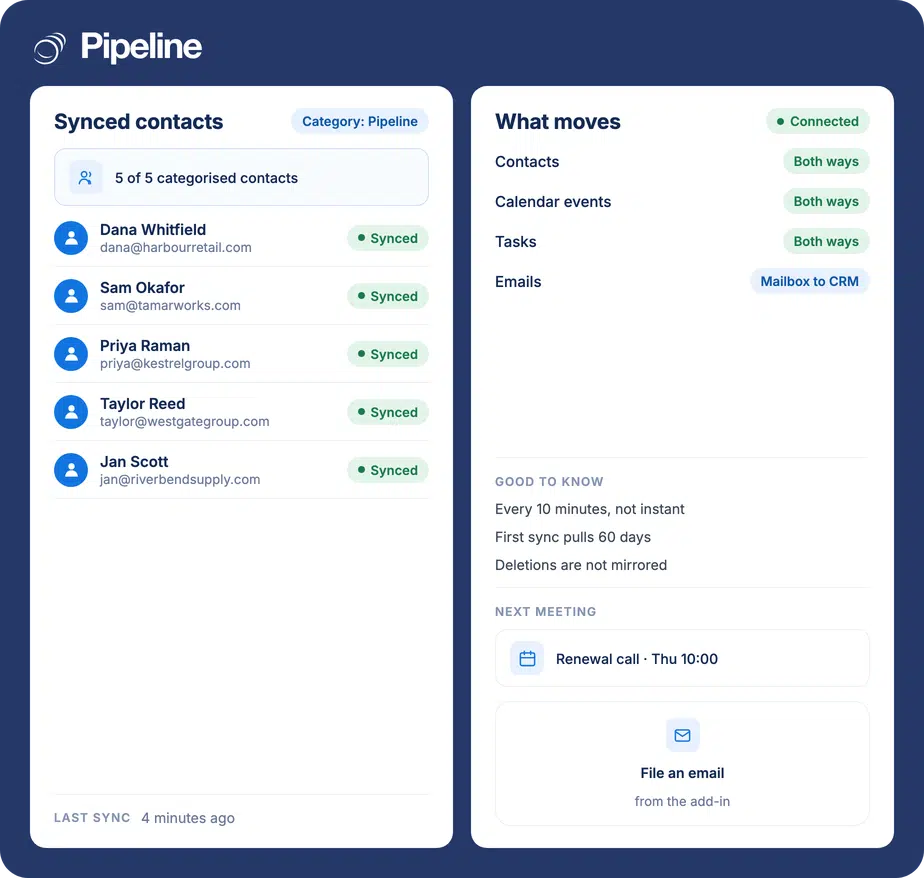
Pipeline CRM integrates with Outlook through an add-in that syncs contacts, calendar events and tasks in both directions, and lets you file individual emails onto a deal. Items sync only when they carry a category named Pipeline in Outlook, which is what keeps your personal contacts out of the CRM. Sync runs about every ten minutes rather than instantly.
The mailbox is where the deal actually happens
Most of what a rep knows about a deal arrives by email or sits in a calendar invite. If none of that reaches the CRM, the CRM is a forecast, not a record.
The context stays in one inbox
A rep answers a question by email and nobody else ever sees it. When they are on holiday, or they leave, that thread is the only place the answer existed.
Contact details go stale on one side
A phone number gets corrected in the mailbox and the CRM keeps the old one. Six months later nobody can tell which record is right.
CC-ing the team is the fallback plan
Sharing by CC works until someone forgets, which is most of the time. It also buries the useful mail among everything else.
Connect Outlook in three steps
An account admin enables the integration once. After that each person installs the add-in and chooses what to sync.
Enable it for the account
An admin turns on permissions from the App Store inside Pipeline CRM. Until that is done, nobody can connect their mailbox.
Install the add-in and sign in
Each user installs the add-in and signs in with both their Pipeline CRM and Outlook credentials. The store listing may still show the old PipelineDeals name.
Create the Pipeline category and tag what syncs
Make a category called Pipeline in Outlook, then apply it to the contacts, tasks and events you want in the CRM. Anything without that category is left alone.
Outlook sync directions in detail
Contacts, tasks and events move both ways. Email does not: you file it from the add-in, one message at a time.
| In Outlook | In Pipeline CRM | Direction | Notes |
|---|---|---|---|
| Contacts | People | Both ways | Most recent change wins. A valid email address is required |
| Calendar events | Events | Both ways | Most recent version is used |
| Tasks | Tasks | Both ways | Most recent version is used |
| Recurring events | Recurring events | Pipeline CRM to Outlook only | Recurring series created in Outlook do not come across |
| Emails | Activity on a deal | Outlook to Pipeline CRM | Filed by you from the add-in, not captured automatically |
| Deletions | Deletions | No | A deleted item stops syncing; it is not deleted on the other side |
Installing the add-in and syncing your mailbox
A walkthrough of installing the add-in, setting the Pipeline category, and filing an email onto a deal.
Teams that sell largely over email
The more of the relationship lives in the mailbox, the more this is worth switching on.
Teams handing accounts over
When someone covers a colleague or inherits an account, the history is on the record instead of in a mailbox they cannot open.
Anyone living in Outlook all day
Filing an email from the add-in is one click in the window you are already in, which is the only way it actually gets done.
Managers who need the calendar to be true
Meetings booked in Outlook show up against the deal, so pipeline reviews match what the week actually looked like.
In the Outlook integration
Everything below comes with the add-in.
An Outlook add-in
Installed per user and signed in with both accounts.
Two-way contact sync
Edit a contact on either side and the other follows, most recent change winning.
Two-way calendar and task sync
Events and tasks stay aligned across both systems.
Category-based control
Only items tagged with the Pipeline category sync, so personal contacts stay personal.
File emails onto a deal
Attach a message to the right record from inside Outlook.
Shared history for the team
Filed mail is visible to colleagues who can see the record, without anyone being CC’d.
Admin enablement
The integration is switched on once for the account from the App Store.
60 days of history on first sync
The initial run brings recent items across rather than everything.
Email is filed by you, not captured automatically
This is worth being plain about, because the wording on this page used to suggest otherwise. Pipeline CRM does not sweep up every inbound and outbound message: you file the ones that matter from the add-in, one at a time, and those become activity on the record. Contacts, tasks and events are the parts that sync by themselves, in both directions, about every ten minutes. If you want automatic capture of all mail, that is a different feature – see email sync and tracking.
Outlook integration questions
The things people ask before connecting their mailbox.
Which CRM integrates with Outlook?
Pipeline CRM integrates with Outlook through its own add-in. Contacts, calendar events and tasks sync in both directions, and you can file individual emails onto a deal from inside Outlook.
An account admin enables the integration once from the App Store in Pipeline CRM, then each user installs the add-in. The setup guide covers each screen.
Is there a Pipeline CRM plugin or add-in for Outlook?
Yes. The integration is delivered as an Outlook add-in that each person installs and signs into with both their Pipeline CRM and Outlook credentials.
One thing to expect: the listing may still show the old PipelineDeals name. It is the same add-in.
Why is nothing syncing?
Almost always the category. Contacts, tasks and events sync only when they carry a category named Pipeline, with a capital P, in Outlook. That category does not exist by default, so it has to be created and then applied to the items you want in the CRM.
Two other things to check: an admin has to have enabled the integration for the account first, and a contact needs a valid email address before it can sync into Pipeline CRM.
How quickly does it sync?
About every ten minutes. It is not instant, so an edit made on one side will not appear on the other immediately.
The very first sync brings across 60 days of history rather than your whole mailbox.
Does every email automatically go into the CRM?
No. Email is one-way and it is deliberate: you file a message onto a record from the add-in, and it becomes an activity there. Pipeline CRM does not capture all of your inbound and outbound mail on its own.
Once filed, the message is visible to colleagues who can see that record, so you do not have to CC anyone to share it.
What happens if I delete a contact or an event?
Deletions are not mirrored. The item stops syncing, but it is not deleted on the other side, so you will still have the copy in whichever system you did not delete it from.
Removing the Pipeline category from an item also takes it out of scope for future syncs.
Can I use Outlook as a CRM instead?
Outlook stores contacts and a calendar, so for a very small team it can stand in for one. What it has no concept of is a pipeline: there are no deal stages, no value or close date on an opportunity, no forecast, and no view of what the team collectively has in play.
That is usually the point at which people connect the two rather than choosing between them, which is what this integration is for.
Do recurring meetings sync?
In one direction. A recurring event created in Pipeline CRM will appear in Outlook, but a recurring series created in Outlook does not come back the other way.
Single events sync in both directions as normal.