
Lead
Management
Leads come from everywhere: your website, trade shows, referrals, cold outreach. Without a system, they slip through the cracks. Pipeline CRM captures, qualifies, routes, and tracks every lead from first touch to closed deal. Lead Forms included on all plans.
✓ No credit card required ✓ 14-day free trial ✓ Cancel anytime
Trusted by over 18,000 users globally





At a Glance
Pipeline CRM is a lead management CRM that offers native Lead Forms with web-to-lead capture, round-robin assignment, and Lead Source tracking for small and mid-size sales teams, with native Gmail and Outlook integration plus Data Enrichment and Email Validation add-ons. Pipeline CRM Lead Management captures leads through native Lead Forms, web-to-lead integration, and CSV import, then qualifies them with customizable Person Statuses and Lead Source tracking. Round-robin assignment routes new leads to the right rep automatically. Automations trigger follow-up tasks and emails when leads arrive or change status. Add Data Enrichment ($19/mo) and Email Validation ($25/mo) to clean and complete lead records. Lead Forms are included on all plans starting at $25/user/month (billed annually) with a 14-day free trial. Built for sales teams in construction, manufacturing, and professional services who need every lead tracked from first touch to closed deal.
What is lead management?
Lead management is the process of capturing, qualifying, routing, nurturing, and converting potential customers into closed deals. It gives sales teams a structured system for handling every inquiry, referral, and website visitor so no opportunity falls through the cracks. Research from InsideSales.com shows that responding to a new lead within five minutes makes you 100x more likely to connect than waiting 30 minutes. A lead management system makes that speed possible.
Capture
Collect leads from every source: website forms, trade shows, referrals, cold outreach, and imports. Pipeline CRM’s native Lead Forms capture contact details directly into your CRM. At events, use the mobile app’s Business Card Scanner to create contacts on the spot. Starting a new territory from zero? The free Local Lead Finder tool pulls up to 50 local businesses in any US ZIP code into an import-ready CSV.
Qualify
Sort leads by readiness with Person Statuses (Hot, Warm, Cold), track where they came from with Lead Sources, and segment with tags. Know which leads deserve your time and which need more nurturing.
Convert
Turn qualified leads into deals with automated follow-up tasks, email tracking that shows when leads open your messages, and drip campaigns that keep your team top of mind until the prospect is ready to buy.
Effective lead management is not just a database of contact names. It’s a system that ensures every lead is captured, assigned to the right person, followed up on time, and tracked through to a decision. Without it, marketing spend generates contacts that sit in spreadsheets, reps cherry-pick the easy ones, and the rest go cold. Pipeline CRM is built to close that gap: capture leads automatically, route them instantly, and give your team the tools to follow up before the competition does.
How does a lead move through Pipeline CRM?
Every lead follows a path from first contact to closed deal. Pipeline CRM structures that path so nothing gets lost between steps. Here’s how it works.
This lifecycle runs automatically once configured. Leads arrive, get assigned, and trigger follow-up tasks without manual intervention. Your reps focus on selling, not data entry.
Why do sales teams lose leads they already earned?
Generating leads is expensive. Losing them is worse. Yet most sales teams lack a structured system for handling leads after they arrive. Research from Harvard Business Review shows that companies that contact leads within one hour are 7x more likely to qualify them than those that wait even two hours. When leads sit in inboxes, spreadsheets, or sticky notes, response time becomes a competitive disadvantage.
Leads arrive from multiple sources with no central system
Website forms go to one inbox. Trade show leads sit in a spreadsheet. Referrals live in email threads. Without a single system, leads are scattered and untracked.
No follow-up process after first contact
A lead fills out a form on Monday. By Wednesday, no one has called. By Friday, they’ve signed with a competitor. Speed and consistency win deals, and most teams have neither.
No visibility into which lead sources actually convert
You spend on Google Ads, sponsor trade shows, and run email campaigns. But you can’t tell which source produces leads that actually close. Marketing budget decisions become guesswork.
How does Pipeline CRM help you capture and convert more leads?
Pipeline CRM handles the full lead lifecycle: capture, qualify, route, and convert. Each capability is built to work together so leads never sit idle. Watch the full product demo to see it in action.
Capture leads directly into your CRM
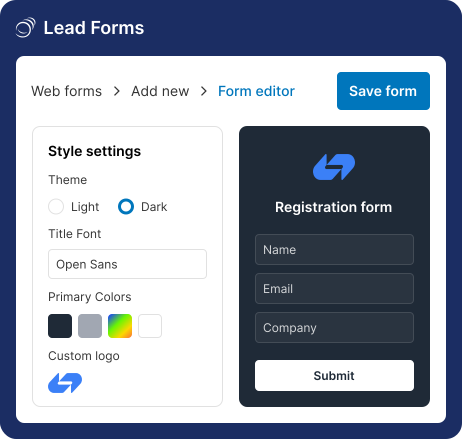
Pipeline CRM’s native Lead Forms let you build branded, mobile-responsive forms in under two minutes. Embed them on your website, share a direct link, or use them at events. Every submission creates a contact record, assigns it to a rep via round-robin, and can trigger a deal automatically. No third-party form tools, no Zapier, no manual imports.
- Native, no-code forms with brand customization
- Round-robin assignment to reps or teams
- Built-in conversion tracking (views, starts, submissions)
- Duplicate prevention and auto-deal creation
Know which leads are worth your time
Not every lead is ready to buy. Person Statuses let you classify leads as Hot, Warm, Cold, or any custom status your team defines. Lead Sources track where each lead came from so you can measure which channels produce the best prospects. Tags add another layer of segmentation for targeting and list building.
- Color-coded Person Statuses for lead lifecycle tracking
- Lead Source tracking with reporting
- Flexible tags for segmentation
- Saved list views with custom filters
Get the right lead to the right rep, instantly
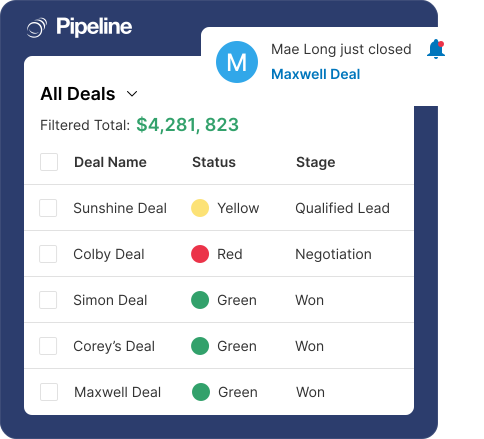
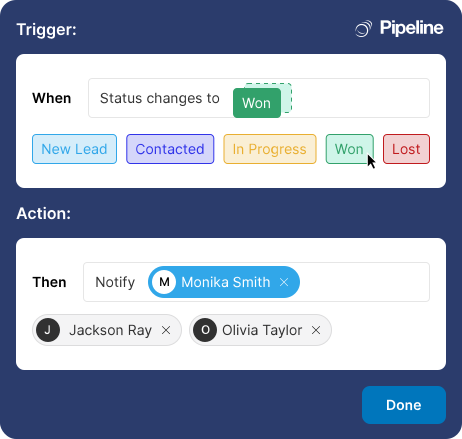
Speed matters. Pipeline CRM routes new leads to reps automatically via round-robin assignment. Automations trigger follow-up tasks, send notification emails, and update fields the moment a lead arrives or changes status. Todo Templates attach standardized follow-up sequences so every rep follows the same playbook.
- Round-robin lead assignment to users or teams
- Automations triggered by lead creation or status change
- Todo Templates for standardized follow-up sequences
- Email Drip Campaigns for automated nurturing (Grow+)
Complete the picture before you call
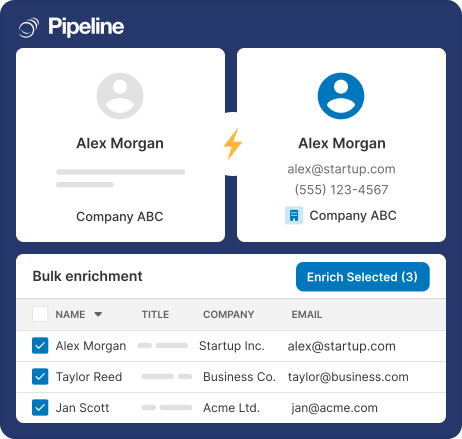
A name and email aren’t enough. Pipeline CRM’s Data Enrichment add-on fills in company details, job titles, and contact information from a work email or website. Email Validation confirms addresses are deliverable before you send. Email tracking shows when leads open your messages, click links, and download attachments.
- Data Enrichment at ~$0.07 per record ($19-$69/mo)
- Email Validation for 5,000 addresses/month ($25/mo)
- Email open, click, and attachment tracking
- Advanced de-duplication to prevent duplicate records (Grow+)
What lead management metrics should your sales team track?
The teams that convert the most leads track a consistent set of metrics that reveal response speed, source quality, and conversion bottlenecks. Pipeline CRM’s reporting tools and Lead Source tracking make all of these measurable.
Lead Response Time
The single most important lead metric. Responding within one hour makes you 7x more likely to qualify the lead than waiting two hours.
Lead-to-Deal Conversion
Measures how effectively your team turns contacts into pipeline. A low conversion rate signals qualification or follow-up problems.
Untouched Lead Rate
What percentage of your leads never get contacted? If reps are cherry-picking easy leads, the rest go cold. Filter your People list by activity count to find the gaps.
Lead Source ROI
Goes beyond cost per lead to measure actual revenue. A cheap source that never converts is more expensive than a pricey one that does.
Follow-up Rate
What percentage of your leads actually get contacted? If it’s under 80%, you’re paying for leads and then ignoring them.
Lead Velocity Rate
Tracks whether your lead volume is growing or shrinking. A leading indicator of future pipeline health and revenue trajectory.
How do sales teams in different industries manage leads with Pipeline CRM?
Lead management challenges vary by industry, but the core need is the same: capture every lead, follow up fast, and know which sources drive revenue. Here’s how three of Pipeline CRM’s strongest verticals use the platform.
Construction & Contractors
- Lead Forms on project pages capture bid requests with round-robin to estimators
- Lead Sources track which job boards, referrals, and trade shows produce the best leads
- Automations create follow-up tasks the moment a new bid request arrives
Construction sales teams juggle leads from job boards, general contractor referrals, trade shows, and their own website. Pipeline CRM’s Lead Forms embed directly on project pages to capture bid requests. Round-robin routes each request to the next available estimator. Lead Source tracking shows whether referrals from GCs convert better than leads from trade shows, so you can focus your networking where it pays off. Learn more about our CRM built for construction sales teams.
Manufacturing & Distribution
- High-volume inbound leads from website and trade shows imported in bulk
- Data Enrichment auto-fills company details from a work email address
- Automations trigger follow-up tasks within one hour of lead submission
Manufacturing teams generate leads at trade shows, through distributor networks, and from website inquiries. The volume is high and the first supplier to respond often wins the order. Pipeline CRM’s Lead Forms and CSV import bring leads in fast. Data Enrichment fills missing company details so reps can qualify before calling. Automations ensure every lead gets a follow-up task within the hour, and Person Statuses let managers see at a glance which leads are hot and which need nurturing.
Professional Services
- Referral-based leads tracked via Lead Sources for attribution
- Person Statuses separate active prospects from past inquiries
- Email tracking shows which proposals get opened and when
Professional services firms rely heavily on referrals, speaking engagements, and thought leadership content for lead generation. These leads arrive through informal channels that are easy to lose track of. Pipeline CRM’s Lead Sources tag every referral with its origin. Person Statuses separate active prospects from archived contacts. Email tracking shows when a prospect opens your proposal, so you know the right moment to follow up. Email Drip Campaigns (Grow+) keep your firm top of mind during long evaluation periods.
How do real sales teams improve lead conversion with Pipeline CRM?
Sales teams across logistics, construction, and e-commerce use Pipeline CRM to capture more leads and convert them into revenue. Here are three examples.
Boost in revenue partnerships
GlobalTranz’s agent recruiting team achieved a 63% boost in partnerships with revenue-generating agents after implementing Pipeline CRM for lead and pipeline tracking.
Read the full storySales increase
Bay Area Underpinning increased sales 15-20% by using Pipeline CRM to track every lead from initial inquiry through to closed project.
Read the full storyBusiness growth after switching
MaxSold grew their business by almost 100% after switching to Pipeline CRM, using it to manage and convert a rapidly expanding lead database.
Read the full storyAward-winning support
What should you look for in lead management software?
Not every CRM handles lead management the same way. Some charge extra for lead forms. Others require third-party tools for basic automation. When evaluating sales lead management software, or any standalone lead management tool, focus on these capabilities.
Native lead capture forms
Your CRM should include lead forms on all plans, not as a paid add-on. If you need a third-party tool to capture leads, you’re paying twice and adding complexity.
Lead source tracking and attribution
Every lead should be tagged with where it came from. If you can’t report on which sources produce revenue, you can’t optimize your marketing spend.
Automatic lead routing and round-robin
Leads should be assigned to reps automatically the moment they arrive. Manual routing adds delays that cost you deals.
Customizable lead statuses and lifecycle stages
Your qualification process is unique. The CRM should let you define custom statuses, not force you into a one-size-fits-all lifecycle.
Built-in email tracking and follow-up automation
Know when leads open your emails. Automate follow-up tasks so reps never forget the next step. These should be core features, not premium upgrades.
US-based live chat support
When you need help setting up lead forms or automations, you want a real person who responds in under a minute. Pipeline CRM offers US-based live chat with a 97.6% satisfaction rate.
Works with your existing tools
Pipeline CRM connects with the tools your team already uses. Sync email, calendar, and marketing data to keep your leads flowing through one system.






Frequently Asked Questions
Find the answer to your question here. If you don’t see it, please feel free to contact us.
What is lead management software?
Lead management software is a tool that helps sales teams capture, organize, qualify, and track potential customers from first contact through to a closed deal. Instead of managing leads in spreadsheets, email inboxes, or sticky notes, lead management software centralizes every lead in one system with tools for automatic routing, status tracking, follow-up reminders, and source attribution.
Pipeline CRM’s lead management includes native Lead Forms for capturing leads from your website, Person Statuses for qualifying leads (Hot, Warm, Cold), Lead Source tracking for attribution, round-robin assignment for automatic routing, and automations that trigger follow-up tasks the moment a lead arrives. All lead management features are available on every plan starting at $25/user/month (billed annually). Start a free 14-day trial to see how it works with your team’s actual leads.
How do Lead Forms work in Pipeline CRM?
Lead Forms are native, no-code forms you can build directly inside Pipeline CRM in under two minutes. You customize the fields, brand colors, and logo, then embed the form on your website or share a direct link. Every submission automatically creates a contact record in your CRM, mapped to the fields you configured.
Forms support round-robin assignment (select multiple reps and Pipeline CRM distributes leads evenly), duplicate prevention (matching by email address), and automatic deal creation. A built-in dashboard tracks form views, starts, submissions, and conversion rate. The Start plan includes 2 active forms, Develop includes 5, Grow includes 15, and Enterprise offers unlimited. Compare plans to see the full breakdown.
Can I track where my leads come from?
Yes. Pipeline CRM’s Lead Sources feature lets you tag every contact and deal with its origin: Google Ads, trade shows, referrals, cold calls, website, and any custom source you define. Lead Sources are available on all plans.
You can filter your People and Deals lists by source to see which channels produce the most leads and, more importantly, which produce the most closed revenue. This data helps you allocate marketing budget to the channels that actually convert, not just the ones that generate the highest volume.
How does Pipeline CRM route leads to the right rep?
Pipeline CRM offers round-robin lead assignment for both Lead Forms and the web-to-lead API. When you configure a Lead Form, select multiple users or a team, and Pipeline CRM distributes incoming submissions evenly across them. You can also override with a specific user assignment when needed.
Automations extend routing further: set up rules that assign leads based on field values (for example, route all leads from California to your West Coast rep). Automations can also create follow-up tasks, send notification emails, and apply Todo Templates the moment a new lead arrives. Available on all plans (Start: 1 automation, Develop: 10, Grow: 20).
Does Pipeline CRM offer data enrichment for leads?
Yes. Pipeline CRM’s Data Enrichment add-on fills in missing contact and company details using a work email address or website URL. It adds job titles, phone numbers, company size, industry, and more to your lead records automatically.
Pricing starts at $19/month for 250 enrichments (~$0.07 each), with tiers up to $69/month for 1,000 enrichments. This is significantly cheaper than standalone enrichment tools like ZoomInfo or Clearbit. Email Validation ($25/month for 5,000 validations) confirms that addresses are deliverable before you send, reducing bounce rates and protecting your sender reputation. Both add-ons are available on all plans.
Is there a free trial for Pipeline CRM’s lead management features?
Yes, Pipeline CRM offers a 14-day free trial that includes full access to all lead management features: Lead Forms, Person Statuses, Lead Sources, automations, email tracking, and more. No credit card is required to start.
We recommend embedding a Lead Form on your website during the trial so you can test the full capture-to-conversion workflow with real leads. Sign up for your free Pipeline CRM trial to get started, or schedule a guided demo if you’d prefer a walkthrough with our team first.