
Share deals outside your company
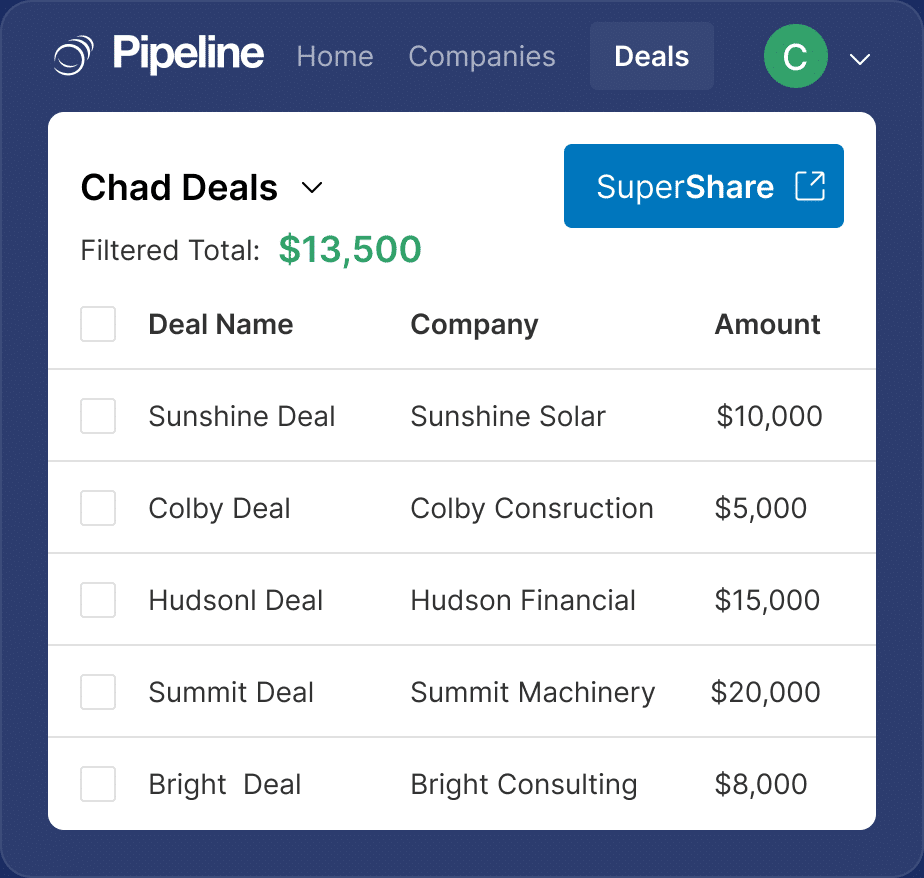
Modern deals span more than one company. SuperShare lets you give a partner, reseller or client a live view of the specific deals they are involved in, and let them add activities, without buying them a seat in your CRM.
✓ No credit card required ✓ 14-day free trial ✓ Cancel anytime
Trusted by over 18,000 users globally





At a Glance
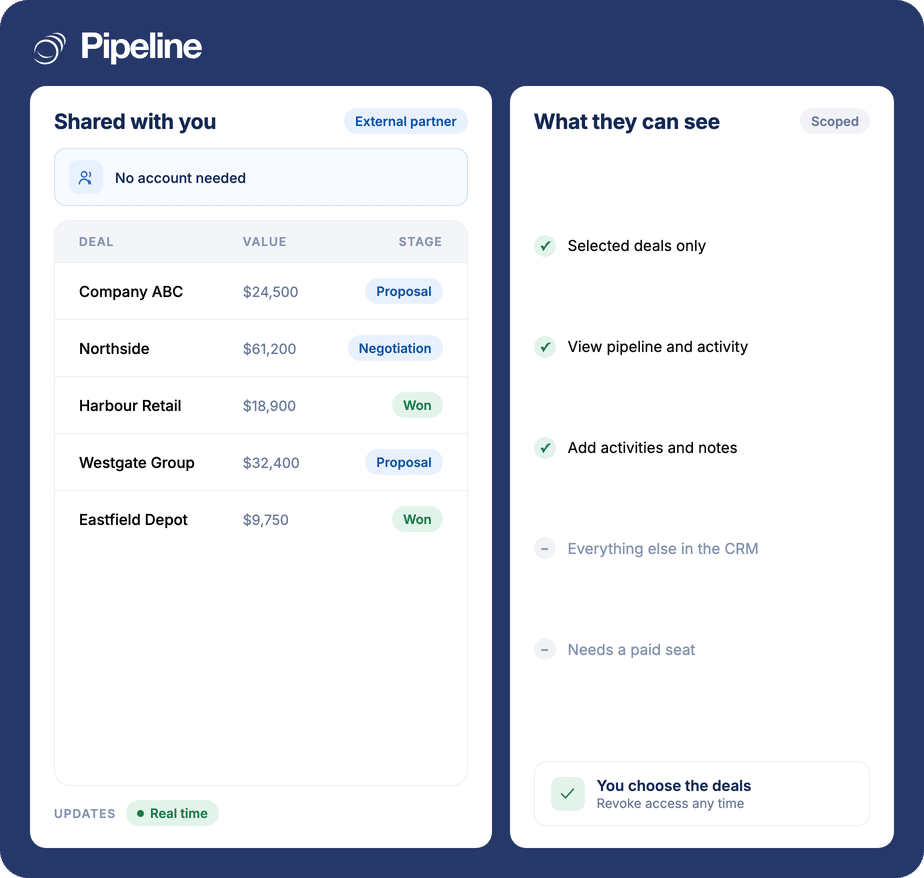
SuperShare lets Pipeline CRM customers share selected sales pipeline data with collaborators outside their company. You grant access to the specific deals you choose, and the collaborator can view them and add activities in real time from the Pipeline CRM dashboard. Nothing else in your CRM is exposed. SuperShare is available on the Develop plan and above.
The deal involves people who are not in your CRM
Partners, resellers, subcontractors and clients all need to know where a deal stands. None of them are going to log into your CRM.
Status updates become a manual job
Someone ends up exporting a view or writing a summary email every week, and the version the partner has is always slightly out of date.
A seat is the wrong unit
Buying a licence for an outside collaborator who needs to see four deals is expensive, and it gives them access to far more than they should have.
Shared spreadsheets drift
The workaround is a copy of the data, which stops matching the CRM the moment either side edits it.
Grant access to the deals, not to the CRM
Sharing is scoped by deal, so the boundary is explicit rather than a matter of trust.
Pick what to share
Quickly grant deal access to the people you want to share with. You share only the CRM data you choose, with the outside people you choose.
They see it live
The collaborator views the shared pipeline data from the Pipeline CRM dashboard in real time, so there is no exported copy to go stale.
They can contribute
Collaborators can view and add activities, which is what keeps a shared deal moving instead of turning into a reporting exercise.
Deals that cross a company boundary
The value is proportional to how often someone outside your business needs to know where a deal stands.
Channel and reseller teams
A partner selling alongside you needs the pipeline they are part of, and nothing else in your CRM.
Projects with subcontractors
When delivery depends on another firm, giving them the deal view beats forwarding updates.
Client-facing accounts
Some clients want to see the state of their own work without asking for a status call.
What SuperShare covers
Scoped external access on the Develop plan and above.
Share with people outside your company
Collaborate on pipeline data with external partners, not just internal users.
Deal-level access
Grant access to the specific deals you want to share.
You control the scope
Share only the CRM data you choose, with the people you choose.
Real-time view
Collaborators see the current state from the Pipeline CRM dashboard, not an exported copy.
They can add activities
Outside collaborators can add activities to keep the deal moving.
No seat required for the collaborator
Sharing does not mean buying the other party a licence.
Works across companies
Built for pipelines that span more than one organisation.
Quick to grant
Access is granted from the dashboard rather than configured by an administrator.
Visibility should not require a licence
When a deal involves another company, the choice is usually between paying for a seat they will barely use and emailing them a spreadsheet that is wrong by Tuesday. Scoped sharing removes that choice: they see exactly the deals they are part of, live, and nothing else.
External sharing questions
Can’t find what you need? Contact our team.
Can I share deals with someone who does not have a CRM seat?
Yes. That is the purpose of SuperShare: you grant access to specific deals so an outside collaborator can view them and add activities, without buying them a licence in your CRM.
It is scoped by deal, so the question of what they can see has an explicit answer rather than depending on a permission model.
What can an external collaborator actually do?
They can view the sales pipeline data you have shared and add activities to it, working from the Pipeline CRM dashboard in real time.
They cannot see the rest of your CRM. Sharing exposes only the data you chose to share with the people you chose to share it with.
Is the shared view live or a copy?
Live. Collaborators work from the Pipeline CRM dashboard in real time, which is the whole point compared with exporting a view or maintaining a shared spreadsheet.
A copy starts drifting from the CRM the moment either side changes something. A shared view cannot.
Which plans include SuperShare?
SuperShare is available on the Develop plan and above – Develop, Grow and Enterprise. It is not included on Start.
The pricing page carries the full plan comparison, and our team can confirm the details for your account.
Is it secure to share deals outside the company?
Sharing is deliberate and scoped: you grant access to particular deals rather than opening the CRM, so the exposure is limited to what you selected.
That is a different model from creating a user account for an outside party, where the default is access to considerably more than the deals in question.
Why not just give the partner a user account?
Cost and scope. A seat is priced for someone who uses the whole CRM, and it grants access shaped for an employee rather than an outside collaborator who needs four deals.
Sharing is the cheaper and narrower answer to what is usually a narrow requirement.
What kinds of teams use this?
Any arrangement where a deal crosses a company boundary – channel partners and resellers selling alongside you, subcontractors involved in delivery, or clients who want visibility of their own work.
The common thread is that the other party needs the deal, not the CRM.