
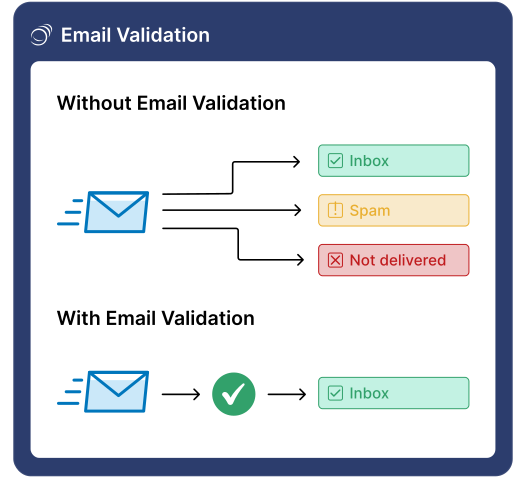
Email validation, as the address is typed
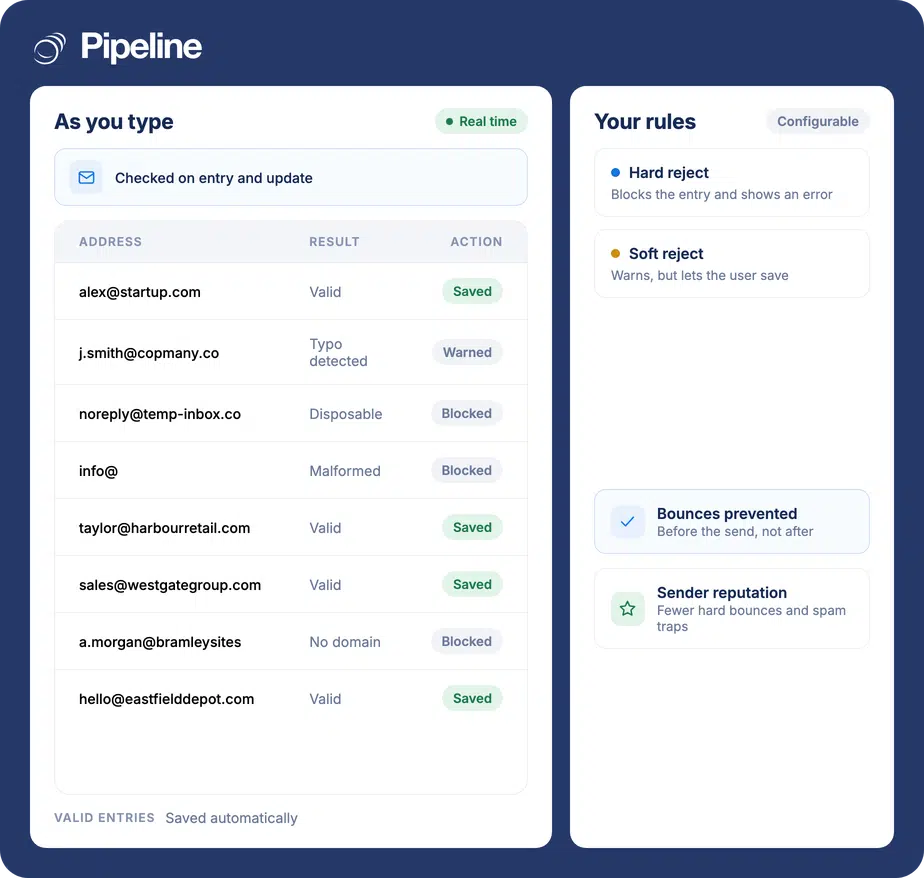
Bad addresses are cheapest to deal with before they are saved. Pipeline CRM checks each address as it is entered or updated, and either blocks it outright or warns and lets it through, depending on the rule you set.
✓ No credit card required ✓ 14-day free trial ✓ Cancel anytime
Trusted by over 18,000 users globally





At a Glance
Email Validation is a Pipeline CRM add-on that checks addresses in real time as they are entered or updated. You set the criteria: hard reject shows an error and blocks the entry, soft reject shows a warning but allows the save. Valid addresses are saved automatically. It costs $25 per month as a flat fee on any plan tier.
A bad address costs more than the email it wastes
One mistyped address is an annoyance. A database with a few percent of them is a deliverability problem that affects everything you send.
Hard bounces damage your sender reputation
Mailbox providers read bounce rates as a quality signal. Enough bad addresses and your good email starts landing in spam folders too.
Typos enter at the keyboard, not in bulk
Most bad data arrives one record at a time, typed by a person in a hurry. Cleaning it later means finding it first.
Fake sign-ups pollute the pipeline
Disposable and fraudulent addresses turn into contacts, then into reporting, then into forecasts built on people who do not exist.
Checked at the point of entry
Validation happens inside Pipeline CRM, so there is no export, no separate tool and no cleanup pass.
Set your criteria
Decide what counts as unacceptable for your business rather than accepting someone else’s defaults.
Choose hard or soft reject
Hard reject displays an error and blocks the entry entirely. Soft reject displays a warning and lets the user proceed with saving – useful when a human sometimes knows better than the checker.
Valid addresses just save
Anything that passes is saved automatically, so validation is invisible except when it catches something.
Anyone who sends at volume
The value tracks how much of your outreach is automated and how many people type addresses into the CRM.
Teams running email campaigns
Bulk sends are where a few bad addresses turn into a bounce rate, and a bounce rate turns into a deliverability problem.
Anyone with public sign-up forms
Public forms attract disposable and fraudulent addresses. Blocking them at entry keeps them out of the database entirely.
Teams where many people enter data
The more hands typing into the CRM, the more valuable a check that does not rely on anyone being careful.
What email validation covers
Included in the $25/month add-on.
Real-time checking
Addresses are validated as they are entered or updated.
Blocks fake addresses
Identifies and blocks fake or incorrect email addresses.
Hard reject
Displays an error and blocks the entry entirely.
Soft reject
Displays a warning but allows the user to save.
Your own criteria
Set validation rules to match your business rather than a default.
Valid entries save automatically
Anything that passes is saved without an extra step.
Prevents hard bounces
Catches the addresses that would have bounced before you send.
Protects sender reputation
Fewer hard bounces and spam traps means better inbox placement.
Blocks fraudulent sign-ups
Keeps incorrect and fraudulent registrations out of the CRM.
No third-party app
Validation happens in Pipeline CRM rather than by exporting to another tool.
What it costs
A flat monthly fee on top of your subscription, billed together with it. Available on any plan tier.
Flat monthly fee, not per user. Add it on any plan tier and cancel at any time.
Add-on fees are added on top of your subscription and billed together with it. See the pricing page for plans and the other add-ons.
Clean data is cheaper to keep than to restore
Every approach to bad email addresses other than stopping them at the door is a cleanup project: exporting, checking, re-importing, and doing it again in six months. Validating at entry means the database never gets dirty in the first place, which is the only version of this that stays solved.
Email validation questions
Can’t find what you need? Contact our team.
How much does email validation cost?
It is $25 per month as a flat fee, not a per-user charge, and it is available on any plan tier.
Add-on fees are added on top of your subscription and billed together with it, and you can add or cancel an add-on at any time.
When does validation happen?
In real time, as an address is entered or updated in Pipeline CRM. It is a check at the point of entry rather than a cleanup pass over your existing database.
That timing is the point: it stops bad data being saved, instead of finding it after it has already been mailed.
What is the difference between hard reject and soft reject?
Hard reject displays an error and blocks the entry entirely, so the address cannot be saved. Soft reject displays a warning but allows the user to proceed with saving.
Both are available and you set the criteria, which matters because there are situations where the person entering the data genuinely knows more than the checker does.
Will it stop fake sign-ups from my forms?
It blocks fraudulent and incorrect addresses, which is the main defence against disposable addresses arriving through a public form.
It pairs directly with lead forms, where addresses arrive from people you have never met.
How does this protect deliverability?
By preventing hard bounces. Mailbox providers treat bounce rates as a signal of list quality, so a database with bad addresses in it damages the delivery of your good email too.
Fewer bounces and fewer spam traps means better inbox placement across everything you send, not just the campaign that would have bounced.
Is there an API for this?
Validation runs inside Pipeline CRM at the point an address is entered or updated, rather than as a separate service you call from elsewhere.
If you need validation in your own application, talk to us about what you are trying to do – the developer documentation is the right starting point for the wider API.
Do I need this if I already have Data Enrichment?
They solve different problems. Validation keeps bad addresses out; enrichment fills in details that are missing.
Both are flat monthly add-ons available on any plan tier, and you can run either on its own.