

Mailchimp CRM integration with campaign results
Send Pipeline CRM contacts to a Mailchimp list automatically, then see what each campaign did to them without leaving the CRM. Opens, clicks and bounces land on the contact record, so the person following up knows what the person already received.
✓ No credit card required ✓ 14-day free trial ✓ Cancel anytime
Trusted by over 18,000 users globally





At a Glance
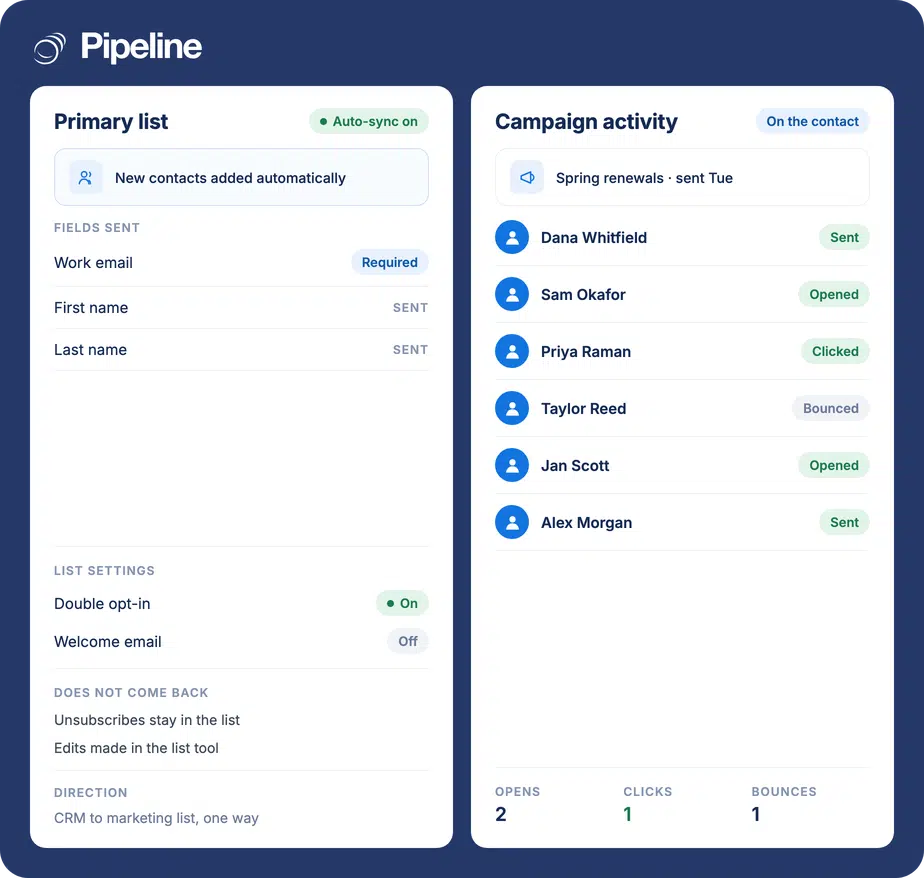
Pipeline CRM integrates with Mailchimp by pushing contacts into a Mailchimp audience, either on demand or automatically through a designated Primary List. Three fields travel: work email, first name and last name. Campaign results come back the other way, so sent campaigns, opens, clicks and bounces appear on the contact record. Contact changes themselves sync one way only, from Pipeline CRM to Mailchimp.
Sales calls people that marketing already emailed
When the campaign list and the CRM are maintained separately, the rep making the call is the last person to find out what the contact has received.
Lists get rebuilt by hand
Exporting a CSV, cleaning it, and importing it into the campaign tool is a job someone does every month and nobody wants to own. It is also stale the day after it is done.
Nobody knows what was sent
A rep rings a contact who opened three emails last week, or one who has ignored every one, and has no way to tell the difference before picking up the phone.
New contacts never make the next send
Someone added to the CRM on Tuesday misses Wednesday’s campaign because the list was built on Monday.
Connect Mailchimp in three steps
You need a Mailchimp account with an audience already created. The connection itself is done in Pipeline CRM.
Create the audience in Mailchimp first
The integration adds contacts to an existing Mailchimp audience, so make the list you want to fill before you connect.
Connect the account in Pipeline CRM
Install Mailchimp from the App Store inside Pipeline CRM and authorise it. If your lists do not appear straight away, refresh them from the integration settings.
Pick a Primary List, or export on demand
Nominate a Primary List and new contacts are added to it automatically, with double opt-in and a welcome email if you want them. Otherwise export a selection whenever you need to.
Mailchimp sync directions in detail
Contact data goes one way. Campaign results come back. Nothing else returns from Mailchimp, which matters most for unsubscribes.
| What | Direction | Detail |
|---|---|---|
| Work email | Pipeline CRM to Mailchimp | Required for a contact to sync at all |
| First and last name | Pipeline CRM to Mailchimp | The only other fields that transfer |
| New contacts | Pipeline CRM to Mailchimp | Added to your Primary List automatically when auto-sync is on |
| Sent campaigns | Mailchimp to Pipeline CRM | Shown on the contact record |
| Opens and clicks | Mailchimp to Pipeline CRM | Shown on the contact record |
| Bounces | Mailchimp to Pipeline CRM | Shown on the contact record |
| Unsubscribes | No | An opt-out in Mailchimp is NOT reflected in Pipeline CRM. Check before you contact someone |
| Edits made in Mailchimp | No | Changes made on the Mailchimp side do not come back |
Teams where the same people are marketed to and sold to
The value is in the overlap: it is worth most when the campaign audience and the pipeline are largely the same list of humans.
Small teams doing both jobs
When the person writing the campaign is also the person following up, having the results on the record removes a whole reporting step.
Anyone nurturing a long cycle
Deals that take months benefit most from knowing which contacts stayed engaged between conversations.
Teams running renewal campaigns
Send to existing customers from Mailchimp, then work the openers first because you can see who they were.
In the Mailchimp integration
Everything below comes with the integration.
One-click contact export
Push a selection of Pipeline CRM contacts to a Mailchimp audience.
Primary List auto-sync
New contacts are added to a nominated list automatically as they are created.
Double opt-in option
Require confirmation before a contact joins the list.
Welcome email option
Send Mailchimp’s welcome message to newly added contacts, or do not.
Sent campaigns on the record
See which campaigns a contact has been sent, in the CRM.
Open and click status
Engagement per contact, visible to whoever picks up the follow-up.
Bounce visibility
Spot dead addresses without opening Mailchimp.
Manual list refresh
Re-pull your Mailchimp audiences if a new one does not show up.
Unsubscribes do not come back to Pipeline CRM
If someone opts out of your Mailchimp campaigns, that opt-out stays in Mailchimp. Pipeline CRM is not told, so the contact will still look contactable in the CRM. Mailchimp will keep honouring the unsubscribe for its own sends, so your campaigns are safe, but anyone working from the CRM record needs to know that an absence of an opt-out flag there does not mean consent. The same applies to edits: changes made on the Mailchimp side never travel back. Treat Pipeline CRM as the source of truth for contact data and Mailchimp as the source of truth for consent.
Mailchimp integration questions
The things people ask before connecting the two.
Which CRM integrates with Mailchimp?
Pipeline CRM integrates with Mailchimp. You can push contacts into a Mailchimp audience on demand, or nominate a Primary List so new contacts are added automatically as they are created.
Campaign results come back the other way, so sent campaigns, opens, clicks and bounces appear on the contact record in the CRM.
Is the Mailchimp sync one-way or two-way?
Contact data is one-way: Pipeline CRM to Mailchimp. Changes you make in Mailchimp are not sent back.
Campaign engagement is the exception and travels the other way, from Mailchimp onto the contact record in Pipeline CRM.
Do unsubscribes sync back to Pipeline CRM?
No, and this one is worth understanding. An unsubscribe in Mailchimp is not reflected in Pipeline CRM, so the contact will still look contactable there.
Mailchimp continues to honour the opt-out for its own campaigns. The risk is a person working from the CRM record assuming no opt-out flag means consent. If consent matters for how you contact people, check Mailchimp rather than the CRM.
Which fields transfer to Mailchimp?
Three: work email, first name and last name. Work email is required, so a contact without one will not sync.
Because only those three are sent, any extra field your Mailchimp audience marks as required will cause the export to fail. Make those fields optional in Mailchimp, or see the setup guide.
What is a Primary List?
It is the Mailchimp audience you nominate for automatic syncing. Once set, new Pipeline CRM contacts are added to it as they are created, rather than waiting for someone to run an export.
You can turn on double opt-in so contacts confirm before joining, and choose whether Mailchimp sends them its welcome email.
Why are my Mailchimp lists not showing up?
Usually because the list was created after you connected. Refresh your audiences from the integration settings in Pipeline CRM and it should appear.
The audience also has to exist in Mailchimp first. The integration adds contacts to lists, it does not create them.
Can I use Mailchimp as a CRM instead?
Mailchimp stores contacts and audience data, and it has added some pipeline features, so for a very small operation it can stand in. What it is built around is the campaign, not the deal.
If you need deal stages, values and close dates, a forecast, and a shared view of activity per account, that is a different job. Most teams keep both and connect them, which is what this integration is for.
Can I trigger a Mailchimp automation from Pipeline CRM?
Not directly. The integration puts contacts into a list and reports back on campaign engagement; it does not start Mailchimp journeys or automations from CRM events.
You can get some of the way there by syncing to a Primary List that a Mailchimp automation watches, since joining that list is a trigger Mailchimp itself can act on.