

Your sales pipeline as a kanban board
Every deal as a card, every stage as a column. Drag a deal to move it forward, collapse the stages you are not working on, and switch back to list view the moment you need to scan rather than work.
✓ No credit card required ✓ 14-day free trial ✓ Cancel anytime
Trusted by over 18,000 users globally





At a Glance
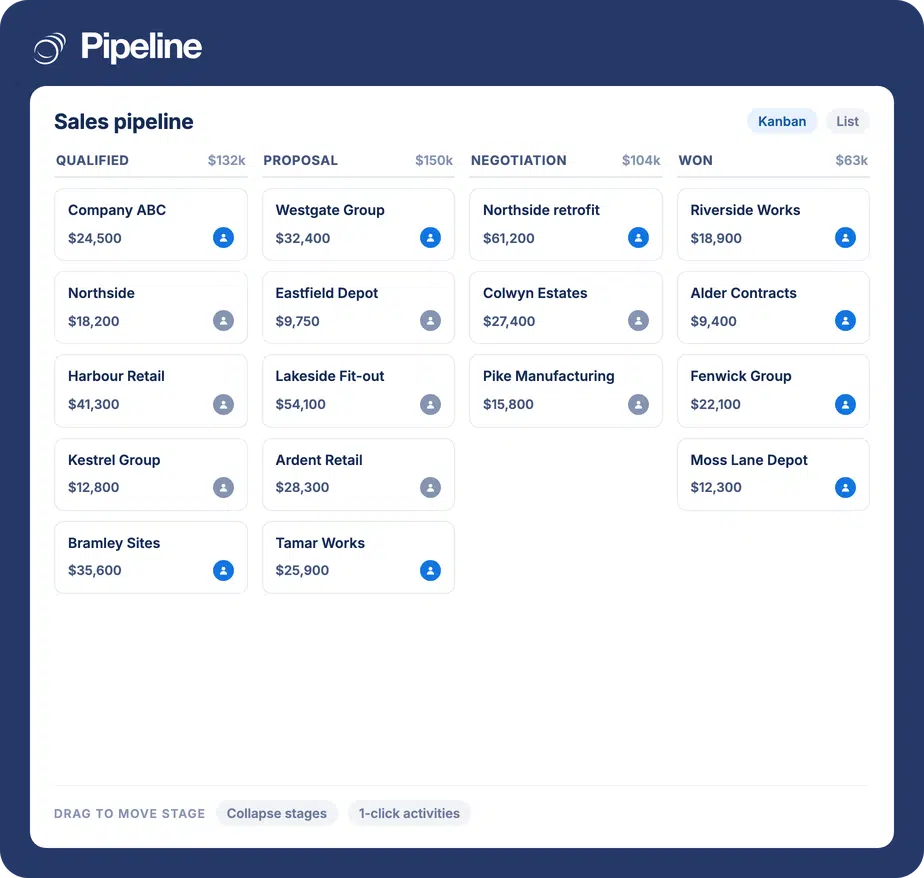
Kanban view shows a Pipeline CRM sales pipeline as a board: each stage is a column and each deal is a card, so the shape of the pipeline is visible at a glance. You can collapse stages to cut visual clutter, take common actions like logging activities in one click, and toggle between kanban and list view depending on whether you are working deals or scanning them.
A list tells you what you have, not where it is stuck
Rows of deals are excellent for scanning and poor for judgement. The shape of a pipeline is spatial, and a table flattens it.
Bottlenecks are invisible in a table
Fourteen deals sitting in one stage looks like fourteen more rows. As a column it looks like the problem it is.
Moving a deal is a form, not a gesture
Opening a record to change a dropdown is enough friction that stages get updated in batches, which is when the pipeline stops being current.
The view is overwhelming or it is useless
A list view with everything on it is hard to interpret; one with the columns hidden is missing what you need. Neither helps you decide what to do next.
Work the board, or switch back to the list
Kanban is a view, not a mode. The underlying deals are the same ones.
See the pipeline as columns
Each stage becomes a column of deal cards, so the distribution of your pipeline is legible without reading a single number.
Cut it down to what you are working
Collapse stages to clear visual clutter, so a board with eight stages can show only the three that matter this week.
Act without leaving the board
Popular actions are available directly on the board, including one-click activities and calendar tasks, so updating a deal does not mean opening it.
Teams who manage by pipeline shape
A board is most useful where stage progression is the main thing being managed.
Reps working a live pipeline
Moving deals forward is the daily job, and a board makes that a drag rather than a form.
Managers running pipeline reviews
A board is the fastest way to run a review, because the questions worth asking are visible before anyone opens a record.
Teams coming from a task board
If your team already thinks in columns and cards, a CRM that shows deals the same way needs no explaining.
What kanban view covers
A view of the deals you already have, not a separate board to maintain.
Deals as cards, stages as columns
The pipeline laid out so its shape is visible at a glance.
Drag between stages
Move a deal forward without opening the record.
Collapse stages
Hide the stages you are not working to clear visual clutter.
One-click activities
Log activities directly from the board.
Calendar tasks from the board
Create calendar tasks without leaving the view.
Toggle to list view
Switch between kanban and list depending on the question.
At-a-glance card detail
See the information you need on the card itself.
Spot deals needing attention
Quickly identify the most valuable deals and those at risk of being missed.
Same underlying data
It is a view of your pipeline, so nothing needs syncing or re-entering.
You can see a bottleneck. You cannot read one
The argument for a board is not that it is prettier than a table. It is that some questions are spatial – where is everything piling up, what has not moved, which column is empty that should not be – and those questions take seconds to answer visually and minutes to answer from rows.
Kanban, list and the calendar
These are not competing products, they are different questions. Here is which one answers which – including where the calendar genuinely fits.
Kanban: working the pipeline
Best when the question is “what is stuck and what moves next”. Deals are cards in stage columns, so distribution and bottlenecks are visible without reading. Use it for daily pipeline work and for reviews.
List: scanning and comparing
Best when the question is “show me all of them at once”. A tabular view is denser and easier to sort and compare down a column, which is exactly what a board is bad at. Toggle between the two.
Calendar: what happens today
Worth being precise here: the calendar in Pipeline CRM covers activities and tasks, not a calendar of deals. It answers “what am I doing today”, where kanban and list answer “where does the pipeline stand”.
Kanban view questions
Can’t find what you need? Contact our team.
What is a kanban view in a CRM?
It is a way of displaying your sales pipeline as a board: each pipeline stage becomes a column, and each deal becomes a card sitting in the column for its current stage. Moving a deal forward means moving its card.
The point is legibility. A kanban view gives a more intuitive read of the pipeline than a traditional tabular or list view, because the distribution of deals is something you see rather than something you work out.
What is the difference between kanban view and list view?
They answer different questions. Kanban is for working the pipeline – it makes stage distribution and bottlenecks obvious, and it lets you move a deal by dragging it. List view is for scanning and comparing, because a table is denser and easier to read down a column.
You do not have to choose permanently. Pipeline CRM lets you toggle between kanban and list view on the same deals, so the view follows the task.
Is there a calendar view of deals?
No, and it is worth being precise about this because the question comes up alongside kanban and list. The calendar in Pipeline CRM covers activities and tasks – what you are doing and when – rather than presenting deals on a calendar.
Kanban and list are the two views of the pipeline itself. You can create calendar tasks directly from the kanban board, which is where the two meet.
Can I move a deal between stages from the board?
Yes. Moving a deal to a different stage is done on the board rather than by opening the record and changing a field.
That matters more than it sounds: when updating a stage is a gesture rather than a form, it happens in the moment, and the pipeline stays current instead of being tidied up in batches.
What if I have too many stages to see at once?
You can collapse stages to clear visual clutter, so a pipeline with eight stages can display only the ones you are actively working.
This is the main thing that keeps a board usable at real pipeline sizes. Without it, boards become as hard to read as the list view they replaced.
Can I do anything from the board other than look at it?
Yes. Popular actions are available directly on the board, including logging activities in one click and creating calendar tasks.
The intent is that a pipeline review can be run entirely from the board – spot the deal, log the next step, move on – without opening records one at a time.
Does the board show a separate set of data?
No. It is a view of the same deals in the same pipeline, so there is nothing to sync, duplicate or keep in step.
Anything you change on the board is a change to the deal, and it shows up immediately in list view and in reporting.