
Pipeline CRM in Spanish and French
Your admin picks a starting language for the account. Every person can override it in their own profile, and that choice follows them to every browser and computer they sign in from.
✓ No credit card required ✓ 14-day free trial ✓ Cancel anytime
Trusted by over 18,000 users globally





At a Glance
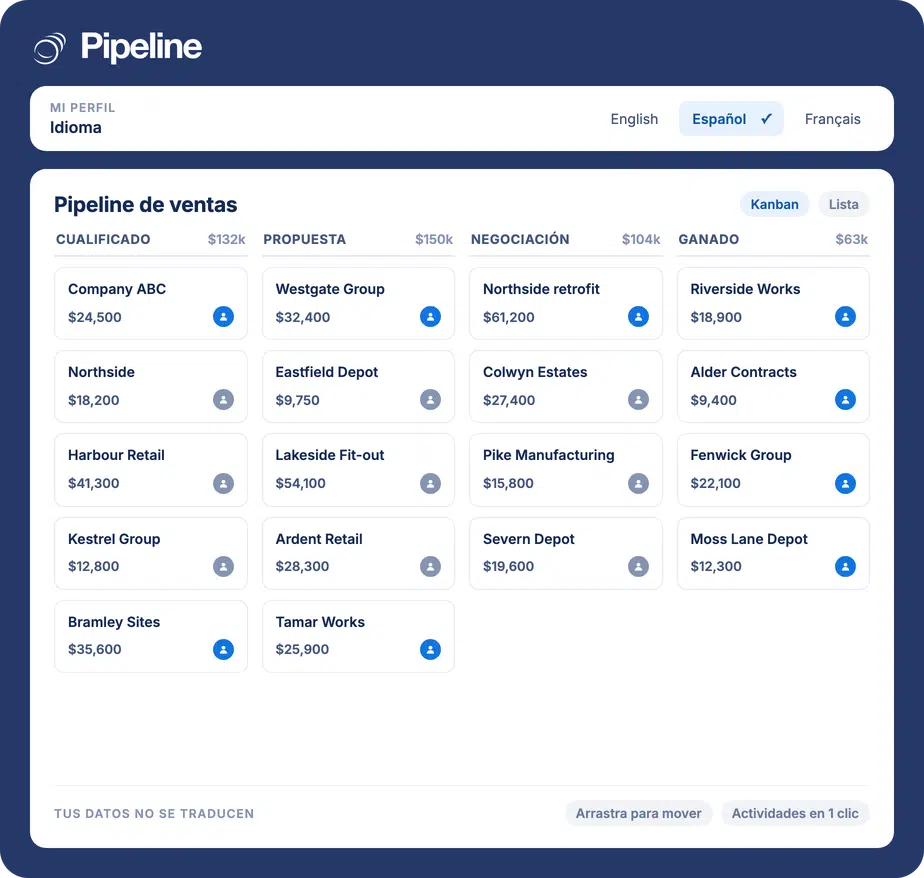
Pipeline CRM’s interface runs in English, Spanish and French. The language is a personal setting rather than an account-wide switch, so a sales manager can work in English while a rep works in Spanish inside the same account, on the same deals, at the same time. What changes is Pipeline’s own wording: menus, buttons, labels and system messages. What you and your team typed into the CRM is never translated and never altered.
A CRM in the wrong language quietly costs you data
Plenty of sales teams do not work in English all day, whether that is a bilingual crew, a rep covering another market, or an office in a country where English is nobody’s first language. When the software insists on it anyway, the cost does not show up as a complaint. It shows up as thinner records.
Reps write less when the software fights them
Somebody working in their second language types shorter notes, skips the optional field and puts off the update until later. The pipeline still looks filled in. The detail behind it is not there.
One language for a team that does not share one
A crew split between English and Spanish speakers gets one setting in most tools, so somebody always loses. The manager picks English, the field team works around it, and adoption stalls where the workaround is.
Nobody wants to find out it renames their pipeline
The reasonable fear about switching a CRM into another language is that it will touch the stage names, the custom fields and the deal titles somebody spent a year getting right.
A default for the account, an override for every person
There are two levels, and the personal one always wins. That is the whole design: the account sets a sensible starting point, nobody is stuck with it.
An admin sets the account default
Regional Defaults, in your account settings, holds the default language, date format and time format. It is a starting position for people you invite from then on, not a rule. Existing users are left alone.
Each person picks their own language
Anyone can change their language from the General tab of their profile, alongside date format and time format. The personal choice overrides the account default, and it can be changed again at any time.
The choice follows the person, not the computer
The setting belongs to the user account, so the same language appears on every browser and operating system they sign in from. A new teammate sees the account default already filled in on their invite screen and can change it right there.
Teams that were already working in more than one language
It matters most wherever the people entering the data and the people reading it do not share a first language.
Contractors with bilingual crews
Construction, HVAC and plumbing, landscaping and painting companies routinely run an office and a field team that do not share a language. Both work the same deals without either side switching.
Teams selling across borders
A rep covering a Spanish-speaking market can work in Spanish while the forecast and the reporting stay in English for the people reading them. Same account, same records, different words on screen.
French-speaking teams anywhere
From Quebec to France, Belgium and Switzerland, a French-speaking rep runs Pipeline in French without the rest of the company changing anything, and without a separate account or a separate set of records to keep in step.
What the language setting covers
The interface is translated. Your data is not, and that is deliberate.
English, Spanish and French
The 3 languages the Pipeline CRM web app currently renders in: English, Spanish and French.
A personal setting, not an account switch
Every user chooses their own language and can change it whenever they like.
Regional Defaults for admins
Set a default language, date format and time format for people you invite.
Preselected during onboarding
New teammates see the account defaults filled in on the invite screen and can override them there.
Follows the user across devices
The language is tied to the person, so it is the same on every browser and computer they sign in from.
Menus, buttons and labels
Pipeline’s own interface copy throughout the web app.
System messages
The prompts and confirmations Pipeline shows you as you work.
Your data left exactly as typed
Deal names, company names, stage names, source names, notes, custom field names and dropdown values are never translated, for anyone, in any language.
Grammar built per language
Plurals, word order and gender agreement are handled inside each language rather than assembled from English fragments.
Available on every plan
There is no separate charge and no plan gate for working in Spanish and French.
Your data is yours, in whatever language you wrote it
The language setting changes the words Pipeline draws on screen. It never changes the information your team put in. If an admin named a stage Negotiation, a teammate working in French sees a French interface around a stage that still reads Negotiation. That is by design: it is your data, and translating it would mean two people looking at the same deal and seeing two different things.
Language questions
Can’t find what you need? Get in touch with our team.
What languages does Pipeline CRM support?
Pipeline CRM currently supports English, Spanish and French. Additional languages may be added in future based on demand.
My admin set the account language to French, but I want to work in English. Can I override it?
Yes. Every user has full control over their own language setting from their profile. Your personal choice always overrides the account default, and you can change it at any time.
Will Pipeline translate my deal names, stage names and notes?
No. The language setting changes Pipeline’s own interface copy: menus, buttons, labels and system messages. It never changes anything you have entered. Deal names, company names, stage names, custom fields, notes and dropdown values stay exactly as you typed them, for everyone, in every language.
If you want a stage name in French, you rename it yourself in your admin settings, and it then reads that way for the whole account.
Can I set a default language for my whole team?
Yes. As an admin, open Regional Defaults in your account settings and set a default language, date format and time format there. People you invite from then on inherit those defaults, and each of them can still override their own language from their profile.
Does the mobile app support French and Spanish?
Not yet. The mobile app for iOS and Android is English only. Language support is available in the Pipeline CRM web app.
Will the emails Pipeline sends me be in French or Spanish?
Not yet. Notifications, reminders and other automated messages Pipeline sends are still written in English regardless of your language setting. This is a known limitation of the current release.
Does the language setting follow me between computers?
Yes. Your language preference is tied to your user account rather than to a device, so it follows you across every browser and operating system you sign in from, until you change it.
Is it available on my plan?
Yes. Working in English, Spanish or French is available to all plans and all users at no extra cost.