

QuickBooks CRM integration with two-way sync
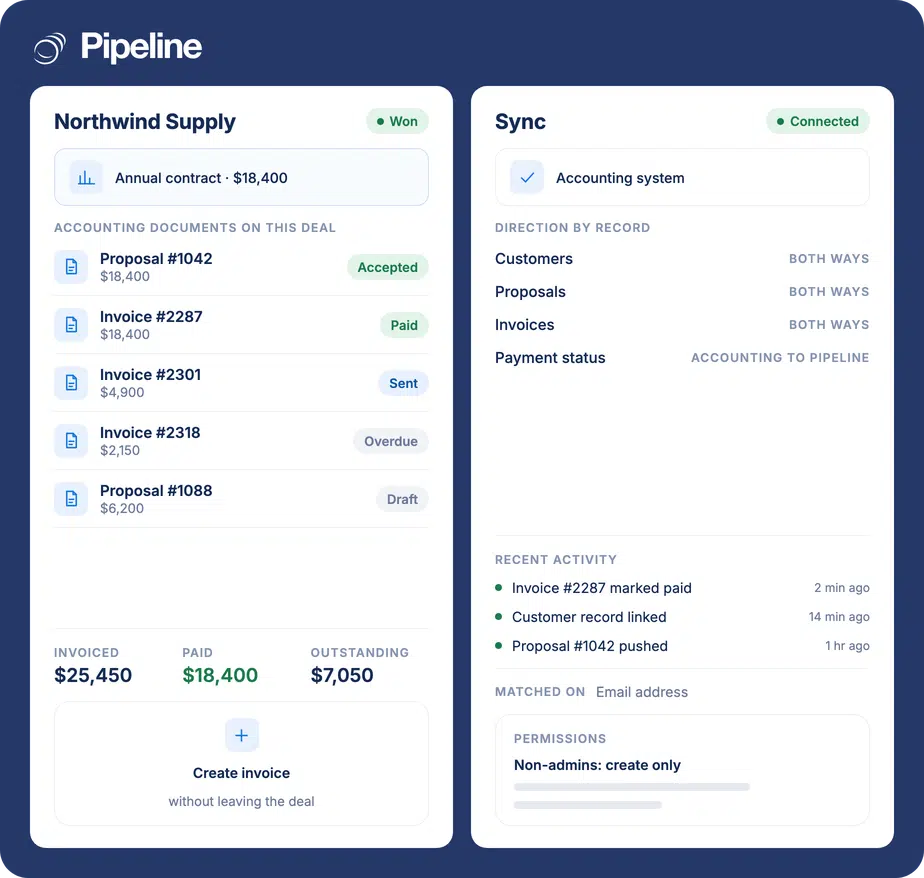
Pipeline CRM connects to QuickBooks Online with a real two-way sync. Customers, invoices and proposals stay aligned across both systems, and your team can create, send and convert invoices from the deal they are already working in.
✓ No credit card required ✓ 14-day free trial ✓ Cancel anytime
Trusted by over 18,000 users globally





At a Glance
Pipeline CRM is a CRM that integrates with QuickBooks Online through a built-in, two-way sync. Customer records, invoices and proposals move in both directions, and you can create an invoice, send it, and convert a proposal into an invoice without leaving the deal. Sync direction is configurable in three modes, and admins control which users can create or convert financial documents. The integration supports QuickBooks Online only, not QuickBooks Desktop.
Sales and accounting keep separate versions of the truth
When the CRM and the accounting system do not talk, the gap gets filled by people re-typing things. That is where the errors and the delays come from.
Invoices get built twice
A deal closes in the CRM, then someone opens QuickBooks and retypes the customer, the line items and the amounts. Every re-entry is a chance to get a number wrong on a document a customer will read.
Reps cannot see whether they have been paid
Chasing payment means asking finance, or logging into a system reps do not have a seat in. So follow-up either stalls or lands on someone who already paid.
Customer details drift apart
The billing address changes in QuickBooks and the CRM never hears about it. Six months later nobody knows which record is current.
Connect QuickBooks Online in three steps
You need admin access to both Pipeline CRM and QuickBooks Online, and an active QuickBooks Online subscription. The whole connection is done in settings, with no data work up front.
Install from the App Store
In Pipeline CRM go to Settings, then Other, then App Store. Find QuickBooks and click Install.
Authorise the connection
Open QuickBooks Online API and click Connect. QuickBooks asks you to authorise Pipeline CRM and, if you manage several companies, to pick which one. Save, then use Test Connection to confirm it.
Map fields and choose a direction
Match your Pipeline CRM fields to the QuickBooks equivalents, then choose whether data flows both ways, Pipeline to QuickBooks, or QuickBooks to Pipeline. Set which users may create and convert financial documents.
Fields and records the QuickBooks sync covers
Sync direction is set per account. In both-ways mode a change on either side updates the other.
| Pipeline CRM | QuickBooks Online | Direction |
|---|---|---|
| Company name | Customer name | Both ways |
| Primary email | Both ways | |
| Phone | Phone number | Both ways |
| Address fields | Billing address | Both ways |
| Proposal on a deal | Estimate | Both ways |
| Invoice on a deal | Invoice | Both ways |
| Payment status | Invoice status | QuickBooks to Pipeline |
QuickBooks integrations across eight CRMs
Which CRMs connect to QuickBooks natively, which sync both ways, and which can raise an invoice without leaving the CRM.
Select any CRM to see what its integration actually does.
| CRM | Built-in | Two-way sync | Invoice from the CRM | Automated | QuickBooks editions |
|---|---|---|---|---|---|
| Yes | Yes | Yes | Yes | Online | |
|
A QuickBooks integration with two-way sync.
|
|||||
| Yes | Yes | No | Yes | Online and Desktop | |
|
A QuickBooks integration with two-way sync.
|
|||||
| Yes | Yes | No | No | Online | |
|
A QuickBooks integration with two-way sync.
|
|||||
| Yes | Partial | No | No | Online | |
|
A QuickBooks integration with a partial two-way sync.
|
|||||
| Yes | Unknown | Yes | No | Online | |
|
A QuickBooks integration. The QuickBooks API allows only one active connection per account, so only one user can install it.
|
|||||
| Yes | No | No | No | Online | |
|
A QuickBooks integration that does not sync between the two systems. Supports one QuickBooks account; connecting more requires third-party integration software.
|
|||||
| Yes | No | No | No | Online | |
|
A QuickBooks integration.
|
|||||
| No | No | No | No | Via MuleSoft | |
|
No native built-in QuickBooks integration. The recommended route is MuleSoft, Salesforce’s integration and automation technology, which provides a QuickBooks connector for MuleSoft Composer. |
|||||
Two-way sync between Pipeline CRM and QuickBooks
A walkthrough of creating an invoice from a deal, converting a proposal, and checking paid status without opening QuickBooks.
Teams that quote and invoice from the same pipeline
The integration pays off wherever the person who wins the work is close to the person who bills it.
Contractors and trades
Estimates become invoices as jobs progress, and the office can see which jobs are paid without interrupting the crew.
Wholesalers and distributors
Repeat orders for the same accounts, where customer records and invoice history need to agree across both systems.
Small teams without an ops layer
Nobody is employed to reconcile two systems, so the sync has to be the reconciliation.
In the QuickBooks integration
Everything below is part of the built-in integration.
Two-way sync
Customers, invoices and proposals stay aligned in both systems.
Three sync directions
Both ways, Pipeline CRM to QuickBooks, or QuickBooks to Pipeline CRM.
Create and send invoices
Raise and send an invoice from the deal record.
Convert proposals to invoices
Turn an accepted estimate into an invoice in one step.
Void, delete and download
Manage existing documents without switching apps.
Payment status on the deal
See whether an invoice is open, paid or overdue in context.
Import existing customers
Bring QuickBooks customers across with their invoices and proposals attached.
Automatic company creation
If a QuickBooks customer’s company is missing in Pipeline CRM, it is created during import.
Configurable permissions
Decide which non-admin users can create estimates, create invoices and convert between them.
Document visibility control
Limit who sees documents created in QuickBooks to admins, the installation owner, or everyone.
QuickBooks Online only, and the sync can overwrite
This integration works with QuickBooks Online. It does not connect to QuickBooks Desktop. And once the first import has linked your records, changes made in QuickBooks overwrite the matching fields in Pipeline CRM, including clearing fields QuickBooks does not hold such as phone, address and website. If your QuickBooks customer records are thinner than your CRM records, choose the Pipeline CRM to QuickBooks direction instead of both ways.
QuickBooks integration questions
The things people ask before connecting the two systems.
What CRM integrates with QuickBooks?
Pipeline CRM integrates with QuickBooks Online through a built-in two-way sync, covering customers, invoices and proposals. The integration is part of the product rather than a third-party connector, so there is no middleware to maintain between the two systems.
You install it from the App Store inside Pipeline CRM and authorise it with your QuickBooks Online login.
Is there an additional cost for the QuickBooks integration?
No. The QuickBooks integration is included with Pipeline CRM and is available to all users. You need an active QuickBooks Online subscription of your own, billed by Intuit.
See the Pipeline CRM pricing page for what each plan includes.
Does the integration work with QuickBooks Desktop?
No. The integration works exclusively with QuickBooks Online. There is no connection to QuickBooks Desktop or QuickBooks Enterprise desktop editions.
If you run QuickBooks Desktop, the practical route is to move to QuickBooks Online first, since the connection is made through the QuickBooks Online API.
Does QuickBooks have a CRM?
QuickBooks is accounting software. It stores customers and their financial history, so it can look like a lightweight contact list, but it does not manage a sales pipeline: there are no deal stages, no forecasting and no activity tracking against an opportunity.
That is the usual reason teams connect a CRM to it rather than trying to sell out of QuickBooks.
Can I sync my CRM with QuickBooks in both directions?
Yes. You choose one of three modes: both ways, Pipeline CRM to QuickBooks, or QuickBooks to Pipeline CRM.
Be deliberate about both ways. After the initial import links your records by email address, a change in QuickBooks overwrites the matching Pipeline CRM fields, and fields QuickBooks does not store such as phone, address and website are cleared. If your CRM records are richer than your accounting records, sync from Pipeline CRM to QuickBooks instead.
How do I connect my CRM to QuickBooks?
In Pipeline CRM, go to Settings, then Other, then App Store, and install QuickBooks. Open QuickBooks Online API, click Connect, authorise Pipeline CRM in QuickBooks and select your company if you have more than one. Save, then run Test Connection.
After that you map your fields, choose a sync direction, and set which users can create and convert invoices. The setup guide covers each screen.
What happens to QuickBooks customers without an email address?
They are skipped. Pipeline CRM matches and links records using the email address from QuickBooks, so a customer with no email cannot be imported.
Add email addresses in QuickBooks before running the import if you want those customers to come across.
Can I control who creates invoices?
Yes. Admins always have full access. For everyone else you decide individually whether they can create estimates, create invoices, and convert estimates into invoices.
You can also limit who sees documents created directly in QuickBooks to admins only, the person who installed the integration, or everyone.