

Generate proposals and invoices from CRM data
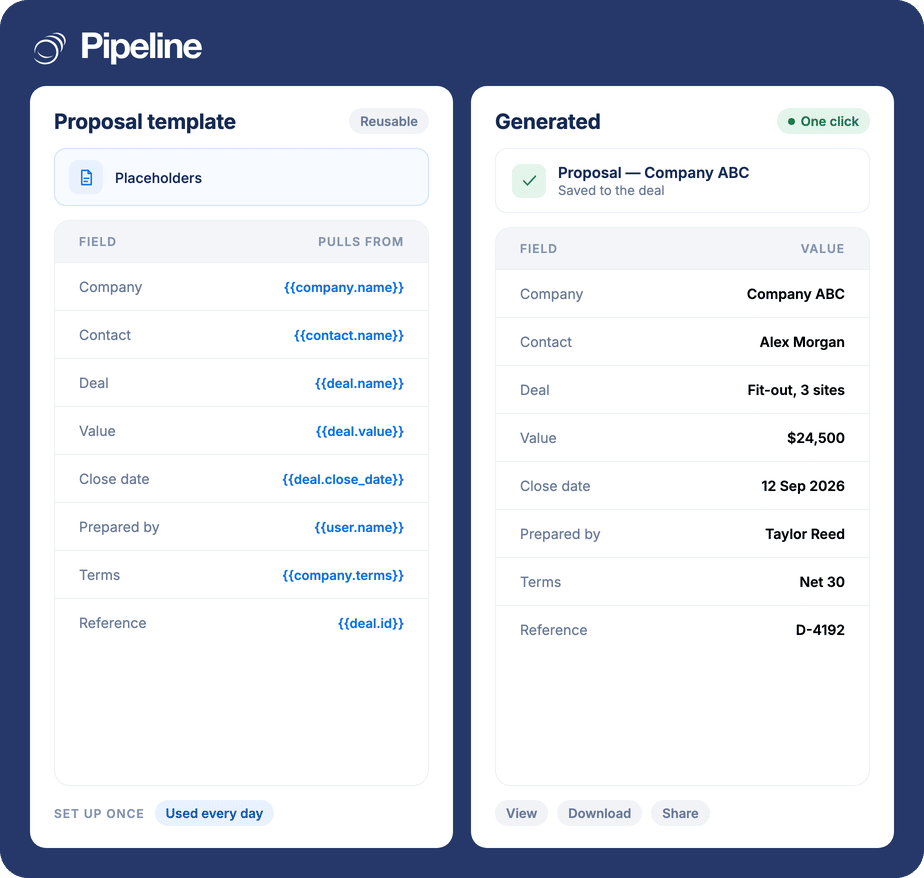
Build a template once with placeholders where the deal data goes. From then on, one click turns a deal into a finished proposal, quote, contract or invoice, saved against the record it came from.
✓ No credit card required ✓ 14-day free trial ✓ Cancel anytime
Trusted by over 18,000 users globally





At a Glance
Instant Docs generates documents from Pipeline CRM data. You build a template with dynamic placeholders that map to fields on Deals, Companies and People, then one click fills it in and produces the finished invoice, proposal or contract. Templates are unlimited and fully brandable, and every generated document is viewable on the deal and company record.
The quote already exists in the CRM
Every field a proposal needs is sitting on the deal. Producing the document is usually a matter of copying them somewhere else by hand.
Documents get rebuilt from an old file
Someone opens last month’s proposal, saves a copy, and edits the parts that changed. Whatever they miss goes out to the customer.
The numbers drift from the record
Once a value is retyped into a document it stops matching the deal, and nobody can tell which of the two is right.
Finished documents live in someone’s folder
If the sent proposal is not attached to the deal, the next person to touch that account has no idea what was actually promised.
Set up the template once, use it every day
The work is in the first template. Everything after that is a click on a deal.
Decide what goes on the document
Identify the data points the document needs – the company, the contact, the deal value, the dates – and start from a sample template or build your own.
Add dynamic placeholders
Placeholders map to fields on Companies, Deals or People and are easy to add and edit. Change content, fonts, colours and logos so the document is yours rather than a generic form.
Generate from the deal
One click auto-fills the template from the record. The finished document is viewable on the Deal and Company pages, where it can be downloaded, saved and shared.
Teams that send the same document constantly
Document generation pays off in proportion to repetition and to how much of the document is data rather than prose.
Anyone quoting from a price list
When most of a proposal is figures pulled from the deal, retyping them is both the slowest and the riskiest part of sending it.
Teams invoicing off closed deals
The invoice needs exactly what the deal already holds, so generating it from the record removes a whole re-entry step.
Anyone who has to prove what was sent
Documents attached to the deal mean the agreed version is on the record rather than in the sender’s downloads folder.
What Instant Docs covers
Invoices, proposals, contracts and anything else built from the same data.
Unlimited templates
Build as many document templates as you need.
Dynamic placeholders
Fields that populate automatically from your CRM data.
Deals, Companies and People
Templates can pull from any of the three record types.
One-click generation
Auto-fill the whole document from the record in a single action.
Sample templates
Start from a provided template for common documents rather than a blank page.
Full visual control
Change content, fonts, colours, graphics and add your logo.
Attached to the record
Generated documents are viewable on the Deal and Company pages.
View, download, save and share
Act on a generated document straight from the record.
Invoices, proposals and contracts
The same mechanism produces any document your data supports.
Stop retyping what the CRM already knows
A proposal is mostly a rearrangement of facts the deal record already holds. Every time a person moves those facts by hand, the document and the record get a chance to disagree. Generating from the record closes that gap – and puts the finished document back where the next person will look for it.
Document generation questions
Can’t find what you need? Contact our team.
How do I generate documents from CRM data?
You build a template containing dynamic placeholders, each mapped to a field on a Deal, Company or Person. When you generate the document from a record, those placeholders are auto-filled with that record’s data in one click.
The template is the reusable part. Once it exists, producing the document is a single action on the deal rather than a document-editing job.
What kinds of documents can it create?
Invoices, proposals and contracts are the common three, but the mechanism is the same for anything built out of CRM data – order forms, statements of work, renewal letters.
If the information lives on a Deal, Company or Person record, a template can put it on a page.
Can I brand the documents?
Yes. You can change content, fonts, colours and graphics, and add your logo, so the output looks like your company’s document rather than a system-generated form.
You can start from a provided sample template and adjust it, or build one from scratch.
Where do the generated documents go?
They are attached to the record. Every invoice, proposal or contract you generate is viewable on the relevant Deal and Company pages, where it can be viewed, downloaded, saved and shared.
That is the part that matters for handovers: the version the customer actually received is on the deal, not in an individual’s file system.
How many templates can I build?
Templates are unlimited, so there is no reason to force several document types through one compromise template.
In practice most teams end up with a handful – a quote, a proposal, an invoice – each set up once and then left alone.
Can documents be signed from here?
Signature is a separate feature. Instant Docs produces the document; eSign is what sends it for signature and tracks it coming back.
They are commonly used together: generate the proposal from the deal, then send that document for signature without leaving the record.
Do placeholders work with my custom fields?
Placeholders populate from data found in Companies, Deals or People, which is where custom fields live, so the fields you have added are available to templates.
If a document needs something the CRM does not currently record, add the custom field first, then reference it from the template.