

Google Workspace CRM integration for calendars and contacts
Sync your Google Workspace calendar and contacts with Pipeline CRM so meetings booked in one appear in the other. Two things to check before you start: it works with Workspace work accounts rather than personal Gmail, and recurring events are not supported.
✓ No credit card required ✓ 14-day free trial ✓ Cancel anytime
Trusted by over 18,000 users globally





At a Glance
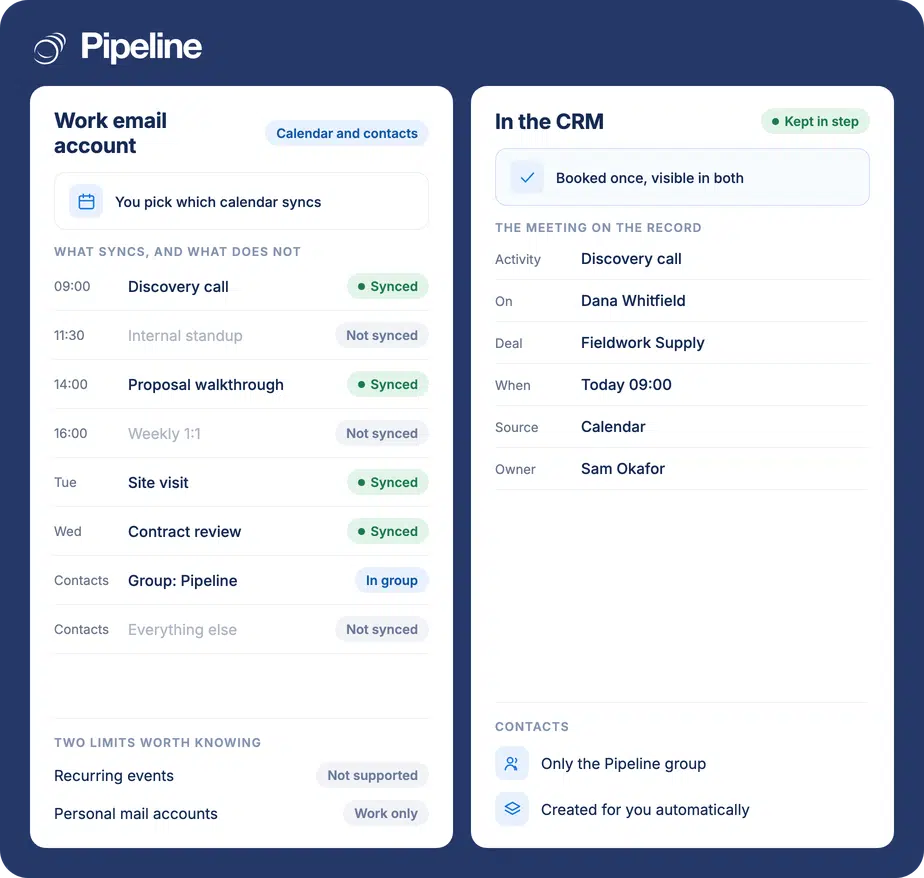
Pipeline CRM integrates with Google Workspace to sync calendars and contacts, keeping changes consistent in both systems. An admin installs the Pipeline CRM Google Workspace app and enables sync per user, then each user chooses which calendar to sync. Contacts sync only inside an automatically created Google group named Pipeline. It requires Workspace work accounts, and recurring events are not supported.
Two calendars, one of them wrong
When the CRM and the calendar are maintained separately, the person who booked the meeting is the only one who knows it is happening.
Meetings booked twice, or not at all
A call agreed by email gets put in one calendar and typed into the CRM later, or never. Either way one of the two is lying about the week.
The record shows no activity
Meetings that only exist in a personal calendar leave the deal looking untouched, so nobody can tell a stalled deal from a busy one.
Contacts drift apart
The phone keeps one address book and the CRM another, and the number a rep actually dials is the one nobody else can see.
One person needs both admin roles
This is the prerequisite that stalls setups: the same email address must be a Google Workspace admin and a Pipeline CRM admin. Not two people cooperating, one identity holding both.
An admin installs the Workspace app
Signed in as your organisation’s Workspace admin, install the Pipeline CRM Google Workspace app and approve the permissions it asks for. You can also start from Settings, then Other, then App Store, then Google Apps Integration and Learn More.
The admin enables sync per user
Back in Pipeline CRM under App Store, Google Apps Integration, Learn More, review the list of Workspace users and toggle Google Sync on for each person who needs it. Nobody syncs until they are switched on here.
Each user picks their calendar
Users open their Profile, then My Profile, then Integrations, find the Google Sync section and click through to the Google sync settings, then choose which calendar to sync and, optionally, contacts. Full setup guide in the help centre.
Teams already living in Workspace
The value is in not maintaining two versions of the same week, so it scales with how much of your selling is scheduled.
Your company runs on Workspace
Work accounts are a requirement rather than a preference here, so this suits organisations already standardised on it.
Meetings are your main activity
Field sales, consultative selling and anything with site visits, where the calendar is the real record of effort.
You want a shared address book
The Pipeline contact group gives the team one set of numbers that is not trapped on somebody’s phone.
In the Google Workspace integration
Everything below is part of the integration, enabled per user by an admin.
Calendar sync in both directions
Changes stay consistent between the calendar you choose and Pipeline CRM, rather than one copying the other.
You choose which calendar
Each user picks the calendar that syncs, so a personal work calendar and a shared team one can be treated differently.
Optional contacts sync
Contacts are opt-in per user, separately from the calendar.
An automatic Pipeline contact group
A Google contact group named Pipeline is created for you. Only contacts in it sync, which keeps your wider address book out of the CRM.
Per-user enablement
An admin turns sync on for individual Workspace users, so a rollout can start with one team.
Ownership follows the group
You own the contacts in your Pipeline group, and reassignment in the CRM moves the contact to the new owner’s group.
Admin-approved permissions
Installed as a Workspace app with permissions approved once by your admin rather than per user.
Works with Excel and Sheets exports
Alongside the spreadsheet add-ins, so calendar data and list exports come from the same CRM.
Recurring events do not sync, and contacts sync by group
Recurring calendar events are not supported. For a team whose week is standing meetings, that is a large share of the calendar, so set the expectation accordingly: one-off meetings, site visits and calls sync, the weekly pipeline review does not. Contacts work by group, which surprises almost everyone. A Google contact group named Pipeline is created automatically, and only the contacts inside it sync. Your wider address book stays private, which is usually what you want, but it does mean “contacts sync” is opt-in per contact rather than wholesale. One behaviour worth knowing before it confuses somebody: if a contact is reassigned in Pipeline CRM, it moves into the new owner’s Pipeline group in Google, but it also stays in the original person’s Google contacts outside the group. So the previous owner keeps a copy that no longer syncs. That is not a bug, but it does mean an old number can linger in somebody’s phone after the account has moved on. Finally, this needs Google Workspace work accounts. Personal Gmail is not supported, and no part of the setup will work around it.
Google Workspace integration questions
What people ask before switching on Google sync.
Does Pipeline CRM integrate with Google Calendar?
Yes. Pipeline CRM syncs with Google Workspace calendars so changes stay consistent in both systems, and each user chooses which calendar syncs.
Two limits are worth knowing before you rely on it: it requires Google Workspace work accounts rather than personal Gmail, and recurring events are not supported.
Will it work with a personal Gmail account?
No. This integration works with Google Workspace, meaning work accounts on your own domain. Personal Gmail addresses are not supported and there is no workaround in the setup.
If your team is on personal Gmail addresses, the calendar sync described here is not available to you.
Do recurring meetings sync?
No. Recurring calendar events are not supported, so a weekly standing meeting will not appear through the sync.
One-off events do, which covers most customer-facing activity: calls, demos, site visits and one-time reviews. It is worth telling the team explicitly, because the gap otherwise looks like an intermittent fault rather than a documented limit.
Do all my Google contacts sync into the CRM?
No, and this is the part that surprises people. A Google contact group named Pipeline is created automatically, and only the contacts you put in that group sync.
Everything else in your address book stays where it is. That is usually the desired behaviour, since most people do not want their entire contact list in a shared system, but it does mean contact syncing is opt-in one contact at a time.
What happens when a contact is reassigned?
It moves to the new owner’s Pipeline group in Google, so the new owner starts syncing it. The catch is that it also remains in the original person’s Google contacts, outside the group.
So the previous owner keeps a copy that no longer syncs and will not receive updates. Worth knowing if a stale number turns up on somebody’s phone months after an account changed hands.
Who needs to set this up?
One person who is both a Google Workspace admin and a Pipeline CRM admin, using the same email address. That is a single identity holding both roles, not two people working together.
That person installs the Workspace app, approves the permissions, and then toggles Google Sync on for each user who needs it. Individual users only choose which calendar to sync.
Setup keeps sending me to the Google Marketplace. Why?
That redirect means your domain setup has not finished. Our help centre gives the URL that completes it, with your own domain substituted in.
If you hit this, follow the setup guide rather than reinstalling the app, since reinstalling does not resolve an incomplete domain configuration.