

eSignature built into your CRM
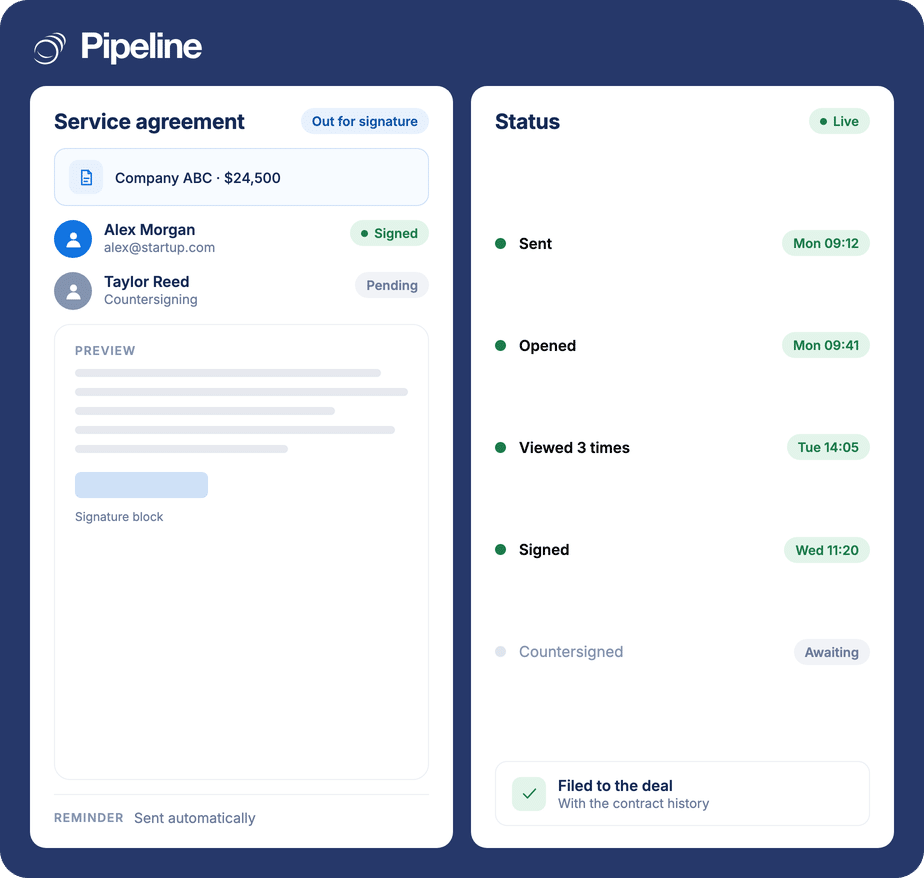
Send a contract for signature from the deal it belongs to. Your client signs in a branded portal without downloading anything or creating an account, and you can see whether it has been opened, viewed or signed without emailing to ask.
✓ No credit card required ✓ 14-day free trial ✓ Cancel anytime
Trusted by over 18,000 users globally





At a Glance
Pipeline CRM includes eSign, so contracts are sent for signature from the deal record rather than a separate signature service. Recipients sign in a branded portal with no software download and no account to create. Automated reminders chase for you, notifications fire when a document is viewed or signed, and the signed contract is filed alongside the customer record. eSign is on the Grow plan and above.
The deal is agreed. Now everyone waits
The gap between a verbal yes and a signed contract is where momentum is lost, and most of that gap is administrative rather than commercial.
Nobody knows where the contract is
Did they get it? Have they opened it? Without status you either wait and hope, or send the follow-up email that makes you look anxious.
Signing is a second product
A separate signature subscription is another tool to pay for, administer and connect – for a step that happens inside the sales process it is bolted onto.
The customer has to sign up to sign
Asking someone to download software or create an account at the moment they have agreed to buy is the worst possible time to add friction.
Send from the deal, watch it come back
The contract never leaves the CRM’s orbit, which is what makes the status visible and the filing automatic.
Send from the record
The document goes out from the deal it belongs to, so there is no re-uploading into a separate signature tool and no second place to look for it.
They sign in a branded portal
Clients sign directly in your branded portal without downloading software or creating a new account, which removes the friction at exactly the wrong moment to add any.
Track it without chasing
Automated reminders go out on their own, and you are notified the moment a document is viewed or signed. Status is visible in real time rather than inferred from silence.
Teams where the contract is the bottleneck
Built-in signing matters most where documents go out constantly and where the wait between agreement and signature is measurable.
Teams sending estimates and quotes
When every job starts with a signed estimate, the signing step happens as often as the selling step.
Anyone paying for a separate signing tool
If signature is already a line item in your stack, having it included changes what the CRM actually costs to run.
Teams that lose deals to delay
Knowing a contract was opened twice and not signed is a prompt to call, which is not available when the document is invisible.
What eSign covers
Part of Pipeline CRM on the Grow plan and above, rather than a separate signature subscription.
Send from the deal
Contracts go out from the record they relate to.
Branded signing portal
Clients sign in your branded portal rather than a third party’s.
No download, no account
Recipients do not install software or register to sign.
Real-time status
Track a document from sent through to signed as it happens.
View notifications
Know when a prospect opens and views the contract, so follow-up lands at the right moment.
Signed notifications
Instant notification the moment a document comes back signed.
Automated reminders
Chasing happens on its own rather than sitting on someone’s list.
Contract history on the record
The full contract history sits alongside customer data and communication logs in one system.
Works with Instant Docs
Generate the document from CRM data, then send that document for signature without leaving the deal.
Signature is part of the sale, not an afterthought
Treating signing as a separate product is what creates the silence after a deal is agreed – the document leaves the CRM, the status leaves with it, and the rep is left guessing. Keeping it on the record means the last step of the sale is as visible as every step before it.
eSignature questions
Can’t find what you need? Contact our team.
Does Pipeline CRM have e-signature built in?
Yes. eSign is part of Pipeline CRM on the Grow plan and above, so contracts are sent for signature from the deal record rather than through a separate signature subscription.
The practical difference is where the status lives. When signing happens inside the CRM, whether a contract has been opened, viewed or signed is visible on the deal instead of in another product.
Do my clients need an account to sign?
No. Recipients sign directly in your branded portal without downloading any software or creating a new account.
That matters more than it sounds: the moment someone has agreed to buy is the worst possible time to ask them to register for something.
Can I see whether a contract has been opened?
Yes. Document status is tracked in real time, and you are notified when a document is viewed and again when it is signed.
Knowing a contract has been opened three times without being signed is a reason to pick up the phone. Silence tells you nothing.
Do I have to chase for signature myself?
Automated reminders handle the chasing, so following up does not depend on someone remembering to.
You still get the notification when it is signed, so the deal moves forward the moment it can rather than the next time anyone checks.
Which plan includes eSign?
eSign is available on the Grow plan and above. It is not included on Start or Develop.
The pricing page carries the full plan matrix, including which other capabilities move at the same tier.
Can I generate the contract as well as sign it?
Yes, and they are designed to be used together. Instant Docs builds the document from your CRM data using a reusable template, and eSign sends that document for signature.
Between them the contract is produced from the deal, signed against the deal and filed on the deal, with no manual step in the middle.
Where does the signed contract end up?
On the record. Your contract history sits alongside customer data and communication logs in one system rather than in a separate signing archive.
So the next person to open that account sees the agreement, the emails and the deal history in the same place.