

Apollo.io CRM integration for Pipeline CRM
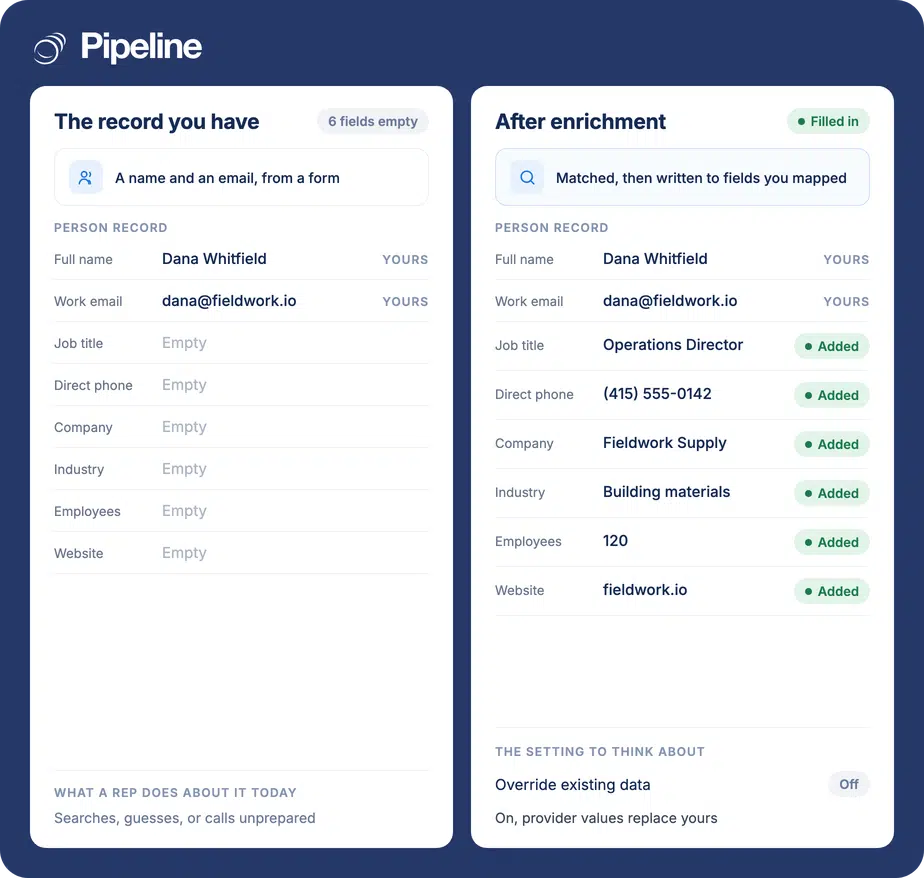
Connect Apollo.io and Pipeline CRM does two things: fills in missing details on your records, and lets you search Apollo’s filters and import leads without the export and reimport. One rule to know up front, because it surprises people: enrichment fires on a record’s work email when it is created or when that email changes, so switching the integration on does not backfill your existing database.
✓ No credit card required ✓ 14-day free trial ✓ Cancel anytime
Trusted by over 18,000 users globally





At a Glance
Pipeline CRM integrates with Apollo.io through a built-in integration installed from the App Store and connected with OAuth rather than an API key. It enriches person and company records based on work email, and can import leads from Apollo’s search filters using the same field mapping. Both halves require a paid Apollo.io plan, and enrichment applies to records created or updated after you enable it.
The export and reimport ritual
Prospecting in one tool and selling in another means somebody spends their week moving spreadsheets between them.
CSV round trips lose fidelity
Export, reformat columns to match the CRM, create the company records, de-duplicate against what is already there. Every step is manual and every step drops something.
Research instead of calling
Direct dials and job titles filled in by hand are minutes per record, and they are the first thing skipped when the pipeline needs attention.
Two databases drifting apart
The prospecting tool and the CRM slowly disagree about who works where, and nobody can say which one is currently right.
Connect, map, then understand the trigger
You need admin permissions in Pipeline CRM and a paid Apollo.io plan, because free accounts have access to neither enrichment nor lead generation. The third step is the one people skip and then raise a ticket about.
Install and connect with OAuth
Go to Settings, then Other, then App Store, find Apollo.io and click Install. Open the Apollo Service tab, click Connect and authorise the connection, then run Test Connection and save. There are no API keys to copy.
Choose what it enriches, and whether it may overwrite
On the Enrich Settings tab, pick person fields, company fields or both, and decide about Override Existing Data. Review the Person and Company field mapping tabs, then enable the integration from the App Store. Lead generation reuses this same mapping, so configuring it once covers both.
Know what will and will not be enriched
Enrichment is triggered by a record’s work email. A new person with a work email gets enriched, and so does an existing person whose email changes. A person updated without an email change does not, and a record with no work email never will. Enabling the integration does not go back over your existing database. Full setup guide in the help centre.
Teams who prospect and sell in the same week
This is worth most where new names arrive constantly, because the trigger model rewards new records rather than old ones.
You already pay for Apollo
Both halves need a paid plan, so the case is strongest where the subscription exists and the CRM is where the selling happens.
You build lists by criteria
Searching by job title, company size, location and industry from inside the CRM and importing the results is the half that removes the spreadsheet.
New records arrive regularly
Because enrichment fires on creation and on email change, a steady flow of new contacts gets the full benefit while a static database gets little.
In the Apollo.io integration
Everything below is part of the integration, installed from the App Store.
Enrichment on work email
Person and company records are filled in automatically when a record is created with a work email, or when that email changes.
Lead generation from Apollo filters
Search Apollo’s criteria from inside Pipeline CRM and import the results as records, rather than exporting a CSV.
One field mapping for both
Lead generation uses the same mapping you configured for enrichment, so it is set up once.
A lead source on imports
Stamp imported leads with a source so they stay identifiable in reporting afterwards.
Assign imports to users
Choose which users the imported leads go to, so a list arrives owned rather than unallocated.
Import history
A status page tracks progress, and Manage Imports lets you review past imports.
OAuth, no API keys
Connect and authorise rather than copying credentials, so there is nothing to store or rotate by hand.
Optional override
Off by default. Enable it only where you want Apollo data to replace values you already hold.
Turning it on does not fill in your existing database
Enrichment is triggered by a record’s work email, and only when that record is created or when the email changes. Enabling the integration does not sweep back through the contacts you already have, so the common experience is switching it on, seeing nothing happen, and assuming it is broken. It is not broken. It is waiting for new records, or for an email to change on an existing one. Two practical consequences. First, a record with no work email will never be enriched, so if enrichment looks patchy across your database, check which records actually have an email before checking anything else. Second, if what you wanted was a one-off cleanup of an old database, this integration is not the tool for it – that is a bulk job, and worth a separate conversation rather than an expectation of this. The other thing worth setting deliberately is Override Existing Data. With it on, Apollo values replace what is already in the mapped field, which is not reversible. Our own troubleshooting note for “data got replaced unexpectedly” is to check that setting, which tells you how often it catches people.
Apollo.io integration questions
What people ask before connecting Apollo.io.
Does Pipeline CRM integrate with Apollo.io?
Yes, and it is built in rather than a third-party connector. You install it from the Pipeline CRM App Store under Settings, then Other, and connect it with OAuth by clicking Connect and authorising – there are no API keys to copy.
It does two things once enabled: enriches person and company records, and imports leads from Apollo’s search filters. Both require a paid Apollo.io plan.
I enabled it and nothing was enriched. Why?
Because enrichment applies to records created or updated after you enable it, not to the database you already have. Switching it on does not backfill.
It fires on work email specifically: a new person created with a work email is enriched, and an existing person is enriched when their email changes. A person updated in any other way is not, and a record with no work email will never be enriched at all. If enrichment looks patchy, check which records actually hold a work email before looking anywhere else.
Do I need a paid Apollo.io plan?
Yes, for both halves. Free Apollo.io accounts have access to neither enrichment nor lead generation, so there is no way to trial this on a free plan.
That is Apollo’s gate rather than ours, and it applies before anything on our side matters.
Can I import leads without exporting a CSV?
Yes, that is what the lead generation half does. Click the Add icon, choose Find Leads, set your Apollo search criteria, choose how many to import, and click Import leads.
Imported records use the same field mapping you configured for enrichment. Set a lead source so they stay identifiable later, and choose which users they are assigned to so the list arrives owned. A status page tracks progress and Manage Imports shows past imports.
Will it overwrite data my team entered?
Only if Override Existing Data is enabled, and it is off by default. With it off, enrichment fills empty fields and leaves your values alone.
With it on, Apollo values replace what is already in the mapped field, and that is not reversible. It is the first thing to check if data changes unexpectedly.
Can it clean up our whole existing database?
Not through this integration. Because enrichment triggers on record creation or an email change, an old database sitting untouched will not be swept.
If a one-off bulk cleanup is what you need, treat it as a separate piece of work rather than something to expect here. Tell us what the data looks like and what good would mean, and we can talk about the right way to do it.
Which fields does it fill in?
Whichever you map. The Person and Company field mapping tabs control exactly where Apollo data is allowed to land, and custom fields can be mapping targets provided you create them in Pipeline CRM first.
If fields are not populating as expected, the mapping is the place to look, and custom fields are where mismatches usually hide.