

Google Sheets CRM integration for Pipeline CRM
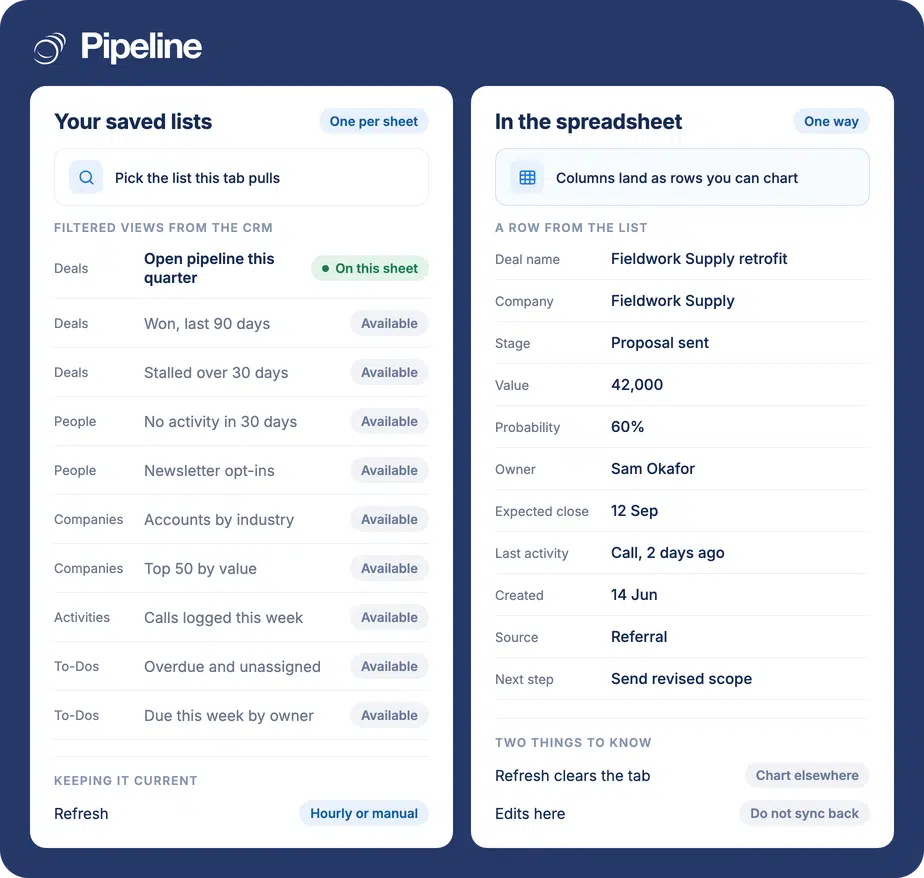
The Pipeline CRM Data Importer add-on pulls a saved list into a Google Sheet, so the reports and charts you build there sit on current CRM data. It runs one way, and each sheet holds one list.
✓ No credit card required ✓ 14-day free trial ✓ Cancel anytime
Trusted by over 18,000 users globally





At a Glance
Pipeline CRM integrates with Google Sheets through the Pipeline CRM Data Importer add-on, installed from the Google Workspace Marketplace. It imports a saved list from Pipeline CRM into a sheet, one list per sheet, and refreshes on demand. The import is one way: changes made in Google Sheets do not sync back to Pipeline CRM.
Somebody has to rebuild that tab every week
Sheets is where a lot of sales reporting actually happens. The cost is the person who re-exports and re-pastes it.
The export is a standing chore
Download, paste, fix the columns, repair the chart. Every week, by the same person, usually the one who can least spare the time.
Stale numbers reach the meeting
A sheet refreshed last Thursday quietly becomes the version the team argues about on Tuesday.
Copies multiply
Once one person duplicates the tab to try something, nobody is sure which sheet is the real one.
Install the add-on, pick a filter
You need export permissions on your Pipeline CRM account, which your admin controls, and at least one saved list or filter to import. The sheet you import into must not be protected.
Save the list you want first
In Pipeline CRM, filter to the view you want and save it. The add-on imports saved lists and filters, so one has to exist before there is anything to pull.
Install the add-on
Go to the Google Workspace Marketplace and search for the Pipeline CRM Data Importer, then click Install and accept the permissions prompt. From inside a sheet you can instead use Extensions, Add-ons, Get add-ons, where it is listed as Pipeline Data Importer.
Import into a sheet
Open a sheet and go to Extensions, then Pipeline Data Importer, then Manage Filters. Sign in when prompted and pick the saved list for this sheet. Use Refresh Data to update every sheet at once. Full setup guide in the help centre.
Teams who already live in Sheets
This suits people who want CRM data inside the spreadsheet they collaborate in, and who are reporting on the data rather than trying to edit it.
Your team shares one sheet
Sheets is where several people look at the same numbers at once, which is the job it does better than a file on somebody’s laptop.
You build your own views
Pivot tables, charts and lookups against live pipeline data, without waiting on a reporting request.
You need it beside other data
Joining CRM rows to something the CRM does not hold, like delivery dates or costs, is ordinary spreadsheet work once the rows are there.
In the Google Sheets add-on
Everything below comes with the Pipeline CRM Data Importer.
Saved lists and filters
Import any view you have saved in Pipeline CRM rather than rebuilding the filter in the spreadsheet.
One list per sheet
Each sheet carries a single list, so a workbook can hold several views on separate tabs.
Refresh every sheet at once
Refresh Data updates all the imported sheets in the file together.
Refresh the filter list
A newly created saved list appears after you refresh the list of filters, so you are not stuck with a stale dropdown.
Sign-in from the side panel
Authentication happens in the panel inside Sheets when you first manage filters.
Your own charts and formulas
Once the rows are in, everything else is ordinary Sheets work with nothing new to learn.
Install from either side
From the Google Workspace Marketplace, or from the add-ons menu inside a sheet.
Controlled by export permissions
Access follows the export permission your admin already manages, rather than being a separate thing to govern.
Importing clears the sheet
Importing a filter or refreshing the data wipes everything already on that sheet. Formulas, charts and graphs on the same tab go with it. Keep the imported list on its own sheet and build everything else on another that references it. Note too that the add-on will not run on a protected sheet.
Google Sheets integration questions
What people ask before importing CRM data into Sheets.
Does Pipeline CRM integrate with Google Sheets?
Yes, through the Pipeline CRM Data Importer add-on, installed from the Google Workspace Marketplace. It imports your saved lists and filters into a sheet.
You need export permissions on your Pipeline CRM account, which your admin controls.
Can I update Pipeline CRM data from Google Sheets?
No. Changes made in Google Sheets do not sync back to Pipeline CRM. The import runs one way.
The add-on is for reporting and analysis on CRM data, not for editing records through a spreadsheet.
What happens to my formulas when I refresh?
Importing a filter or refreshing the data clears everything already on that sheet, so formulas, charts and graphs on the same tab are lost.
Put the imported list on its own sheet and build everything else on a separate one that points at it.
Why is the add-on not working on my sheet?
The most common cause is that the sheet is protected. The add-on cannot write to a locked sheet, so unlock it and try again.
The other thing to check is export permissions on your Pipeline CRM account, since without them the import has nothing to pull.
Can I put two lists on the same sheet?
No. Each sheet supports one list or filter. To work with several views, import each into its own sheet in the same file.
If a saved list you just created is missing from the dropdown, use Refresh list of filters and it will appear.
How is this different from the managed Google Sheets service?
This add-on is built in, free with your account, and moves data one way from Pipeline CRM into a sheet you refresh yourself.
The managed service is a different, paid offering that we set up and run for you, and it is built for the cases this add-on does not cover. If you are not sure which fits, the integrations directory lists both alongside everything else.