

Gmail CRM integration: Pipeline CRM inside your inbox
Work your pipeline from the inbox you already have open. The Pipeline CRM Chrome extension puts a panel in Gmail where you can save a sender as a contact, see the deals attached to them, add a task or an event, and file an email onto the record – without switching tabs.
✓ No credit card required ✓ 14-day free trial ✓ Cancel anytime
Trusted by over 18,000 users globally





At a Glance
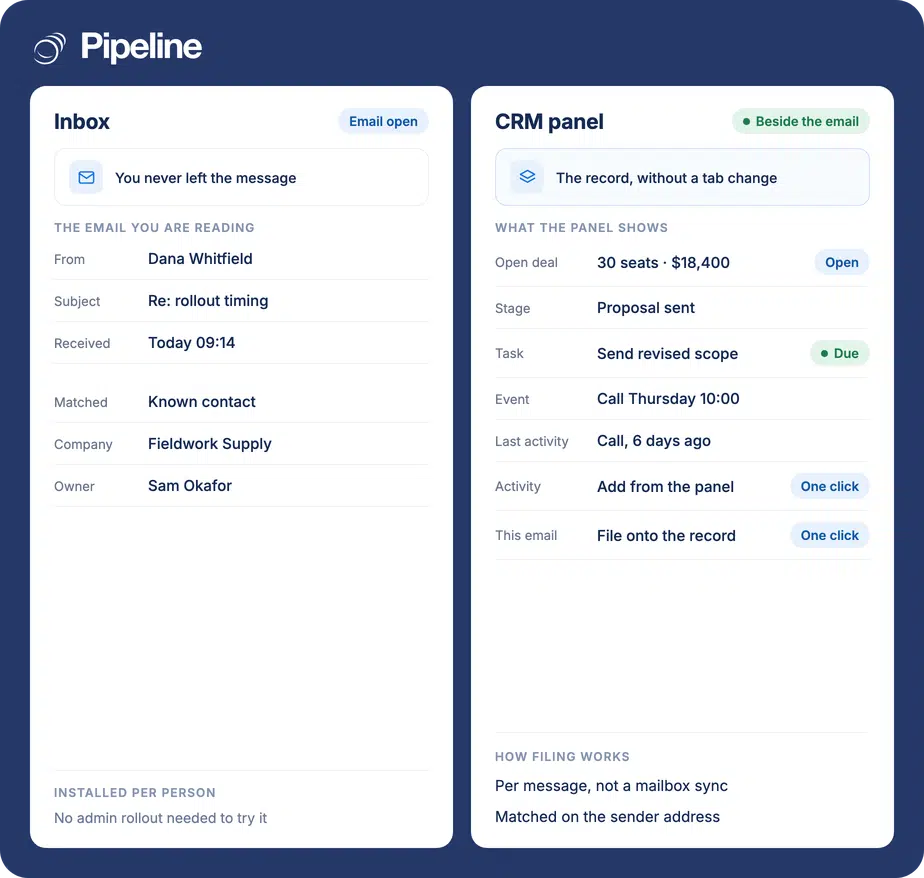
Pipeline CRM integrates with Gmail through a Chrome extension that adds a CRM panel to your inbox. From an open email you can save the sender as a contact, view their associated deals, see and add tasks and events, and file the email as an activity on the profile matching the sender’s address. It is installed per user from the Chrome Web Store.
The CRM nobody updates
Sales conversations happen in the inbox. The CRM is a separate tab, and the gap between them is where the record quietly stops being true.
Switching tabs costs the update
Logging a reply means leaving the email, finding the contact, and typing what just happened. Most people intend to and then the next email arrives.
Context lives in one person’s inbox
The thread that explains why a deal stalled is sitting in a mailbox nobody else can search, so cover and handovers start from nothing.
You reply without the history
Answering an email without knowing the open deal, the last call or the outstanding task is how a rep contradicts a colleague in writing.
Install it once, per person
This is a per-user Chrome extension rather than an admin-wide integration, so each person installs it and signs in with their own Pipeline CRM account.
Add it from the Chrome Web Store
Open the Pipeline CRM Gmail extension and click Add to Chrome. A side panel appears for you to sign in to your Pipeline CRM account.
Open the panel in Gmail
In Gmail, click the Pipeline logo in the right-hand side panel to open the extension. It shows the contact matching the email you have open, along with what the CRM already knows about them.
Save people, and file emails
With an email open, click Save to create a contact from the sender. To keep the email itself, click the Pipeline icon at the top right of the message and it is filed as an activity on the profile matching the sender’s address. Full guide in the help centre.
The panel, open beside a message

Teams who live in their inbox
The value is proportional to how much of your selling happens by email rather than in the CRM.
Email is where deals move
If most of your back and forth is written, the panel puts the record where the work already is instead of asking for a second visit.
CRM adoption is the problem
Teams that resist a CRM usually resist the context switch rather than the CRM. Removing the tab change is the cheapest adoption fix there is.
Small teams without an admin
Because it installs per person from the Chrome Web Store, nobody needs to arrange a domain-wide deployment to try it.
In the Chrome extension
Everything below happens in the panel, without leaving the message you have open.
A CRM panel in the inbox
Opens from the Pipeline logo in Gmail’s right-hand rail and follows the email you are reading.
Save a sender as a contact
Create a new Pipeline CRM contact from the person who emailed you, without retyping their details.
See their open deals
For a known contact, the deals associated with them appear in the panel, so you reply knowing what is in flight.
View tasks and events
The Agenda section shows the tasks and events already linked to that contact.
Add a task or an event
Create the follow-up while you are still looking at the email that prompted it.
See activity history
The Activities section lists what has already been recorded against the contact.
Log a new activity
Record a call or a note from the panel rather than opening the CRM to do it.
File an email onto the record
Click the Pipeline icon on a message and it is saved as an activity on the profile matching the sender’s email address.
An inbox panel, not an email sending tool
“Gmail CRM” means different things to different people, so here is the line. This extension brings the CRM into Gmail: the contact, their deals, their tasks and their history, in a panel beside the message, plus filing an email onto the record in one click. What it does not do is send. No mail merge, no send-later, no open or click tracking, no sequences. That is a different part of the product.
Gmail integration questions
What people ask about using Pipeline CRM in Gmail.
Does Pipeline CRM integrate with Gmail?
Yes, through a Chrome extension that adds a Pipeline CRM panel to your Gmail inbox. You install it from the Chrome Web Store and sign in with your own Pipeline CRM account.
From an open email you can save the sender as a contact, see the deals attached to them, view and add tasks and events, and file the email itself onto the record.
Can I use Gmail as a CRM?
Up to a point, and it is worth being honest about where that point is. Labels, stars and filters will track a handful of conversations, and plenty of people run their first few deals exactly that way.
What Gmail has no concept of is a pipeline. There is no deal value, no stage, no forecast, no shared view of who owns what, and no history that survives one person leaving. The moment a second person needs to know the state of a deal, or you need to answer “what is likely to close this month”, an inbox cannot answer it.
The useful middle ground is not to choose. Keep working in Gmail, and let the CRM hold the pipeline – which is what this extension is for: the record comes to the inbox rather than asking you to leave it.
Which CRM works inside Gmail rather than just connecting to it?
Pipeline CRM does both. The Chrome extension puts a working panel inside Gmail – contact, deals, agenda, activity history – so you act on the record in the inbox, and separately the CRM has its own mailbox sync and templates for sending.
The distinction matters when you compare tools. An integration that only pushes email copies into a CRM still makes you switch tabs to do anything. A panel means the reply and the update happen in one place.
We ranked the field on exactly that distinction in our guide to the best CRMs for Gmail, including where Pipeline CRM does not lead.
Do I need an admin to set it up?
No. It installs per person from the Chrome Web Store and each user signs in with their own Pipeline CRM credentials, so one rep can try it without a domain-wide rollout.
That is different from the Google Workspace calendar and contact sync, which does need an admin who holds both Workspace and Pipeline CRM admin rights.
Does it track email opens and clicks?
Not the extension. It is a panel that brings CRM context into the inbox and lets you file emails onto records, so it does not track anything, and it does not do mail merge, send-later or automated sequences.
Pipeline CRM does track opens, through a separate feature called Email Sync, and it works with Gmail. You connect your Gmail account to Pipeline CRM and emails you send from the CRM become trackable, so you can see when a prospect opened your message. Tracking is limited on the Start and Develop plans and unlimited on Grow, which also adds templates, bulk email and campaigns.
So the honest version is: the inbox panel and the tracking are two different parts of the product, and you can run either without the other. Email in Pipeline CRM covers the sending side.
Does every email get logged automatically?
No, and that is deliberate. You file the emails you want by clicking the Pipeline icon on the message, rather than the extension copying your whole mailbox into the CRM.
When you do file one, it attaches to the profile matching the sender’s email address. The match is made for you, so an email from an address the CRM does not recognise needs that contact saving first.
Does it work with Google Workspace and personal Gmail?
The extension is a browser extension for the Gmail interface, so it is not restricted the way the Workspace calendar sync is – that one requires Workspace work accounts.
If your team is on Workspace, the two are complementary: the extension gives everyone the inbox panel, and an admin can separately switch on calendar and contact syncing.