

Elementor Forms CRM integration through Zapier
This needs Elementor Pro. The free Elementor plugin has no form widget, so there is nothing to connect without it. With Pro, a Zap sends each submission to Pipeline CRM as a person and a deal, with your fields mapped to CRM fields. Five short videos below cover it end to end, starting with building the form.
✓ No credit card required ✓ 14-day free trial ✓ Cancel anytime
Trusted by over 18,000 users globally





At a Glance
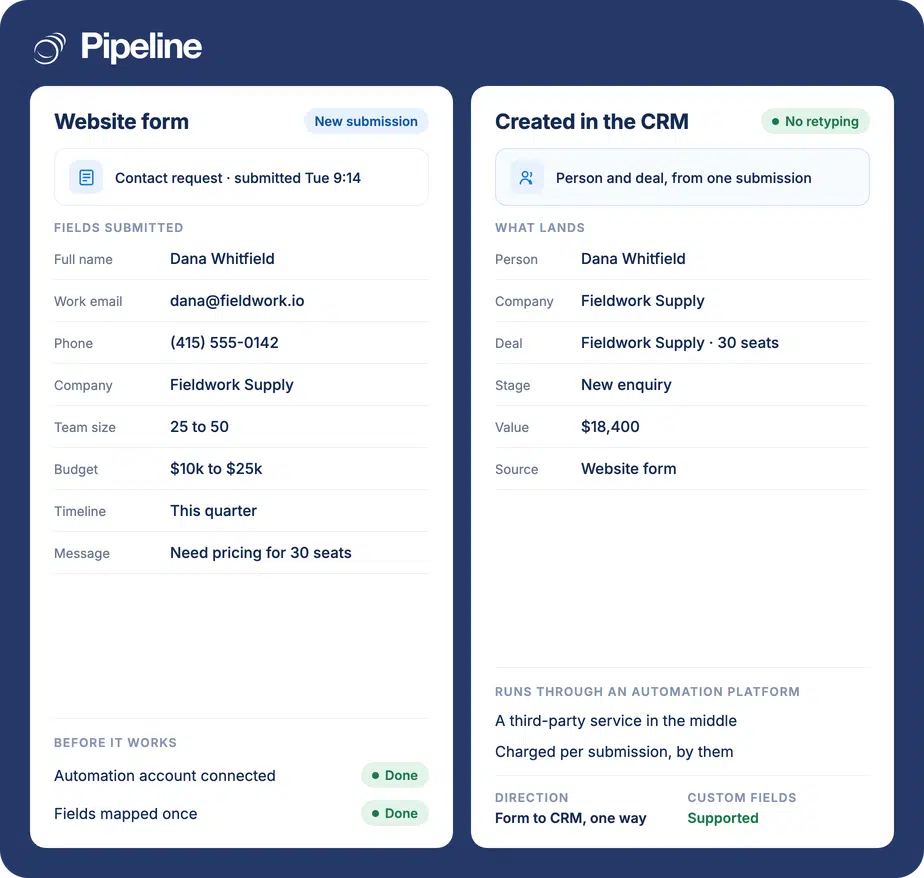
Pipeline CRM connects to Elementor Forms through Zapier rather than a built-in integration, and it requires Elementor Pro because the free plugin has no form widget. A Zap receives each submission and creates a person and a deal in Pipeline CRM, mapping form fields to standard or custom CRM fields. It runs one way, form to CRM.
A form on the page is not a lead in the pipeline
Elementor makes the form easy to build and says nothing about what happens to the submission afterwards, which is where most of the value is lost.
Email is not a system of record
Submission notifications land in an inbox and depend on somebody acting on them. The ones arriving overnight or during a busy week are the ones that go cold.
Entries stay stuck in WordPress
Elementor keeps submissions in the site’s admin, which is not where anyone sells from. Nobody checks a WordPress table to plan their day.
Qualifying answers get dropped
You asked about budget, timing and team size. Retyped by hand those answers rarely reach the deal record, so the first call asks them all over again.
Three steps, once Pro is in place
You need Elementor Pro on the WordPress site, a Pipeline CRM account and a Zapier account. Zapier has a free tier with a monthly task limit; sustained use is one of their paid plans, billed by them.
Build the form and its fields
Add the Elementor form widget to the page and set up the fields you want, giving each one a clear label. The labels become the mapping targets later, so vague ones make step three harder than it needs to be.
Send the submission to Zapier
In the form’s Actions After Submit, add the Webhook action and point it at the URL Zapier gives you. This action is a Pro feature, which is the second reason Pro is required.
Connect Pipeline CRM and map fields
Add Pipeline CRM as the Zap’s action, choose what to create, and map each form field to the CRM field it belongs in, custom fields included. Submit a real entry and confirm the person and the deal both appear.
Five short screencasts
Recorded end to end on the real screens. Unlike the other guides here, the first one starts before Zapier, with building the Elementor form itself.
Teams whose site is built in Elementor
This is worth doing in proportion to how much of your pipeline arrives through the website rather than through conversations.
The site is already on Elementor Pro
If Pro is paid for and the forms are built, this adds a destination rather than asking anyone to rebuild the site.
You qualify on the form
Teams asking about budget, timeline or team size gain most, because those answers can land on custom fields and shorten the first call.
One person owns the website
Setup is a WordPress and Zapier job. It suits teams where somebody can edit a page and paste a webhook URL without raising a ticket.
What the Zap can do
Built in Zapier from the Elementor webhook and Pipeline CRM actions. These are the combinations teams actually use.
Create a person from a submission
Each submission becomes a person record carrying the contact details you mapped.
Create a deal at the same time
The same submission opens a deal, so the enquiry enters the pipeline rather than a contact list.
Map custom fields
Pipeline CRM custom fields are available as mapping targets, so qualifying answers land where you report on them.
Set the deal stage and value
Route new enquiries into a chosen stage, and derive a value from a budget field where the form asks for one.
Set the lead source
Stamp the source on creation, so pipeline can be attributed to the page or campaign that produced it.
Assign an owner
Route the record to a specific user, or share enquiries out with a Zapier step.
Filter which submissions qualify
Add a Zapier filter so only submissions meeting your criteria create a deal, and the rest stay out of the pipeline.
Handle each form separately
Every Elementor form can point at its own Zap, so a demo request and a newsletter signup do not end up in the same place.
Without Elementor Pro there is nothing to connect
The free Elementor plugin does not include a form widget, and the Webhook action that sends a submission anywhere is a Pro feature. So this is not a case of Pro making things easier: on free Elementor there is no form and no way out of it, and no workaround on our side changes that. If you are on free Elementor and want website enquiries in your CRM, the realistic options are to buy Pro, use a different form plugin, or use Pipeline CRM’s own hosted lead forms. If you do have Pro, there is a technical upside worth knowing. Elementor posts the submission straight to a URL you supply, with no authentication to arrange and nothing to poll, which makes it the simplest of these connections to build directly. Pipeline Connect can scope and build a bespoke one and run it for you, taking Zapier and its per-task bill out of the path. Ask us what that involves.
Elementor Forms integration questions
What people ask before connecting an Elementor form.
Which CRM integrates with Elementor forms?
Pipeline CRM does, through Zapier or a direct webhook. Elementor’s form widget can post each submission to a URL, and from there a Zap creates a person and a deal in Pipeline CRM with your fields mapped across.
Most CRMs are reachable the same way, because the Elementor side is a plain webhook rather than a vendor-specific connector. What differs is what the receiving end creates: a person and a deal with custom fields and a lead source is more useful than a bare contact.
Do I need Elementor Pro?
Yes, and there is no way around it. The free Elementor plugin has no form widget at all, so there is no submission to send anywhere, and the Webhook action that sends it is itself a Pro feature.
If you are on free Elementor, your options are to buy Pro, use a different form plugin such as Ninja Forms or Gravity Forms, or use Pipeline CRM’s own hosted lead forms and skip the WordPress form entirely.
Does Elementor have a CRM?
No. Elementor is a website builder. It stores form submissions in the WordPress admin, which can look like a contact list, but there is no pipeline, no deal value, no follow-up scheduling and no history of what was said.
That storage is genuinely useful as a backup of what was submitted. It is not somewhere to sell from, which is why the submission needs to reach a CRM.
Can I map my own custom fields?
Yes. Pipeline CRM custom fields appear as mapping targets in the Zap alongside the standard ones, so an answer from the form can land directly on the deal or the person record.
Give your Elementor fields clear labels when you build the form. The labels are what you match against later, and vague ones make the mapping step needlessly confusing.
What does it cost?
Three things, none of them ours. Elementor Pro is a paid licence. Zapier charges per task, with a free tier that has a monthly limit. Pipeline CRM charges for your seats as usual and adds nothing for this.
If the Zapier cost is the sticking point, a direct webhook integration removes it, because Elementor can post to any endpoint without an automation platform in between.
Can we skip Zapier entirely?
Technically yes, and this is the easiest of these connections to do that way. Elementor posts the submission straight to a URL with no authentication to arrange and nothing to poll, so a direct endpoint can receive it.
That endpoint still has to exist and be maintained. Pipeline Connect can scope and build one and run it for you. It is not something to switch on from this page today, so tell us what you need it to do.