

Gravity Forms CRM integration through Zapier
There is no built-in Gravity Forms connection in Pipeline CRM. What works today is a Zap: a new form entry creates the person and the deal, with your fields mapped to CRM fields including custom ones. Four short videos below walk through the setup, including the authentication step that trips most people up.
✓ No credit card required ✓ 14-day free trial ✓ Cancel anytime
Trusted by over 18,000 users globally





At a Glance
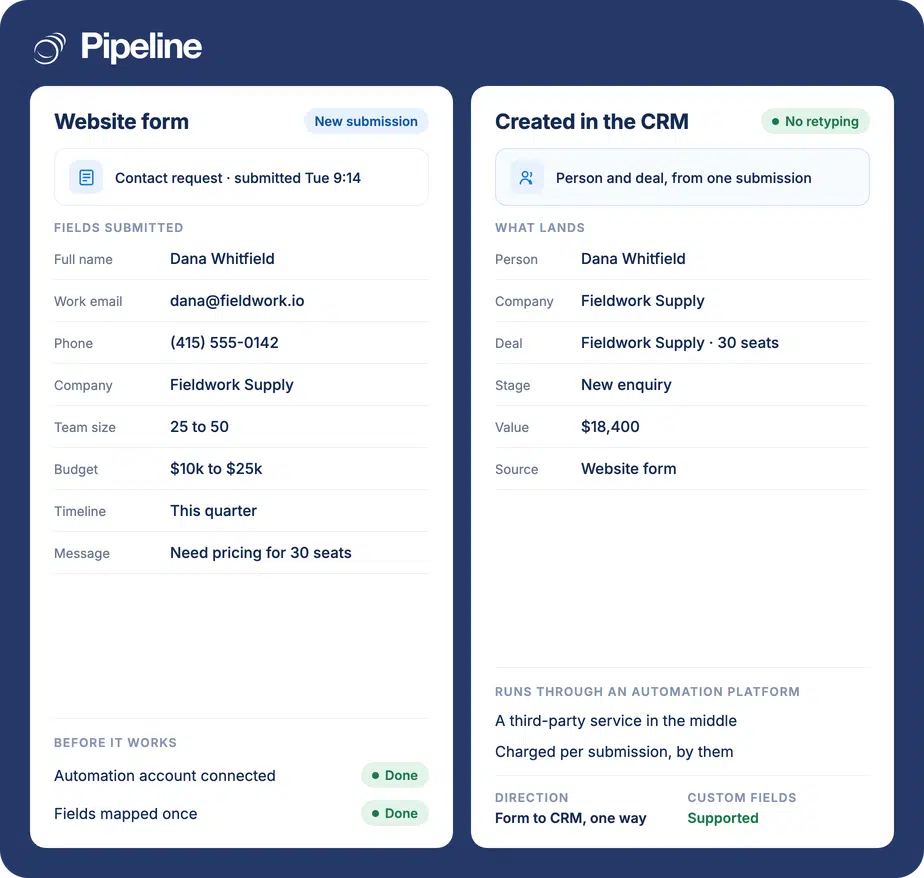
Pipeline CRM connects to Gravity Forms through Zapier rather than a built-in integration. A Zap watches for a new form entry and creates a person and a deal in Pipeline CRM, mapping each form field to the CRM field you choose, custom fields included. It runs one way, from the form to the CRM, and Zapier charges per task.
The enquiry that never became a deal
A form that emails you is a notification, not a pipeline. Everything after the email depends on a person remembering to act on it.
Notifications get buried
Entries land in an inbox alongside everything else. The ones that arrive overnight, at the weekend, or while the usual owner is away are the ones that quietly go cold.
Retyping loses the qualifying answers
You asked about budget, team size and timing on the form. Copied across by hand, those answers rarely make it onto the record, so the first call asks them again.
No source, no reporting
Deals created by hand lose where they came from, so you cannot tell which page or campaign produced the pipeline and you end up guessing at what to spend more on.
Three steps in Zapier
You need a WordPress site running Gravity Forms, a Pipeline CRM account and a Zapier account. Zapier has a free tier with a monthly task limit; sustained use is one of their paid plans, billed by them.
Set the Gravity Forms trigger
In Zapier, create a Zap with Gravity Forms as the trigger app and New Form Submission as the event, then pick the form. This is the step where authentication is fiddly, which is why the first video below covers it in full.
Set the Pipeline CRM action
Choose Pipeline CRM as the action app, connect your account, and pick what the submission should create. Most teams create a person and a deal, so the enquiry enters the pipeline rather than a contact list.
Map the fields, then test
Point each form field at the CRM field it belongs in, custom fields included, and set the deal stage and source. Submit a real entry and confirm the record and the deal both appear before you rely on it.
Four short screencasts
Recorded while building the Zap described above, on the real screens. The first one is the authentication step, which is the part written instructions handle worst.
Teams whose pipeline starts on their website
This pays off in proportion to how much of your pipeline arrives through a form rather than a conversation.
Your forms are already in Gravity Forms
If the forms are built and styled and working, this adds a destination rather than asking you to rebuild anything.
You qualify on the form
Teams asking about budget, timeline or team size get the most from the mapping, because those answers can land on custom fields and shorten the first call.
You report on lead source
Setting the source on creation means the pipeline can be traced back to the page or campaign that produced it, without anyone tagging records by hand.
What the Zap can do
Built in Zapier from Gravity Forms triggers and Pipeline CRM actions. These are the combinations teams actually use.
Create a person from a submission
A new entry becomes a person record with the contact details you mapped.
Create a deal at the same time
The same entry opens a deal, so the enquiry enters the pipeline instead of sitting in a contact list.
Map custom fields
Your own Pipeline CRM custom fields are available as mapping targets, so qualifying answers land where you report on them.
Set the deal stage and value
Send new enquiries into a specific stage, and derive a value from a budget field where the form asks for one.
Set the lead source
Stamp the source on creation so reporting can attribute pipeline to the form, page or campaign.
Assign an owner
Route the record to a specific user, or round-robin it with a Zapier step if enquiries should share out.
Filter which entries qualify
Add a Zapier filter so only submissions meeting your criteria create a deal, and the rest stay out of the pipeline.
Handle several forms differently
Each form can have its own Zap, so a demo request and a support enquiry do not land in the same place.
The Elite gate, and who is in the middle
If you ever want to move off Zapier, know where the licence lines fall. Gravity Forms’ own Webhooks add-on, the obvious way to push entries straight out, requires an Elite or Nonprofit licence and is not available on Basic or Pro. Its REST API v2, however, is core on every tier. So a direct integration is buildable whatever licence you hold: it reads entries through the API with your own key when the webhook route is not open to you. None of that affects the Zapier recipe on this page, which works regardless. What does affect it is Zapier itself. It is a third party in the path, billed by them per task, and when a Zap breaks it breaks somewhere nobody on your team is watching. If you would rather not carry that, Pipeline Connect can scope and build a direct Gravity Forms integration and run it for you. Ask us what it involves.
Gravity Forms integration questions
What people ask before wiring a form into the CRM.
Does Pipeline CRM integrate with Gravity Forms?
Through Zapier, yes. There is no built-in Gravity Forms connection. You build a Zap with Gravity Forms as the trigger, on new form submission, and Pipeline CRM as the action, creating a person and a deal.
So the connection is configured in Zapier, billed by Zapier per task, and maintained by you rather than by us.
Which CRM integrates with Gravity Forms?
Pipeline CRM does, through Zapier, and so do most CRMs by the same route, because Gravity Forms publishes a Zapier add-on and the CRMs publish Zapier actions.
The thing worth comparing is not whether a connection exists but what it creates. A form entry that becomes a person AND a deal, with your qualifying answers on custom fields and a lead source stamped on it, is more useful than one that only creates a contact.
Do I need an Elite licence?
Not for the Zapier route on this page. That works on any Gravity Forms licence that includes the Zapier add-on.
The Elite question comes up for a different path: Gravity Forms’ own Webhooks add-on, which pushes entries straight to a URL, requires Elite or Nonprofit. If you are considering a direct integration rather than Zapier, that gate matters, though it is not the only way – REST API v2 is core on every tier and a direct build can read entries through it instead.
Can I map my own custom fields?
Yes. Pipeline CRM custom fields appear as mapping targets in the Zap alongside the standard ones, so a question you ask on the form can land directly on the deal or the person.
This is where the value is. Mapping budget, timeline or team size onto custom fields is what stops the first call repeating what the form already answered.
What does it cost?
Nothing extra from us. Zapier charges for the tasks it runs, and every submission that creates records spends one. They have a free tier with a monthly limit, and sustained volume puts you on a paid plan.
Weigh that against your submission count. A few enquiries a week fits a free tier; a busy lead form does not.
Does data come back from the CRM to the form?
No. This runs one way, from the form to Pipeline CRM. Nothing about a form entry changes after it is created, and editing the deal does not alter the entry stored in Gravity Forms.
That is usually what you want for lead capture, where the submission is a record of what someone said at a moment in time.
Can we skip Zapier and have a direct integration?
It can be built. Gravity Forms exposes REST API v2 on every licence tier, so Pipeline Connect can scope a direct integration and run it for you without the third party or the per-task bill.
It is not something to switch on from this page today. Tell us what you need it to do and we will explain what building it involves.