

CallRail CRM integration for Pipeline CRM
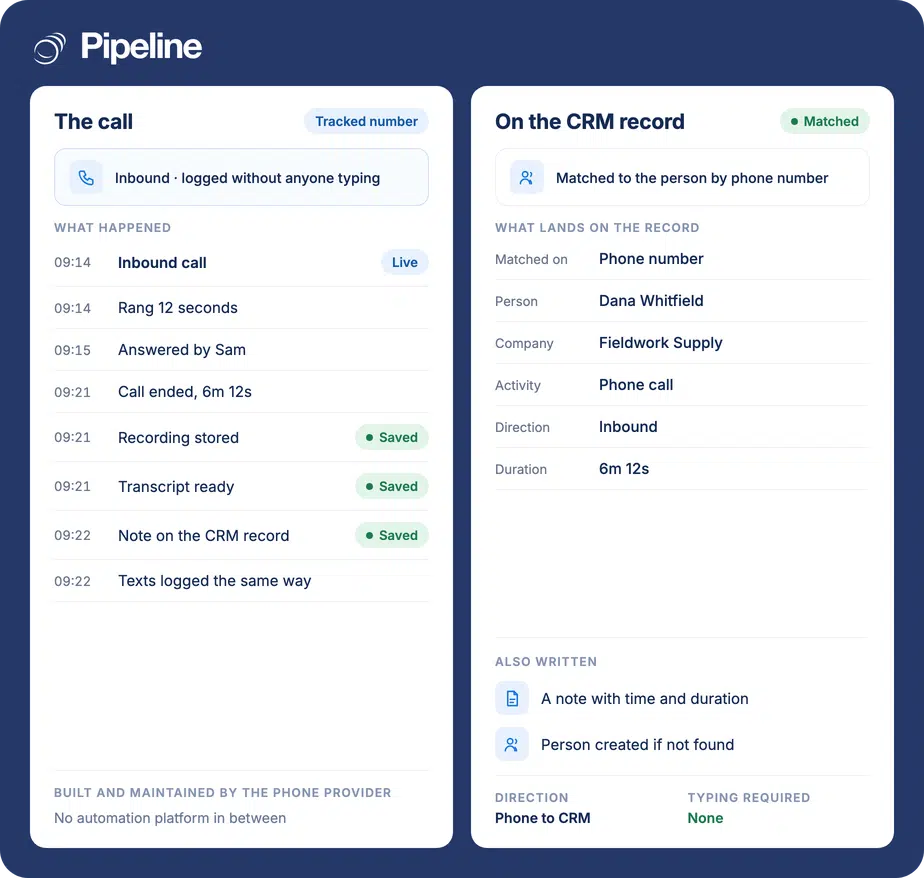
CallRail builds and maintains this integration, and it does one job well: calls and texts to your tracking numbers land on the right person in Pipeline CRM, matched by phone number, with a note carrying the time and length of the call. If nobody matches, it creates the lead.
✓ No credit card required ✓ 14-day free trial ✓ Cancel anytime
Trusted by over 18,000 users globally





At a Glance
CallRail connects to Pipeline CRM through an integration CallRail builds and maintains, authenticated with your Pipeline CRM API key. Calls and text messages to your tracking numbers are matched to an existing person by phone number, or create one, and a note is attached carrying the call start time and duration. It requires two exactly named custom fields in Pipeline CRM before any data arrives.
The call that nobody logged
Phone calls are the least recorded thing in most pipelines, which makes them the easiest place for context and credit to disappear.
Inbound calls arrive as strangers
Someone rings the number on your website and the person answering has no idea whether they are a new enquiry, an existing deal or a customer with a problem.
Nobody logs their own calls
Call notes written by hand are the first thing dropped on a busy day, so the record shows a gap where the most useful conversation was.
The same person becomes three records
Without matching on the phone number, a caller who already exists gets entered again, and the history splits across duplicates nobody reconciles.
Create the two custom fields first
This is the step that decides whether anything works. Get the field names wrong and the integration connects successfully and then delivers nothing, with no error to tell you why.
Add two person custom fields
In Pipeline CRM account settings, create two person custom fields as text fields, named exactly CallRail Number and CallRail Tracker Name. CallRail’s own guide is blunt about this: if the names do not match, you receive no data. White-label agencies use their own name plus Lead Tracking instead.
Get your API key
An admin enables API access and copies the key from Account Settings, then Pipeline CRM API. The integration authenticates with that key, so the data lands in your account and no third party sits in between.
Connect it in CallRail, per company
In CallRail, open Integrations, choose Pipeline CRM, pick the company you are connecting, paste the API key and save. The integration is company-dependent, so repeat it for each CallRail company you want flowing into the CRM. CallRail documents the current click-path.
Teams whose leads call rather than click
This earns its keep wherever the phone is a primary channel and the callers are not already in your CRM.
You advertise a phone number
Home services, trades, clinics, legal and anyone running local search or print, where the call is the conversion rather than a form.
You run several tracking numbers
The tracker name arrives on the record, so the person picking up can see which number was dialled even though the campaign detail stays in CallRail.
You are an agency reporting to clients
The white-label field naming means the fields can carry your agency’s name rather than CallRail’s, which matters when the client sees the CRM.
In the CallRail integration
Built and maintained by CallRail. This is the whole of what reaches Pipeline CRM, listed so you can judge the fit before setting it up.
Matches the caller by phone number
Looks for an existing person with that number and attaches to them rather than creating a duplicate.
Creates the lead when nobody matches
A first-time caller becomes a new person record instead of an unattributed call nobody follows up.
Writes name, phone, work city and work state
The fields CallRail populates on a record it creates.
Records the tracking number
Lands in the CallRail Number custom field, so you can see which advertised number was dialled.
Records the tracker name
Lands in the CallRail Tracker Name custom field, which is the closest thing to campaign context that reaches the CRM.
Adds a note for every call
Categorised as Phone Call, containing the start time and the duration of the conversation.
Adds a note for text messages
Texts to your tracking numbers are logged the same way, under their own note category.
Runs per CallRail company
The connection is configured for each company in your CallRail account, so agencies can send different clients into different CRM accounts.
Attribution stays in CallRail
It is worth being exact, because this page used to overstate it. CallRail’s own product does dynamic number insertion, keyword-level call attribution, multi-touch cost per lead and visitor timelines. None of that crosses into Pipeline CRM. What arrives is the person, the tracking number, the tracker name and a note with the time and duration. In practice that is the right split for most teams: the rep needs to know who is calling and what happened, and the marketer needs the attribution reporting, which is better in the tool that measures it. But if you were expecting keyword-level cost data to appear on the deal, it will not, and you should plan reporting around CallRail rather than around the CRM.
CallRail integration questions
What people ask before connecting call tracking to the CRM.
Does Pipeline CRM integrate with CallRail?
Yes, through an integration CallRail builds and maintains. You authenticate it with your Pipeline CRM API key inside CallRail, and calls and texts to your tracking numbers start landing on the matching person in the CRM.
Because it is CallRail’s integration rather than ours, the setup screens and the updates are on their side. Their current guide is the one to follow: CallRail’s Pipeline CRM integration article.
Why is no data arriving?
Almost always the custom fields. The integration needs two person custom fields in Pipeline CRM named exactly CallRail Number and CallRail Tracker Name, created before you connect it.
CallRail’s documentation states that if the names do not match you will not receive any data, and it fails silently: the integration looks connected and simply sends nothing. Check the spelling character for character, including the spaces. If you are a white-label agency, the names use your agency name plus Lead Tracking instead.
Does keyword and campaign attribution come into the CRM?
No, and this is the most common misunderstanding. CallRail’s tracking number and tracker name arrive on the record. The keyword, the ad, the landing page, the visitor timeline and the cost per lead all stay in CallRail.
For most teams that is the sensible division: the person answering the phone needs to know who is calling, and attribution reporting belongs in the tool that measures it. Just do not plan on reporting call ROI from inside the CRM.
What happens if the caller is already a contact?
They are matched by phone number and the note is attached to the existing person, rather than a duplicate being created.
If no existing record has that number, CallRail creates one carrying the name, phone number, work city and work state along with the two tracking fields.
Are text messages logged too?
Yes. Texts to your tracking numbers create notes on the record in the same way calls do, under their own note category, so an SMS conversation is not invisible in the CRM.
What are my other options for phone calls in Pipeline CRM?
Several, and unlike CallRail most of them are integrations we built and document ourselves. JustCall, RingCentral, Aircall, Dialpad and Kixie all connect to Pipeline CRM for calling and activity logging.
The split is roughly this: CallRail is for tracking inbound marketing calls to advertised numbers, while the others are dialler and phone-system integrations for the calls your team makes and takes. Teams running both an ad budget and an outbound motion often use one of each.
Do we need to set it up for each CallRail company?
Yes. The integration is company-dependent inside CallRail, so you connect it once per company with the API key for the Pipeline CRM account it should feed.
For agencies that is a feature rather than a chore, because different clients can be pointed at different CRM accounts.