

FullContact CRM integration for Pipeline CRM
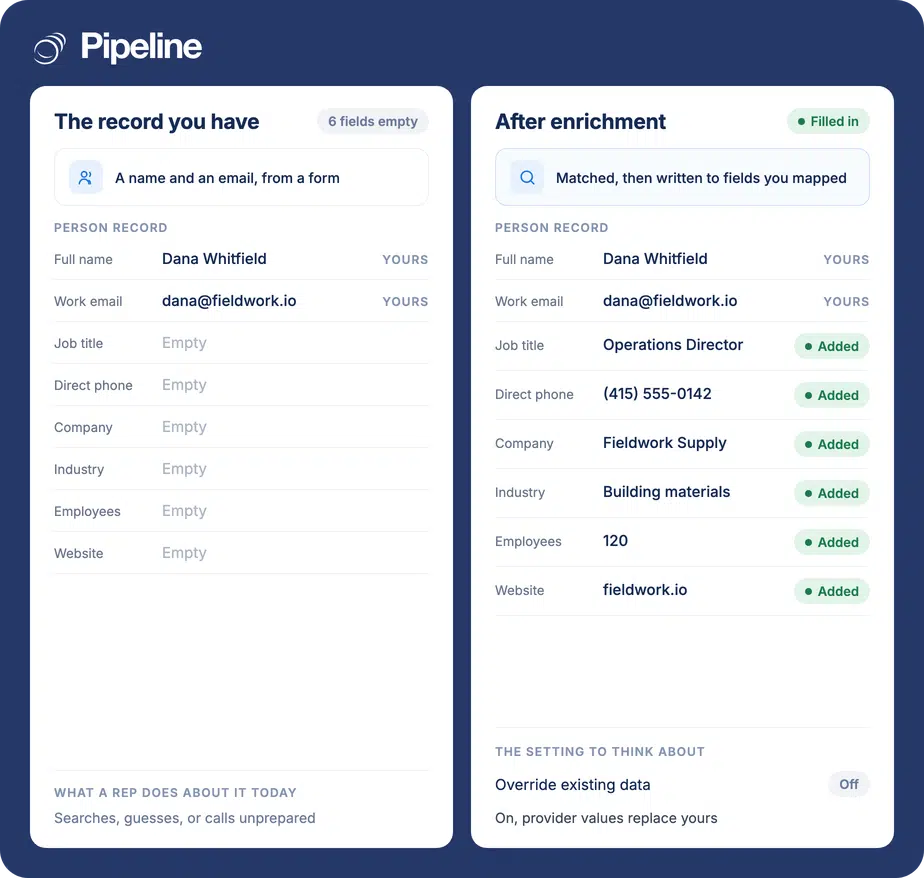
Connect FullContact and Pipeline CRM fills in what your records are missing across both people and companies, writing only into the fields you map. You decide whether it may overwrite values you already hold, and that choice can differ for people and for companies.
✓ No credit card required ✓ 14-day free trial ✓ Cancel anytime
Trusted by over 18,000 users globally





At a Glance
Pipeline CRM integrates with FullContact through a built-in integration installed from the App Store and authenticated with a FullContact API key pasted into the Token field. It enriches person records, company records or both, writing data into the Pipeline CRM fields you map. Overriding existing values is optional and can be set separately for people and companies.
The gaps nobody has time to fill
Records arrive incomplete and stay incomplete, because filling them in is nobody’s actual job.
Manual research does not scale
Looking up a title and a company size takes a couple of minutes. On a list of two hundred it is a week nobody has.
Blank fields break segmentation
Filters and routing rules built on industry or headcount silently exclude every record where that field is empty.
Duplicated effort across the team
Two reps researching the same account separately is common and invisible, because neither result gets written back to the record.
Create your fields, then paste the token
You need admin permissions in Pipeline CRM and a FullContact account with API access. Any custom fields you want populated should exist before you map.
Add any custom fields first
Default mappings cover the common fields. For anything beyond them, create the Pipeline CRM custom field before mapping, because you cannot point data at a field that does not exist.
Install it and paste the key into Token
Go to Settings, then Other, then App Store, find FullContact and click Install, then open the FullContact Service tab. Generate an API key in your FullContact dashboard and paste it into the field labelled Token, then run Test Connection and save.
Choose what it enriches and what it may overwrite
On the Settings tab, pick person fields, company fields or both, and decide whether overriding existing data is allowed, separately for people and for companies. Then map the FullContact fields and enable it. Full setup guide in the help centre.
Teams with more records than research time
Enrichment earns its keep in proportion to how much you do not already know about the people in your database.
You inherited a large database
Years of accumulated records with patchy fields are exactly what enrichment is for, and the case where override is worth considering.
Inbound arrives as a name and an email
Form fills give you the minimum. Enrichment turns that into something a rep can qualify before making contact.
You want people and companies handled differently
Because override is set separately for each, you can refresh firmographics freely while protecting contact details your reps maintain.
In the FullContact integration
Everything below is part of the integration, installed from the App Store.
Person enrichment
Fills missing details on people records from FullContact’s data.
Company enrichment
Fills missing company information such as industry, size and website.
Enrich people, companies, or both
You choose which record types the integration may touch at all.
Field-level mapping
Each FullContact field points at a specific Pipeline CRM field, so nothing lands somewhere you did not intend.
Custom fields supported
Create the field in Pipeline CRM first and it becomes available as a mapping target.
Override set per record type
Allow overwriting for companies while protecting people, or the reverse. The two are independent.
Fills only the gaps, by default
With override off, enrichment writes into empty fields and leaves your existing values untouched.
Test Connection before going live
Verify the token works from inside the integration before enabling it for the team.
Override replaces what you already have
With override enabled, FullContact data replaces any existing value in a mapped field. Not merged, not kept alongside – replaced. A mobile number a rep got directly from the customer loses to whatever the provider holds. The useful thing here is that override is set separately for people and for companies. Firmographics like industry and headcount are usually safe to refresh, because nobody on your team is curating them by hand. Contact details usually are not. So the sensible default position is override on for company data and off for person data, decided deliberately rather than switched on wholesale. If you want to see the provider’s version before trusting it, map FullContact into new custom fields first, compare them against what you hold, and only then point it at your primary fields.
FullContact integration questions
What people ask before turning on enrichment.
Does Pipeline CRM integrate with FullContact?
Yes, and it is built in rather than a third-party connector. Install it from the Pipeline CRM App Store under Settings, then Other, and authenticate it with a FullContact API key.
Once enabled it enriches person records, company records or both, writing only into the fields you have mapped.
Which CRM integrates with Full Contact?
Pipeline CRM does. The vendor writes its name as one word, FullContact, so it is worth searching both spellings when you are comparing tools.
The integration is built in on our side: you install it from the App Store, paste a FullContact API key, choose whether to enrich people, companies or both, and map each field to the Pipeline CRM field it belongs in.
Where does the API key go?
Into the field labelled Token on the FullContact Service tab. You generate the key in your FullContact dashboard first.
The mismatch in labels catches people out, since FullContact calls it an API key and our screen calls it a Token. They are the same thing.
Will it overwrite data my team entered?
Only if you allow it, and that is off by default. With override off, enrichment fills empty fields and leaves existing values alone.
Override is set separately for people and for companies, which is the useful part. Most teams end up allowing it for company firmographics nobody maintains by hand while protecting the contact details their reps curate.
Can it fill in my own custom fields?
Yes, as long as the field exists before you map. Create the custom field in Pipeline CRM and it becomes available as a mapping target alongside the defaults.
This is also the safest way to trial it: map into new custom fields, compare against what you already hold, then decide whether to point it at your primary fields.
Will this reduce manual data entry?
For research, yes, and that is the specific claim worth making. Enrichment removes the step where somebody looks up a job title, a company size or a phone number and types it into the record.
It does not do anything about the rest of your data entry. Deal updates, call notes, next steps and stage changes are still work for a person, and no enrichment tool touches them. If the goal is less typing overall, enrichment is one part of it alongside the calendar, email and phone integrations that log activity automatically.