

ZoomInfo CRM integration for Pipeline CRM
Connect ZoomInfo and Pipeline CRM fills in what your records are missing: job titles, direct phone numbers, industry, company size. You choose which fields it may write to, and whether it is allowed to overwrite what you already have. Check one thing first: ZoomInfo API access is often sold separately at extra cost, so confirm your contract includes it.
✓ No credit card required ✓ 14-day free trial ✓ Cancel anytime
Trusted by over 18,000 users globally





At a Glance
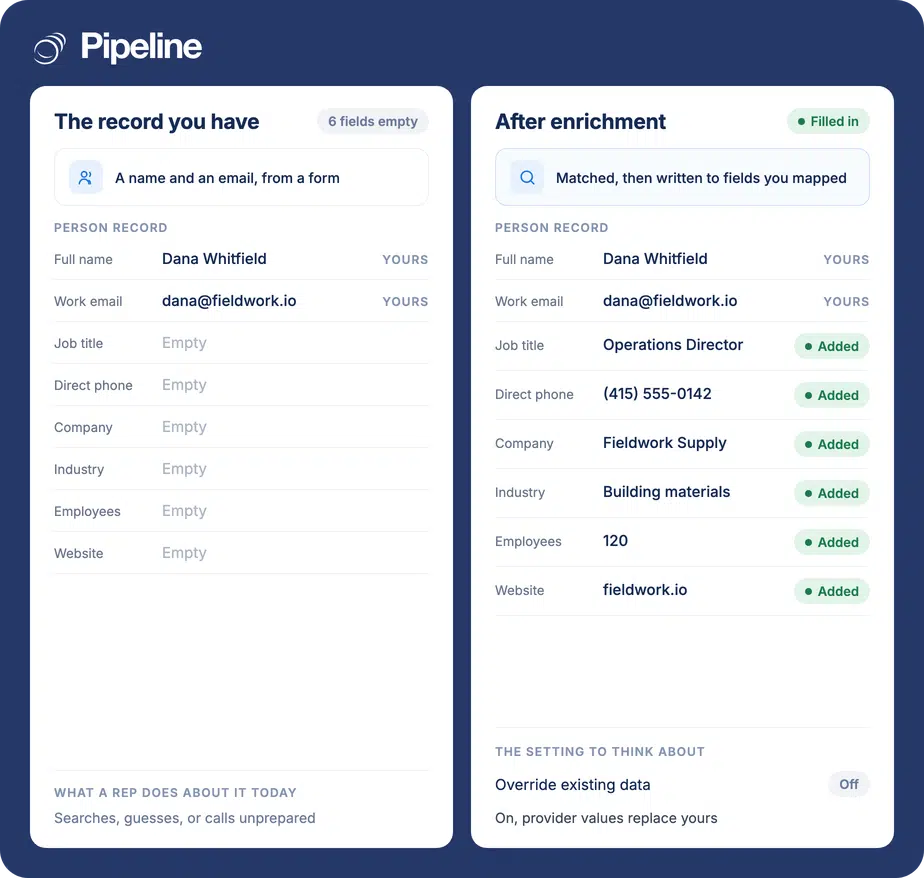
Pipeline CRM integrates with ZoomInfo through a built-in integration installed from the App Store and authenticated with your ZoomInfo username and password. It enriches person records, company records or both, writing ZoomInfo data into the Pipeline CRM fields you map. It needs ZoomInfo API access, which is often sold separately, and overwriting your existing values is optional.
Half a record is not a record
Most contacts arrive as a name and an email. Everything a rep needs to decide who to call, and what to say, is missing.
Research eats selling time
Filling in a title, a company size and a direct line by hand takes minutes per record. Across a list it is a day nobody planned for.
You cannot segment what you do not know
Without industry, size or role on the record you cannot prioritise a list, route it, or report on which segments actually convert.
Stale data quietly misroutes work
People change jobs. A record that was right two years ago sends today’s call to the wrong person at the wrong company.
Create your custom fields first
You need admin permissions in Pipeline CRM and a paid ZoomInfo account. The field work comes first, because you cannot map to a field that does not exist yet.
Add any custom fields you want filled
The default mappings cover the common fields. If you want ZoomInfo data beyond them, create those custom fields in Pipeline CRM before you start mapping, or there will be nowhere to put the data.
Install it and connect
Go to Settings, then Other, then App Store, find ZoomInfo and click Install, then open the ZoomInfo Service tab. Enter the username and password you sign into ZoomInfo with, run Test Connection, then enable the integration from the App Store.
Map fields and decide about override
On the Person and Company mapping tabs, point each ZoomInfo field at a Pipeline CRM field, and choose whether to enrich people, companies or both. Leave override off unless you specifically want ZoomInfo to replace values you already hold. Full setup guide in the help centre.
Teams working lists they did not personally build
Enrichment pays off in proportion to how much you do not already know about the people in your CRM.
You run outbound at volume
Direct dials and job titles are the difference between a list you can work and a list somebody has to research first.
Inbound arrives thin
Form fills give you a name and an email. Enrichment turns that into something a rep can qualify before picking up the phone.
You segment or route by firmographics
If industry or company size decides who owns a lead, having those fields populated is what makes the routing possible at all.
In the ZoomInfo integration
Everything below is part of the integration, installed from the App Store.
Person enrichment
Adds missing details to people records, such as job title, phone number and company.
Company enrichment
Adds missing company information, such as industry, size and website.
Enrich people, companies, or both
You choose which record types the integration is allowed to touch.
Field-level mapping
Each ZoomInfo field is pointed at a specific Pipeline CRM field, so nothing lands somewhere you did not intend.
Custom fields supported
Create the field in Pipeline CRM first and it becomes available as a mapping target, so you can capture data beyond the defaults.
Optional override, per record type
Override can be enabled separately for people and for companies, so you can let one be overwritten and protect the other.
Adds only what is missing, by default
With override off, enrichment fills empty fields and leaves your existing values alone.
Test Connection before going live
Verify the credentials work from inside the integration before enabling it.
Override replaces what you already have
With override enabled, ZoomInfo data replaces any existing value in a mapped field. Not merged, not kept alongside – replaced. If a rep typed a mobile number they got from the customer directly, and ZoomInfo holds a different one, override means the rep’s number is gone. That is sometimes exactly what you want, on a database nobody has maintained for years. It is rarely what you want on fields your team edits by hand. Because it can be set separately for people and for companies, the usual sensible position is override on for firmographics you never touch and off for contact details your reps curate. Decide it deliberately per record type rather than switching it on wholesale, and consider mapping into custom fields first if you want to compare before you commit. One practical note about credentials: this integration authenticates with a ZoomInfo username and password rather than an API key, so it is tied to a person’s login. If that person leaves or changes their password, enrichment stops. Worth using an account that will outlast whoever set it up.
ZoomInfo integration questions
What people ask before turning on enrichment.
Does Pipeline CRM integrate with ZoomInfo?
Yes, and it is built in rather than a third-party connector. You install it from the Pipeline CRM App Store under Settings, then Other, and sign in with your ZoomInfo credentials.
Once enabled it enriches person records, company records or both, writing ZoomInfo data only into the fields you have mapped.
Is ZoomInfo a CRM?
No. ZoomInfo is a B2B data provider. It holds information about companies and the people who work at them, which is a different job from managing your own relationships and deals.
It has no pipeline, no deal stages, no forecast and no record of your conversations. What it gives you is better raw material: who someone is, where they work, how big the company is and how to reach them. The CRM is where that becomes a deal, which is why the two are usually used together rather than one instead of the other.
Do I need a paid ZoomInfo account?
You need ZoomInfo API access, and that is not quite the same question. Free accounts have no API access at all, so a free plan is a hard no.
But a paid plan is not automatically a yes either. ZoomInfo often sells API access as a separate line at premium cost, so plenty of paying customers do not have it included. Confirm with ZoomInfo that API access is in your contract before you plan the work, because there is no workaround on our side and it can turn a short setup into a procurement conversation.
Will it overwrite data my team entered?
Only if you enable override, and that is off by default. With override off, enrichment fills empty fields and leaves existing values alone.
With it on, ZoomInfo values replace what is already in the mapped field. Since override can be set separately for people and companies, most teams end up allowing it for firmographics nobody edits by hand while protecting contact details their reps maintain.
What credentials does it use?
Your ZoomInfo username and password, the same ones you sign in with. This is unusual: the other enrichment integrations use an API token instead.
The practical consequence is that the connection belongs to a person’s login. If that person leaves the company or rotates their password, enrichment stops until it is reconnected, so it is worth setting up with an account that will outlast them.
Can it fill in my own custom fields?
Yes, provided the field exists first. Create the custom field in Pipeline CRM before you map, and it becomes available as a mapping target alongside the default fields.
Doing this before you start is also the safest way to trial enrichment: map into new custom fields, compare the results against what you already hold, and only then decide whether to map into your primary fields.
Can I combine ZoomInfo with other sources in one pipeline?
Not through this integration, and it is worth being clear about the boundary. What this does is enrich records inside Pipeline CRM from ZoomInfo, into fields you map.
Pulling several sources together – say ZoomInfo alongside LinkedIn lead ads, then normalising the fields and de-duplicating before anything reaches the pipeline – is a different kind of job, and it is custom rather than configurable. That is what Pipeline Connect is for: it builds and runs integrations against more or less anything with an API, so a multi-source enrichment flow with your own matching and dedupe rules is buildable. Tell us what the flow needs to do and we will scope it.
Which records get enriched?
Whichever types you allow. You choose person fields, company fields, or both during setup, and you can enable enrichment for one while leaving the other untouched.
That is the same control as override: both settings exist separately for people and companies, so you can be cautious with one and permissive with the other.