

Ninja Forms CRM integration, built by Ninja Forms
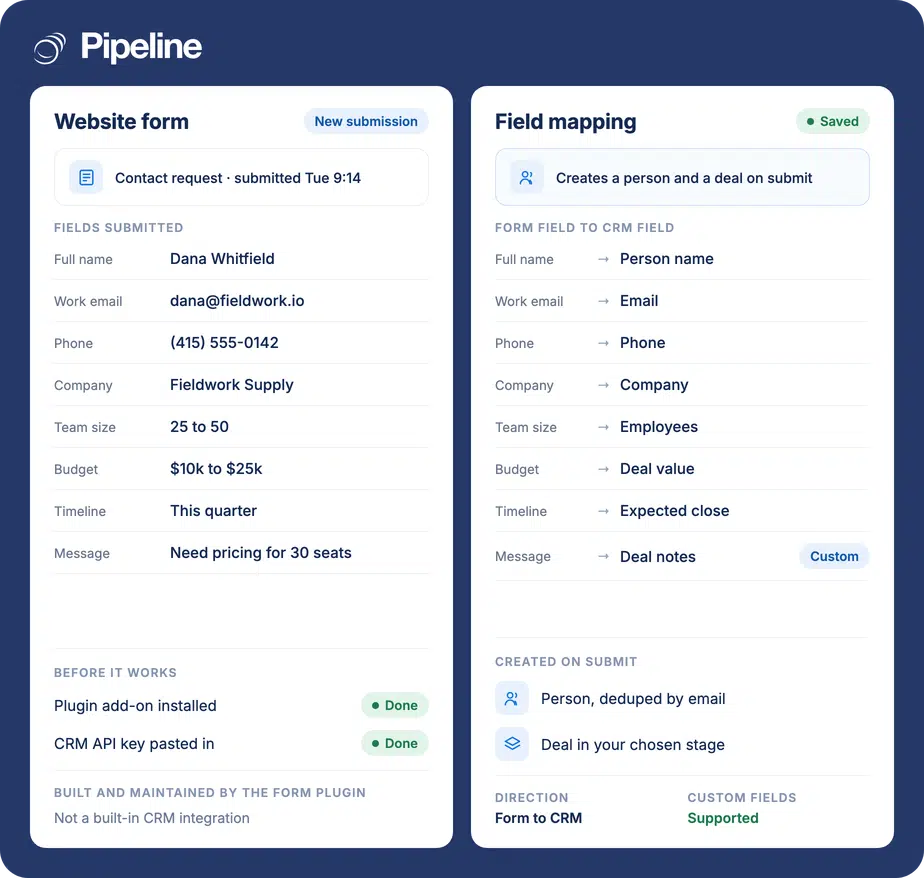
Ninja Forms builds and maintains its own Pipeline CRM add-on. Install it on your WordPress site, paste in your Pipeline CRM API key, and map each form field to the CRM field it belongs in. A submission then creates a person and a deal without anyone retyping it.
✓ No credit card required ✓ 14-day free trial ✓ Cancel anytime
Trusted by over 18,000 users globally





At a Glance
Ninja Forms connects to Pipeline CRM through an add-on that Ninja Forms builds and maintains, not a built-in Pipeline CRM feature. It adds an action to the Ninja Forms builder, authenticated with your Pipeline CRM API key, and maps any form field to a standard or custom Pipeline CRM field. Each submission creates a person and a deal. It needs the paid add-on and the Allow Unregistered API setting enabled.
The gap between a form submission and a deal
A WordPress form that emails you is not lead capture. Someone still has to read the email and type it in, and that step is where enquiries go missing.
Retyping is where leads leak
A submission notification sits in an inbox until somebody copies it into the CRM. The ones that arrive on a Friday afternoon, or while the person who usually does it is away, quietly do not.
Custom-built connections rot
A one-off script wired to the API works until the form changes, the plugin updates or the person who wrote it leaves. Then it fails silently, which is worse than not having it.
Half the answer is not captured
Most form builders only map name, email and phone, so the qualifying questions you actually asked, like budget or timeline, never reach the deal record and get asked again on the call.
Three steps, done in WordPress
The connection lives on your WordPress site, not in Pipeline CRM, so the setup happens in the Ninja Forms builder. Ninja Forms documents the click-path and keeps it current, so follow their guide rather than this summary if the screens have moved.
Install the add-on
Add the Pipeline CRM add-on to Ninja Forms on your WordPress site. It is a paid Ninja Forms extension; the base Ninja Forms plugin is free. Note that Ninja Forms still lists it under the legacy Pipeline Deals CRM name, so search for that if you cannot find it.
Authenticate with your API key
Copy your API key from Pipeline CRM under Account Settings, then Other, then API Integrations, and paste it into the add-on. The same screen holds the Allow Unregistered API setting the add-on needs switched on, which is covered below.
Map your fields
In the form’s settings, add the Pipeline CRM action and pick the target for each field from a dropdown. Custom fields appear in the same list as standard ones, so a qualifying question can go straight onto the deal. Submit a test entry and check it landed.
Teams whose enquiries start on their own website
This earns its keep when the website form is a real source of pipeline rather than a contact page nobody uses.
You already run Ninja Forms
If your forms are built in Ninja Forms, this is the shortest route to the CRM: an add-on and a field map, with no middleware to keep alive and no monthly task fee.
You qualify on the form
Teams that ask about budget, timeline or team size in the form get the most out of the mapping, because those answers can land on custom fields and the first call starts further along.
One person owns the website
Setup is a WordPress job. It suits teams where somebody can install a plugin and paste an API key without raising a ticket.
In the Ninja Forms Pipeline CRM add-on
Built and maintained by Ninja Forms. Listed here so you can judge the fit before installing it.
An action in the form builder
Adds a Pipeline CRM step to any Ninja Forms form, so the connection is configured per form rather than site-wide.
Field mapping from a dropdown
Each form field is pointed at the Pipeline CRM field it belongs in, chosen from a list rather than typed.
Custom fields included
Your own Pipeline CRM custom fields appear alongside the standard ones, mapped the same way.
Creates the person
A submission becomes a person record in Pipeline CRM with the mapped contact details.
Creates the deal
The same submission opens a deal, so the enquiry enters the pipeline rather than sitting in a contact list.
API-key authentication
Authenticated with your own Pipeline CRM API key, so the data goes to your account and no third-party service sits in the middle.
No task or operation fees
Because the add-on posts straight to Pipeline CRM, there is no automation platform metering each submission.
Works with your existing forms
Applies to forms you have already built and styled. You are adding a destination, not rebuilding the form.
Ninja Forms integration questions
What people ask before installing the add-on.
Does Ninja Forms integrate with Pipeline CRM?
Yes. Ninja Forms publishes and maintains its own Pipeline CRM add-on, which adds a Pipeline CRM action to the Ninja Forms builder and posts submissions straight into your account.
It is the vendor’s add-on rather than a Pipeline CRM feature, so it is installed and configured on your WordPress site. Ninja Forms documents it at ninjaforms.com/docs/pipelinedeals-crm/.
Who built the Ninja Forms connection, and who supports it?
Ninja Forms did, and Ninja Forms supports it. The add-on is their product, released and updated on their schedule, and it talks to the public Pipeline CRM API using your API key.
So the setup questions, the plugin updates and the billing for the add-on all sit with Ninja Forms. What sits with us is the API key and the account settings it depends on.
Is it still called Pipeline Deals?
In Ninja Forms, yes. Their add-on and documentation still use the legacy Pipeline Deals CRM name, so that is what you will search for in their extensions list even though the product is now Pipeline CRM.
It is the same account and the same API. Only the label on their side is out of date.
What do I need before it will work?
Two things. The Ninja Forms Pipeline CRM add-on, which is a paid Ninja Forms extension on top of the free base plugin. And the Allow Unregistered API setting enabled in Pipeline CRM under Account Settings, then Other, then API Integrations.
That second one is an account-wide setting that lets API calls authenticate with an account key rather than an individual user’s credentials, so it is worth a look from whoever owns security in your account before you switch it on. Ninja Forms’ setup guide walks through both steps.
Can I map my own custom fields?
Yes. Pipeline CRM custom fields appear in the same dropdown as the standard fields when you map the form, so a question you ask on the form can land directly on the deal or the person record.
This is the part worth spending time on. Mapping budget, timeline or team size onto custom fields is what stops the first call repeating questions the form already answered.
What if I use a different form builder?
Several other builders reach Pipeline CRM. Some publish their own connector, as Ninja Forms does, and others connect through Zapier, which works broadly but charges per task.
Pipeline CRM also has its own hosted lead capture forms, which avoid the plugin and the API key entirely. If you are choosing rather than committed, compare that option first: lead capture forms in Pipeline CRM.