
CRM email automation and drip campaigns
Set up a sequence once and let it run. Campaigns send on a contact action or a timeline, engagement lands back on the contact record, and the deal keeps moving while nobody is manually chasing a follow-up.
✓ No credit card required ✓ 14-day free trial ✓ Cancel anytime
Trusted by over 18,000 users globally





At a Glance
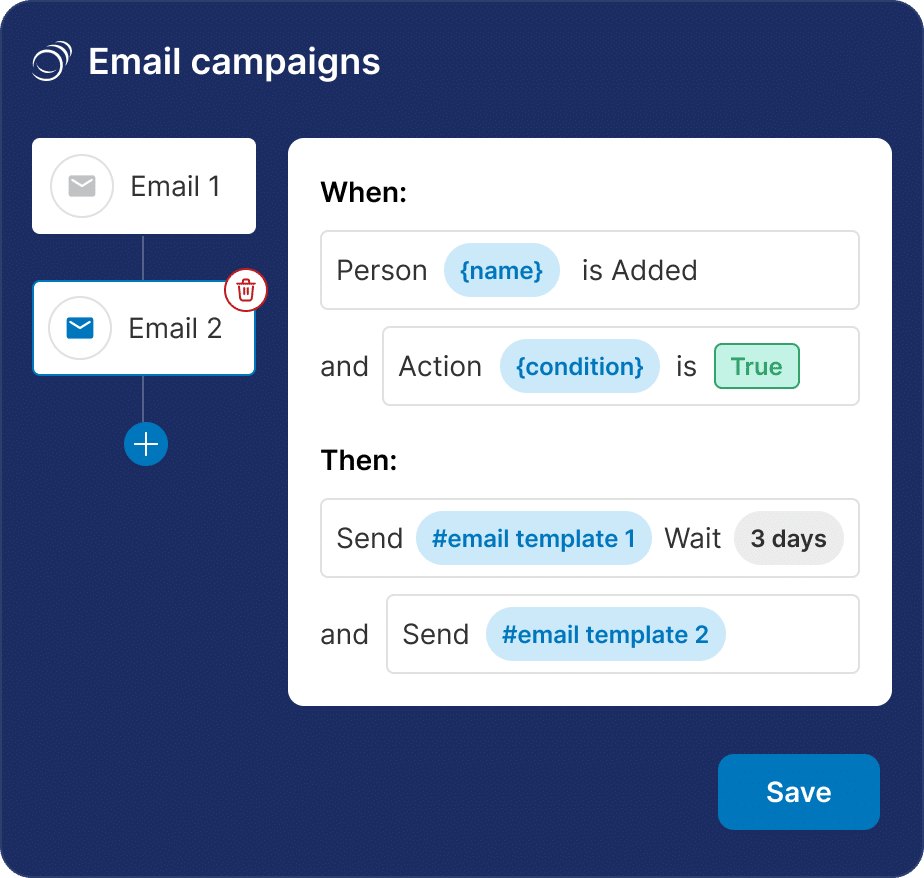
Pipeline CRM sends automated email campaigns from inside the CRM. Build a sequence that fires on a contact action or a set timeline, target it with filters and rules, and test variants against each other with A/B testing. Opens and clicks land on the contact record, so engagement is visible next to the deal. Bulk email and drip campaigns are on the Grow plan and above.
Follow-up is the first thing to slip
Nobody plans to drop a lead. It happens because manual follow-up competes with live deals, and live deals always win.
The second email never gets sent
The first touch goes out reliably. The third, seventh and fourteenth depend on someone remembering, on a week when three deals are closing.
Campaigns live in a separate tool
When sending happens outside the CRM, engagement stays outside it too, and the rep looking at the deal cannot see what marketing already sent this contact.
Everyone gets the same message
Without filters and rules, a campaign either goes to everybody or gets hand-built per segment, so it either annoys people or does not go out at all.
Build the sequence once, then leave it alone
A campaign is three decisions: who receives it, what triggers each step, and which version wins.
Choose who it goes to
Filter to the list you actually want with rules and conditions, and exclude the contacts who should not receive it. The list stays under your control rather than defaulting to everyone.
Set what each step waits for
Steps fire on a contact action or on a timeline, so a welcome sequence, a post-meeting follow-up and a re-engagement campaign are the same mechanism with different triggers.
Test and read the results
Run variants against each other with A/B testing, then use opens and clicks on the contact record to decide who is worth a call.
Walk through building a campaign
An interactive tour of the campaign builder, no signup required.
Teams with more leads than follow-up hours
Automation earns its keep where the volume of contacts is larger than the number of people who can chase them.
Small teams carrying a big list
Two or three reps against thousands of contacts means most of the list gets no contact at all unless something sends on its own.
Long cycles with quiet stretches
Deals that go quiet for months need a nurture track, or the next conversation starts from scratch.
Anyone reviving an old list
Re-engagement campaigns work the closed-lost and gone-cold contacts you already paid to acquire.
What automated campaigns cover
Bulk email and drip campaigns are on the Grow plan and above; the pricing page carries the full plan matrix.
Drip campaigns
Multi-step sequences that send without anyone pressing send.
Action and timeline triggers
Steps fire on what a contact does, or on a schedule you set.
Filtered recipient lists
Target a campaign with filters instead of sending to everyone.
Advanced rules and conditions
Decide who qualifies for a campaign and under what circumstances.
List exclusions
Remove contacts who should not receive a send, and keep that control per campaign.
A/B testing
Run variants against each other and refine messaging and targeting on the results.
Welcome sequences
Start new contacts on a track automatically rather than manually.
Re-engagement campaigns
Build targeted campaigns aimed at dormant and closed-lost contacts.
Engagement on the contact record
Opens and clicks land in the CRM next to the deal, not in a separate marketing tool.
Bulk email
Send to a filtered list in one go. Grow plan and above.
Consistency beats effort
A sequence that runs every time will out-perform a better email that gets sent when someone remembers. The value here is not that the copy is cleverer; it is that the fourteenth touch happens at all, on the week when three deals are closing and nobody has time to think about nurture.
Email automation questions
Can’t find what you need? Contact our team.
How does email automation work in a CRM?
You build a sequence of messages and tell each step what to wait for. A step fires either on something the contact does or after a set amount of time, so the campaign advances on its own once a contact enters it.
Because the sequence runs inside the CRM, the recipient list comes from your own contact filters and the resulting opens and clicks land back on the contact record rather than in a separate marketing tool.
What is the difference between email automation and email sync?
Email automation is outbound: one message going to many contacts on a sequence. Email sync is capture: the one-to-one conversations your team is already having, logged automatically against the right deal.
Most teams end up using both. Sync is covered on the email integration page and is available on every plan.
Which plan includes drip campaigns?
Bulk email and email drip campaigns are on the Grow plan and above. They are not available on Start or Develop.
Email tracking is separate and available on every plan, with 250 tracked emails per user on Start and unlimited on Develop, Grow and Enterprise. The pricing page has the full matrix.
Can I control who receives a campaign?
Yes. Recipients come from a filtered list rather than your whole database, and advanced rules and conditions decide who qualifies for a given campaign.
You can also remove contacts who should not receive a send, so a campaign aimed at dormant leads does not reach someone mid-negotiation.
Can I A/B test a campaign?
Yes. You can run variants against each other and use the result to refine both the messaging and the targeting.
Engagement is reported per contact as well as per campaign, so a test tells you which version performed better and also which specific people responded to it.
What can I use automated campaigns for?
The common three are welcome sequences for new contacts, follow-up after a meeting, and re-engagement of leads that have gone quiet.
They are the same mechanism with different triggers, so once one campaign is built the others are largely a matter of changing the entry condition and the copy.
Does engagement show up on the deal?
Yes. Opens and clicks are recorded on the contact record, so a rep looking at a deal can see what campaigns that contact has received and what they engaged with.
That is the practical reason to send from the CRM rather than a standalone email tool: the sales conversation and the marketing history sit on the same record.