
Write the email without leaving the deal
Pipeline CRM’s AI Email Assistant is built into the email editor, so you draft, rewrite and tighten a message where the deal already lives. No switching to another tab, no pasting context into a chatbot, no copying the result back.
✓ No credit card required ✓ 14-day free trial ✓ Cancel anytime
Trusted by over 18,000 users globally





At a Glance
The AI Email Assistant is a writing tool built into Pipeline CRM’s email editor, powered by OpenAI. It drafts and rewrites emails from a default or custom prompt wherever the editor appears: your inbox, bulk email, campaign steps and templates. Every plan includes a monthly prompt allowance per user, and you can connect your own OpenAI key for unrestricted access.
Copying context into a chatbot is the slow part
Most sales teams already write with AI. They just do it in a second tab, which is where the time goes and where the context gets lost.
The tab-switch costs more than the writing
Open the tool, retype who the person is and what the deal is about, wait, copy the answer, paste it back, fix the formatting. The drafting was never the expensive part.
Pasted context leaves the CRM
Whatever gets typed into an outside chatbot to explain the deal is now somewhere your account settings do not reach.
Follow-ups get shorter as the day goes on
The tenth email of the afternoon gets less care than the first. That shows up in reply rates long before anyone notices it in the pipeline.
In the editor, not in another tab
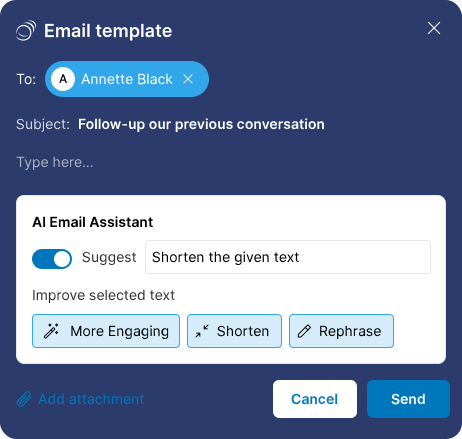
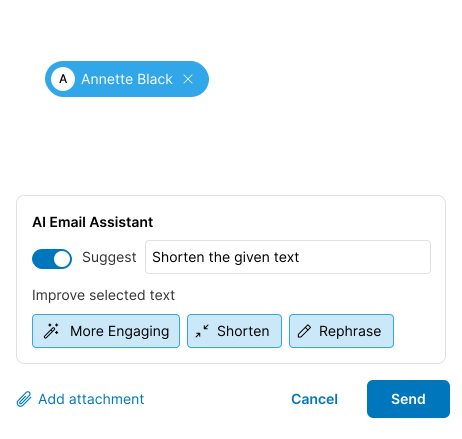
The assistant sits at the bottom of the email editor. Everything happens without leaving the record you are working on.
Pick a prompt or write your own
Choose a default prompt, or type a custom one describing the message you need and the tone you want it in.
Generate, then keep or redo
Approve inserts the draft into the editor for you to finish. Rewrite asks for another version, and you can change the prompt to steer it. You can also copy it elsewhere or delete it.
Highlight anything to change just that
Select a sentence and ask for a targeted edit: rephrase, shorten, lengthen, or make it more engaging.
Anyone whose day is mostly email
The value tracks how many messages a person sends and how much of the context already lives in the CRM.
Reps working a full inbox
Individual replies are where the assistant is used most, because the record is already open and the context does not need explaining.
Anyone sending to a list
Bulk sends and campaign steps are where a better first draft is worth the most, because one message goes to everybody.
Teams standardizing on templates
Drafting reusable templates is a writing job that happens once and is then read hundreds of times.
What the assistant does
Included on every plan, with a monthly prompt allowance per user.
Built into the email editor
It appears at the bottom of the editor rather than in a separate tool.
Works in four places
Individual email responses, the bulk email composer, email campaign steps and email templates.
Default prompts
Pick a ready-made prompt when you do not want to write one.
Custom prompts
Describe the message and the tone yourself to guide what it writes.
Approve or rewrite
Insert the draft to finish editing, or ask for another version.
Copy or delete
Take the generated text elsewhere, or discard it.
Targeted edits
Highlight part of the draft and ask for a change to just that part.
Rephrase, shorten, lengthen, more engaging
Built-in commands for the edits people ask for most.
A usage counter
The interface shows prompts used against your monthly limit.
Bring your own OpenAI key
Connect an OpenAI API key for unrestricted access, billed by OpenAI rather than by us.
Your records stay out of the prompt
It does not use confidential details such as past emails, company information or deal specifics when generating content.
The context is already in the CRM
Every AI writing tool can draft a sales email. The difference is what it costs you to ask: an outside chatbot needs the situation explained to it every time, and the explaining is the work. Writing where the deal already lives removes that step, and keeps what you would have pasted into someone else’s tool.
AI email assistant questions
Can’t find what you need? Contact our team.
Where can I use the AI Email Assistant?
Anywhere the email editor appears in Pipeline CRM: individual email responses in your inbox, the bulk email composer, email campaign steps and email templates.
Which of those you see depends on your plan and on your email sync status.
Who can access it, and are there prompt limits?
It is available on every plan. Each plan includes a monthly allowance of writing prompts per user: 25 on Start, 50 on Develop, 100 on Grow and 250 on Enterprise.
The interface shows how many prompts you have used against your limit. Unused prompts do not carry over to the next month.
What if I need more prompts than my plan includes?
You can connect your own OpenAI API key for unrestricted access. Usage is then billed to you by OpenAI rather than by us.
The help centre has a step-by-step guide to creating the key and connecting it: connect your own OpenAI key.
How much can I customize what it writes?
You can write a custom prompt describing the message, the structure and the tone you want, rather than choosing from a fixed list.
You can also highlight any part of a draft and ask for a targeted change, using built-in commands like rephrase, shorten, lengthen or make it more engaging.
Does it use my customer data to write the email?
No. The assistant does not use confidential details such as your past emails, your company information or deal specifics when it generates content.
What it writes comes from the prompt you give it.
What powers it?
OpenAI. You do not need an OpenAI account to use the prompts included with your plan; you only need one if you want to connect your own key for unrestricted access.
Is this the same as Pipeline Copilot?
No, they are separate. The AI Email Assistant writes email inside the email editor.
Pipeline Copilot is a different assistant with a different job, and it does not write or send email.