





Project Management
From Closed-Won to Delivered. All in Pipeline CRM. Plan, track, and execute the work that happens after the deal closes, without leaving your CRM. Projects link to your deals, companies, and contacts so nothing gets lost between sales and delivery.
✓ No credit card required ✓ 14-day free trial ✓ Cancel anytime
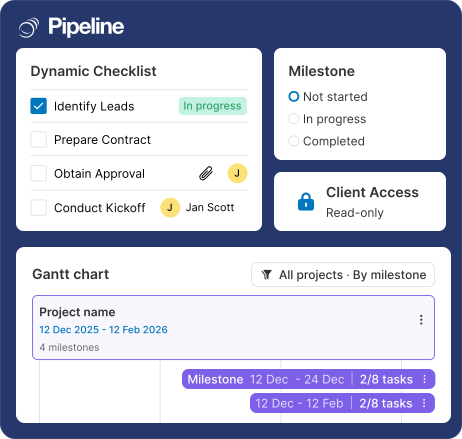
At a Glance
Pipeline CRM Project Management is a native module for teams that sell and deliver. Create projects linked to your deals, companies, and contacts. Break work into milestones and tasks. Manage work in List, Kanban, or Gantt/Timeline views. Apply one of 10 industry templates or build your own. Invite clients as guests. Available on the Grow plan and above. No integrations to stitch together, no double data entry.
Closed deals should not go dark
Customers told us the same thing for years: selling and delivering live in different tools, and the handoff leaks time, context, and revenue. So we fixed it inside Pipeline CRM, not on top of it.
Juggling six tools kills momentum
Customer data in Pipeline, project work in Asana, Trello, Monday, or a spreadsheet. Everyone is retyping everything.
The sales-to-service handoff is a black hole
Deal closes. Project starts. Somehow the account manager has no idea what was promised.
Managers cannot see what is actually happening
No single place to see which projects are on track, which are stalled, and where to step in.
Three steps from deal to delivered
Create
Start a project from a Closed-Won deal, a company, or the top-nav. Apply one of 10 industry templates (or your own) to scaffold milestones and tasks automatically.
Assign
Pull in collaborators from your team. Invite clients, vendors, or subcontractors as Guests with limited access to their assigned work. Attach files right on the tasks.
Deliver
Track work in List, Kanban, or Timeline/Gantt view. Statuses are admin-configurable. Notifications keep everyone in sync on assignments, changes, and new activity.
Built for teams that sell and deliver
Construction
- Track project phases, subcontractors, and client approvals in one place
- One project links to multiple subs and the GC, with the deal record attached
- Gantt view for long-cycle builds, Kanban for week-to-week
Professional Services & Agencies
- Manage onboarding, deliverables, and client check-ins from the same place as the deal
- Client guest access with read-only task visibility
- Templates for standard engagement shapes (discovery, build, handoff)
Manufacturing & Distribution
- Coordinate installation, service delivery, and post-sale support tied to the original deal
- Field-service-ready: tasks per technician, milestones per job site
- File attachments for specs, quotes, and signed orders
Everything you need to run projects in your CRM
Project Management is live on the Grow plan with every capability below. No add-ons, no separate subscription.
- Projects, Milestones, Tasks linked to Companies, People, and Deals
- List, Kanban, and Timeline/Gantt views for projects, milestones, and tasks
- 10 industry templates for Construction, Manufacturing, SaaS, Finance, Consulting, Healthcare, Real Estate, Wholesale, and two universal workflows
- User-created templates that admins can edit, rename, and organize in folders
- Guest access for clients, vendors, and subcontractors with no per-seat fee
- Admin-configurable statuses for milestones and tasks
- Project Profile Page with metrics, linked entities, activity feed, and file storage
- File attachments at the task level
- Notifications on assignment, status change, guest invite, and activity mentions
- Agenda integration so tasks show up in the same place team members already live
- Full REST API for Projects, Milestones, Tasks, with linking and unlinking
Project management that knows your customer
Standalone PM tools like Monday, Asana, and Trello are built for project teams. They don’t know who the customer is, what was sold, or what happened in the last sales call. Pipeline CRM Project Management does.
Pipeline CRM Project Management
- Projects link to Companies, People, and Deals (many-to-many)
- One subscription: $49/user/month on Grow (billed annually)
- 10 industry templates out of the box, including Construction and Manufacturing
- Guest access for clients, no per-seat fee for guests
- No Zapier, no API glue, no double data entry
Standalone PM tools (Monday, Asana, Trello)
- No native link to your deals, companies, or contacts
- Separate subscription on top of whatever CRM you use ($10-$24/user/month typical)
- Project-first templates, CRM data stays in the CRM
- Client access usually costs extra per seat
- Integration via Zapier or custom API work — expect ongoing maintenance
Frequently asked questions
Can’t find what you need? Contact our team.
Is Project Management available on my plan?
Project Management is available on the Grow plan and above. Grow is $49/user/month (billed annually). If you’re on the Develop plan and previously used Milestones (under Companies), your milestones still exist in the new Projects structure. If you need full Project Management access, contact support about upgrading.
How do I start a project from a closed deal?
Open the deal profile page and click “Create Project.” Apply a template at creation to auto-scaffold the milestones and tasks. You can also create projects from the top-nav “+” button or from any Company or Person profile page.
Create and manage project templates → · Manage your project from the Project Profile page →
Can my client see the project?
Yes, through Guest access. The project owner invites them by email. They create a free Pipeline Guest account and get limited access to that specific project only. Guests can view List, Kanban, and the Project Profile Page. They can create activity notes and tag collaborators. They cannot edit projects, milestones, or tasks (except items assigned to them), and they have no access to the rest of your CRM.
Is there a limit on how many projects I can run?
Yes. On the Grow plan, the limit is 100 active projects per account. Closed projects don’t count. If you hit the limit, admins see an option to upgrade to Enterprise. If you need a higher limit before upgrading, contact support and we can evaluate your account.
Why didn’t the activities from my deal copy into the project?
This is by design. When a project is created from a deal, the sales activity feed (notes, emails, logged calls) does not transfer. The project workspace is meant to be a clean starting point for post-sale execution. The deal, company, and person records stay linked to the project, so you can click through to view the full sales history at any time.
Can I use this on mobile?
Project Management is web-based and works across devices through any browser. The dedicated mobile app does not currently include Projects. If mobile-app project access is critical for your team, talk to our team about your workflow.
Will projects show up in reports or dashboards?
Yes. There’s a dedicated section for Project reports, alongside Agenda reports. The Dashboard supports any project or agenda reports and views you build.