

Asana CRM integration through Zapier
There is no built-in Asana connection in Pipeline CRM. What works today is a Zap: when a deal reaches a stage you choose, Zapier creates the Asana task, so the handoff from selling the work to doing it stops depending on someone retyping it. Five short videos below walk through the setup.
✓ No credit card required ✓ 14-day free trial ✓ Cancel anytime
Trusted by over 18,000 users globally





At a Glance
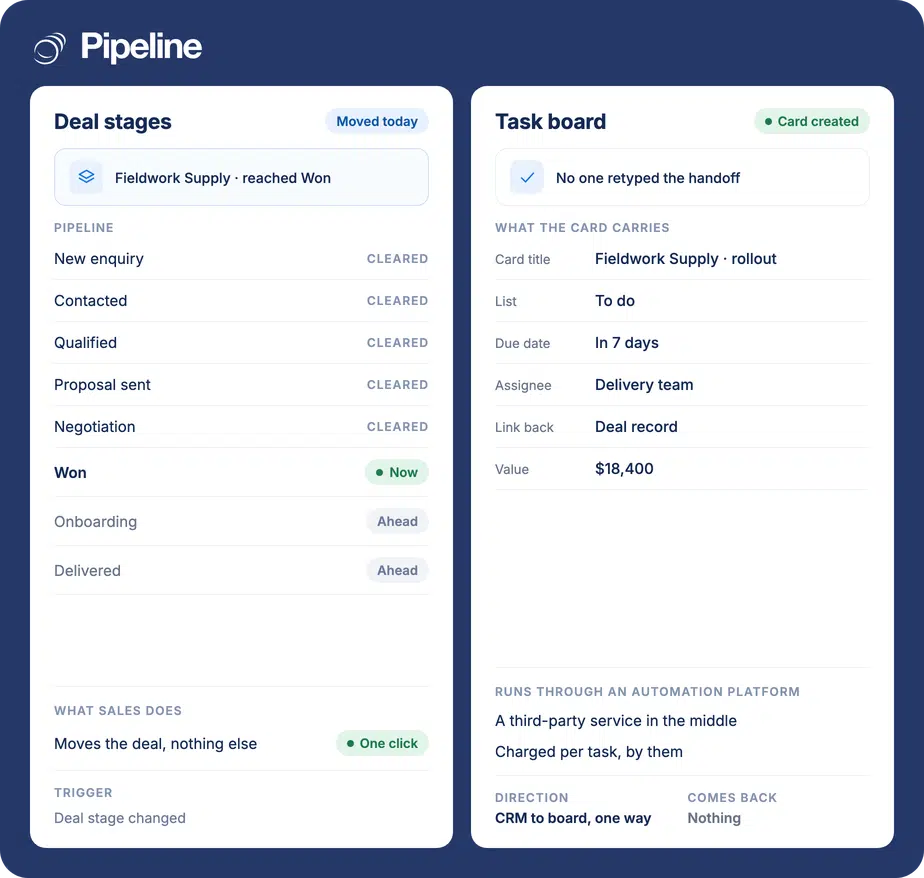
Pipeline CRM connects to Asana through Zapier rather than a built-in integration. A Zap listens for a Pipeline CRM deal stage change and creates an Asana task in the project and section you choose, carrying fields you map such as the deal name, value, due date and a link back. It runs one way and Zapier charges per task.
Where the sale becomes the work
Teams that ask for this usually sell in one tool and deliver in another, with somebody in the middle copying between them.
Delivery finds out late
A deal closes on Thursday and the team that has to deliver it hears on Monday, or when the customer asks. The work starts behind before anyone has done anything wrong.
The detail does not travel
A won deal carries a value, a scope and a paper trail. Retyped as a task, it arrives as a title and a due date, and the delivery team asks the customer what was already agreed.
Two tools, two versions of done
When nothing links the deal to the task, the CRM says won and the project says not started, and neither view can be trusted on its own.
Three steps in Zapier
You need a Pipeline CRM account, an Asana account and a Zapier account. Zapier has a free tier with a monthly task limit; sustained use is one of their paid plans, billed by them.
Set the Pipeline CRM trigger
In Zapier, create a Zap with Pipeline CRM as the trigger app and Deal Stage Changed as the event. Connect your account and pick the stage that should start the work, usually Won.
Set the Asana action
Choose Asana as the action app and Create Task as the event. Connect your Asana account, then pick the workspace, project and section the task belongs in.
Map the fields, then test
Map the deal name into the task name, put the deal link in the description, and set a due date from the close date or a fixed offset. Move a real deal into the stage and confirm the task appears.
Five short screencasts
Recorded while building the Zap described above, on the real screens, which move around more often than written steps can keep up with.
Teams who sell projects and then run them
The value is in the handoff, so it is worth most where a won deal is the start of the work rather than the end of the process.
Delivery already lives in Asana
If the delivery team will not leave Asana, this keeps them in it and stops sales chasing them in chat to say a deal landed.
Every won deal starts a project
Agencies, consultancies, implementation and onboarding teams, where the same set of tasks follows every sale.
You are running sales in Asana today
Teams whose pipeline is a project board and no longer fits one. This lets Asana keep the work while the pipeline moves somewhere built for forecasting.
What the Zap can do
Built in Zapier from Pipeline CRM triggers and Asana actions. Both sides publish more than this; these are the combinations teams actually use.
Create a task when a deal changes stage
The common one. A deal reaching your chosen stage opens the task that starts the work.
Choose the project and section
Tasks can land in a specific project and section, so won work arrives where the team already looks rather than in a general inbox.
Carry the deal fields across
Map the deal name, value, close date, owner and contact into the task name, notes or custom fields.
Link back to the deal
Put the Pipeline CRM deal URL in the task notes so anyone working it can reach the history in one click.
Set a due date from the deal
Derive the due date from the close date or a fixed offset, so the project reflects what was promised in the sale.
Assign the task
Send it to a specific assignee, or leave it unassigned for whoever picks up work from the section.
Create a subtask checklist
Add further Zapier steps to create the standard subtasks that follow every won deal, rather than one bare parent task.
Filter which deals qualify
Add a Zapier filter so only deals over a value, or from one pipeline, create a task.
It is one way, and Zapier is in the middle
This is not a two-way sync. Completing the Asana task does not move the deal, and editing the task changes nothing in Pipeline CRM. The reverse direction is a separate Zap with its own mapping, and running both needs filters so they do not trigger each other. Zapier is also a third party in the path, billed by them per task, and a broken Zap fails quietly somewhere nobody on your team is watching. If you would rather not carry that, Pipeline Connect can scope and build a direct Asana integration and run it for you. One caveat we will not paper over: Asana does not publish whether its webhooks depend on your plan tier, so a direct build needs that checked against your own account first. Ask us and we will look at it with you.
Asana integration questions
What people ask before wiring these two together.
Does Pipeline CRM integrate with Asana?
Through Zapier, yes. There is no built-in Asana connection in Pipeline CRM. You build a Zap with a Pipeline CRM trigger, such as a deal changing stage, and an Asana action, such as creating a task.
That matters for what to expect: the connection is configured in Zapier, billed by Zapier per task, and maintained by you rather than by us.
Does Asana have a CRM?
Not a real one. Asana is work management, and teams do build pipeline-shaped projects in it, with a section per stage and a task per deal. That works until you need the things a CRM does.
What is missing is not a feature or two. There is no weighted forecast, no stage conversion rate, no age-in-stage, no email or call history on the record, and no concept of a contact who exists across several deals. Asana can tell you what is on the list; it cannot tell you what is likely to close or why the last five similar deals did not.
The usual answer is not to abandon Asana. Keep it for the work, put the pipeline in a CRM, and connect the two so a won deal starts the project, which is exactly what the Zap on this page does.
Which CRM integrates with Asana?
Pipeline CRM does, through Zapier, and most CRMs offer the same route because Asana publishes a Zapier app.
The useful question is what the connection creates. A task that carries the deal value, the close date, a link back to the record and its standard subtasks is worth considerably more than one carrying a title.
Can it work the other way, from Asana to the CRM?
Yes, as a separate Zap using Asana as the trigger, for example creating a Pipeline CRM task or updating a deal when an Asana task completes.
It needs its own field mapping and its own testing, and if you run both directions you need Zapier filters so the two automations do not set each other off.
What does it cost?
Nothing extra from us, and something from Zapier. Every task Zapier runs counts against your plan, so each created Asana task spends one. Their free tier has a monthly limit and sustained volume moves you onto a paid plan.
A handful of won deals a month sits inside a free tier comfortably. Hundreds of triggered tasks does not.
Can we have a direct integration instead of Zapier?
It can be built. Asana publishes an API and webhooks, and Pipeline Connect can scope a direct Asana integration and run it for you, which takes the third party and the per-task bill out of the path.
One honest caveat: Asana does not document whether webhooks depend on your plan tier, so that has to be checked against your own account before anyone promises a build. It is also not something you can switch on from this page today. Tell us what you need and we will look at it with you.